
About this article
This article is the third deep dive in the “Application Architecture” category of the Architecture Crash Course for the Generative-AI Era series, covering naming and code conventions.
Reading time overwhelmingly exceeds writing time on code; readability is team productivity itself. The article covers naming principles, case conventions, linter/formatter, directory layout, PR review, CODEOWNERS, Git commit conventions — the whole picture of “end debates with automation.”
Before you read this
This article is mostly about how programs are written and structured. If IT vocabulary is unfamiliar, reading the primer "Programs and APIs" first makes it far easier to follow. You can also look anything up in the glossary as you read.
What are naming and code conventions in the first place
Naming and code conventions are “a rulebook for unifying how a team writes code.”
Think of traffic rules. Because signal colors, lane rules, and sign meanings are standardized, you can drive on an unfamiliar road without getting lost. If rules varied by region, just passing another car would cause an accident. Code works the same way: when variable naming, indentation, and file structure are unified, anyone can immediately read anyone else’s code.
Why naming and code conventions matter
What happens if a team develops without conventions? Every review devolves into non-essential debates: “camelCase or snake_case for variable names?”, “indentation,” “brace position.” I’ve seen teams where every PR sparked 30+ minutes of comment rallies — the week after introducing Prettier, those debates vanished. Conventions alone raise productivity.
Reading time overwhelmingly exceeds writing time on code; readability is team productivity itself.
The basic principles of naming
Good naming shares principles. Robert C. Martin’s Clean Code organizes them: just observing “intent clear, doesn’t lie, pronounceable, searchable” changes readability sharply.
| Principle | Substance |
|---|---|
| Express intent | daysUntilExpiration, not d |
| Don’t lie | List<T> whose actual content is Set<T> is wrong |
| Avoid misunderstanding | Avoid vague names like process() |
| Pronounceable | generationTimestamp, not genymdhms |
| Searchable | Limit 1-letter variables to loop counters |
Naming is the largest documentation in code. With good names, comments become mostly unnecessary.
The casing conventions differ by language and by target.
Whether to write variables, functions, classes, and file names in which case has de facto standards per language. Writing user_name for a JavaScript variable or user_profile for a Python class — even when grammatically valid — produces unease and cognitive load. Language conventions are accumulated community agreement; respecting them maps directly to readability.
Case unification is effective because consistency lets you judge “what is this” instantly from form. PascalCase = type, camelCase = variable or function, SCREAMING_SNAKE_CASE = constant, recognizable at a glance — speeding read time itself.
| Case | Use |
|---|---|
| camelCase | Variables / functions in JS / TS / Java / Kotlin |
| PascalCase | Classes / types |
| snake_case | Python / Ruby / DB columns |
| kebab-case | File names / URLs |
| SCREAMING_SNAKE_CASE | Constants |
Match the language convention. Absolutely avoid mixing within the same language.
Naming patterns by target
Each target (variable, function, class) has gold-standard naming patterns. Following them lets readers instantly judge “what is this.”
| Target | Pattern | Example |
|---|---|---|
| Function | Verb + object | createUser, validateEmail |
| boolean | is / has / can prefix | isActive, hasPermission |
| Class | Noun | OrderService, UserRepository |
| Interface | Noun | UserRepository or IUserRepository (preference) |
| Event | Past tense | UserRegistered, OrderPlaced |
| Constant | All caps, intent-expressing | MAX_RETRY_COUNT |
Events are past tense as the rule. UserRegistered instead of Register makes “what happened” clear.
Some names are best avoided outright.
The following naming drops codebase quality; flag in review without exception:
❌ data, info, util     ← Conveys nothing
❌ temp, tmp            ← Trap of being persisted as-is
❌ mgr, mng, svc        ← Excessive abbreviation
❌ foo, bar             ← Don't use outside test code
❌ getUserList vs getUsers ← Synonym mixing
❌ newUser, oldUser     ← Meaningless once time passes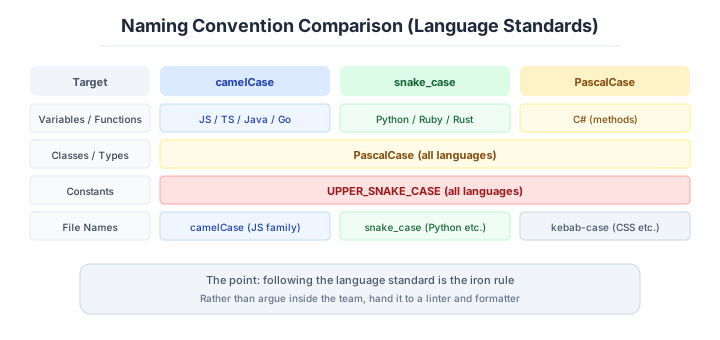
When using abbreviations, build a project-specific abbreviation dictionary (user = u forbidden, identifier = id OK, etc.) and standardize. Sharing a forbidden list in the team makes review-time pointing easier.
Author’s note — the “User / Member / Account / Customer problem”
A large e-commerce project: same customer info handled across User / Member / Account / Customer — four names mixed. Search APIs were findUser / getMember / searchAccount, three lineages “hitting the same table.” New engineers had to ask seniors “which one to fix for this requirement” every time.
Even mid-career 3rd-year engineers asking “how do User and Customer differ?” and nobody being able to answer clearly is common. The cause is simple: Ubiquitous Language (the team-wide common vocabulary used with one meaning) wasn’t defined initially. Each feature team wrote separately, slamming domain terms together; later joiners spent more “time building the dictionary in their heads.”
Conventions are ultimately “the work of building this dictionary upfront and sharing.” One name per concept. Build the dictionary before writing code.
Linter and formatter — the tools that end the argument
A linter detects quality issues; a formatter auto-fixes appearance. They forcibly end debates about “tabs vs spaces” or “semicolons or not.”
| Language | Linter | Formatter |
|---|---|---|
| JS / TS | ESLint / Biome | Prettier / Biome |
| Python | Ruff / Pylint | Black / Ruff |
| Go | golangci-lint | gofmt |
| Rust | Clippy | rustfmt |
| Java | Checkstyle / SpotBugs | google-java-format |
The integrated, fast Biome / Ruff are the favorites. Enforce in CI and end the debates.
The philosophy behind a formatter is worth stating.
Modern formatters like Prettier and gofmt design “deliberately few” configurable items. The empirical rule: “the more configurable items, the more new debates.” The design crushes the room for argument.
❌ Tab faction vs space faction debates every time
✅ Decided by Prettier / gofmt — debate ended
The moment the team agrees “follow this formatter,” style debates almost disappear. The goal is zero debate cost; visual preference is secondary.
The tool decision is enough at “nobody is 100% satisfied but everyone tolerates.”
Directory layout and comment principles
Directory layout splits broadly into layer-type and feature-type. Suitability changes with scale and team workflow.
[Layer]                  [Feature]
src/                    src/
├─ controllers/         ├─ users/
├─ services/            │  ├─ controller.ts
├─ repositories/        │  ├─ service.ts
├─ models/              │  └─ repository.ts
                        └─ orders/
├─ ...- Small / many beginners -> Layer (clear layer roles)
- Mid-large / multi-team parallel dev -> Feature (code grouped per feature, easier parallel)
Feature-type works as “a precursor to modular monolith or microservicing.”
Comments follow their own principle.
Comments are for “WHY”, not “WHAT.” Writing what names already convey just creates confusion when code and comment diverge.
| Write | Don’t |
|---|---|
| WHY (reasons, background) | WHAT (read the code) |
| Non-obvious constraints / workarounds | Names already convey |
| External-spec dependencies | Work history, person names |
| TODO (with deadline) | Old code (let Git handle) |
❌ // increment i by 1
✅ // place a sentinel at the end, so +1 (legacy API constraint)
Comments rot. Comments left without updates become lies. “The best comment is the one you didn’t need to write.”
PR review and CODEOWNERS
PR review is the place to protect quality and the team’s learning ground. “Review culture decides team technical strength” — that strong an effect.
- Run as a learning place, not a blame place.
- Comment on code (don’t criticize the person).
- Small PRs produce fast reviews (target ≤400 lines).
- Quick response (within 24 hours) prevents stagnation.
- Make Nit / Suggestion / Blocker explicit.
Labeling comments as “Must / Should / Nit” clearly conveys reviewer intent.
CODEOWNERS is the guardrail that makes it stick.
Critical files (payment, infrastructure, security) require team-owner review before merge. GitHub’s CODEOWNERS automatically routes review requests when specific files change.
# .github/CODEOWNERS
/src/payment/    @payment-team
/infra/          @sre-team
/.github/        @admin-team
/src/auth/       @security-team
You can prevent unknown people from merging sensitive or high-difficulty code on their own. Combined with merge-protection rules, ensures critical-area reviews happen.
For large projects, no CODEOWNERS is a hotbed of accidents. Set up early.
Commit messages deserve a convention too.
Unifying commit-message format across the team makes history-search and changelog generation easy. Conventional Commits is the de facto standard.
feat: add user-search API
fix: fix session-fixation vulnerability at login
docs: add env-var description to README
refactor: split UserService (responsibility overload)
chore: update dependencies
Adding prefixes (feat / fix / docs / refactor / chore / test / perf, etc.) makes “what kind of commit” identifiable at a glance. Adopting Conventional Commits enables auto-versioning via semantic-release. The 2018 Angular-team-published convention is the de facto standard as of 2026.
Rolling the conventions out works in stages.
“Conventions written in README are obeyed” is mostly fantasy. Mechanical CI enforcement is the staged rule.
| Phase | Tools | Check timing | Target time |
|---|---|---|---|
| 1 pre-commit | Biome / Ruff / gofmt (Formatter) | At commit (local) | < 5s |
| 2 pre-push | ESLint / Clippy (Lint) + type check | Before push | < 30s |
| 3 PR | All Lint + tests + coverage | At GitHub push | < 10 min |
| 4 CODEOWNERS | Force team review on critical-file change | At PR creation | Auto |
| 5 Pre-release | semantic-release (Conventional Commits) for auto-version | At merge | Auto |
Tools like Prettier / gofmt / Biome that “deliberately narrow settings” are preferred because their design philosophy prevents tab-vs-space debates from arising. Ruff is rapidly replacing Black + Flake8 + isort in the Python ecosystem with ruff format + ruff check.
Enforce conventions mechanically in CI. Verbal, README, “I’ll be careful” doesn’t work.
Three scenarios
If you are building solo or at a startup
Simply riding on the Prettier and ESLint defaults makes every convention argument other than naming disappear. For naming, the recommendation is a mini glossary of the domain vocabulary — the ubiquitous language — ten words in the README. That minimal investment becomes the best handover document you could leave for yourself six months from now.

If you are a small or mid-size SaaS
This is the stage for establishing convention enforcement in CI, pull requests under 400 lines, and Conventional Commits as culture. Make the intent of a review comment explicit with Must / Should / Nit labels, hand style arguments to the tooling, and let the humans concentrate on the logic.
If you are a large enterprise
CODEOWNERS, merge protection and a company-wide naming convention become mandatory equipment. Force a review by the owning team on the important files — payments, infrastructure, authentication — so that someone unfamiliar cannot merge sensitive code on their own. Maintaining the glossary per domain doubles as training material for new joiners.
AI decision axes — Enforcing conventions in CI becomes the AI’s quality gate
Naming conventions maintain consistency in AI-generated code
If your project’s naming conventions (camelCase / snake_case, file naming, directory structure) are enforced by linters like ESLint, AI-written code gets auto-corrected in CI. AI sometimes writes names that differ from project-specific conventions, pulled by its training-data majority, but linters fix this instantly so it doesn’t become a problem.
Linter/Formatter CI enforcement becomes a quality gate for AI-generated code
Variation in AI-generated code style is unavoidable. With a system enforcing formatters/linters (Prettier, ESLint, Ruff) in CI, AI-generated code and human-written code unify to the same style. Style debates are completely removed from human judgment, letting reviews focus on design and logic.
Pitfalls and forbidden moves
Here are the six most dangerous landmines that eat into the whole team’s productivity.
| Forbidden move | Why it is bad → what to do instead |
|---|---|
| Using several names for the same concept | every new joiner has to go round asking “which one is right?” → build the glossary first |
Vague words such as data, info and temp | with zero intent expressed, a temp gets persisted into production → give it a concrete name that states the intent |
| Deferring linter warnings as “we will fix them together later” | past a hundred, nobody looks at them → hold the count at zero |
| Writing commit messages in free form | history search and changelog generation stop working → use Conventional Commits |
| Allowing payments and authentication to be merged with no CODEOWNERS | someone who does not know the code can change the sensitive parts → set it on the important paths |
| Pull requests over a thousand lines | the review becomes a formality → split them under 400 lines, ideally 100 |
Conventions are not something to argue about; they are something to hand to a tool. The “tabs or spaces” argument is technically over.
What you must decide — what’s your project’s answer?
Articulate your project’s answer in 1-2 sentences for each:
- Naming convention (case, prefix, forbidden terms)
- Linter / Formatter selection and configuration
- Directory layout (Layer / Feature)
- Comment policy
- PR-size guideline / review SLA
- CODEOWNERS operation
- Git commit-message convention (Conventional Commits, etc.)
Related Articles
Summary
This article covered naming and code conventions — naming principles, linter/formatter, PR review, CODEOWNERS, Conventional Commits.
End debates with automation; make conventions machine-readable. The 2026 realistic answer for code-convention operation including AI era.
The next article is the Application Architecture category’s final installment, error handling (Result type, Circuit Breaker, idempotency).
Back to series TOC -> ‘Architecture Crash Course for the Generative-AI Era’: How to Read This Book
I hope you’ll read the next article as well.
Also popular with readers
📚 Series: Architecture Crash Course for the Generative-AI Era (34/95)