![[Data Architecture] Data Modeling](/uploads/2026/04/arch-intro-cat-data.png)
About this article
As the third installment of the “Data Architecture” category in the series “Architecture Crash Course for the Generative-AI Era,” this article explains data modeling.
DBs outlive code, and changing the structure of a table grown to tens of millions of rows can require hours of downtime. The first round of modeling stays effective for a decade. This article covers the 3 stages of conceptual/logical/physical modeling, normalization and denormalization, primary-key design, indexes, schema-change strategy, and soft delete and history management - presenting how to build “schemas readable by both AI and humans.”
Before you read this
This article uses a good deal of vocabulary from around databases. If that is unfamiliar, reading the primer "Database Basics" first makes it far easier to follow. You can also look anything up in the glossary as you read.
What is data modeling in the first place
Data modeling is “deciding the organizational rules for the data your application handles.”
Imagine packing for a move. If you just shove clothes, dishes, and documents into cardboard boxes, you won’t know where anything is at the new place. But if you set classification rules - “clothes go in garment cases, dishes in cushioned boxes, documents in file boxes” - anyone can quickly retrieve what they need. Data modeling works the same way: it’s the process of designing “in what structure and with what relationships to store” the information handled by the business. If this design is sloppy, you’ll later face slow searches, inability to aggregate, and changes breaking everything.
Why modeling matters most
Once a database is in production, changing the table structure is extremely expensive. Adding a single column to a table of tens of millions of rows can require hours of downtime, and a modelling mistake stays as debt for years. “An application can be rewritten; a data model cannot” is the reality.
On top of that, an operational database is read from many directions — other systems, the analytics platform, reports, BI — so the blast radius of a schema change is wider than it looks. Decisions taken at the modelling stage, about indexes, how far to normalise, and partitioning strategy, set the ceiling on future performance.
The three stages of modeling
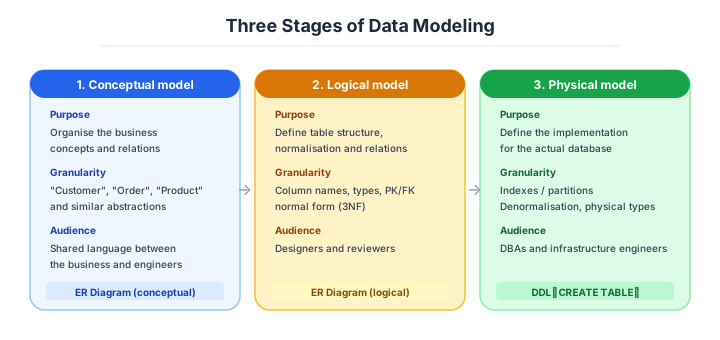
Data modeling proceeds in 3 stages as a rule. Diving straight into table definitions (physical design) means you can’t grasp the business essence and is the source of breakdowns.
| Stage | What you do | Output |
|---|---|---|
| Conceptual model | List the “things” handled in the business | Entity list, ER diagram |
| Logical model | Define attributes and relations, normalize | Logical ER diagram, attribute spec |
| Physical model | Implementation form fit to the DB product | CREATE TABLE, indexes |
Large-scale projects clearly separate these 3 stages, but in small/mid-scale projects, combining logical and physical is realistic. Still, always do the conceptual model first.
Normalisation and denormalisation
Normalization is a design principle for eliminating data duplication and preventing inconsistency on update. It’s a theory proposed by E.F. Codd in the 1970s, with normal forms from 1NF to 5NF. In practice, 3NF is general; beyond that is theoretical/academic territory.
For example, writing a customer’s name into the “orders table” means updating all order records when the customer’s name changes. Splitting it into “make a customer table separately, the order only holds customer ID” is normalization. You build a state where one change keeps the whole consistent.
| Stage | Content |
|---|---|
| 1NF (1st Normal Form) | Each cell has one value. Move repeating items to a separate table |
| 2NF (2nd Normal Form) | Separate columns that don’t depend on the entire primary key |
| 3NF (3rd Normal Form) | Separate columns that depend on non-key columns (transitive dependency) |
In practice, 3NF is enough. 4NF and 5NF are theory.
Denormalisation is the deliberate reverse.
Normalization excels at consistency, but has the side effect of JOINs increasing and read performance dropping. The deliberate move to “leave redundancy on purpose” is denormalization. In analytics DBs, denormalization is standard, and in business DBs it’s applied partially where read performance is needed.
| Normalized | Denormalized |
|---|---|
| High update consistency | Update consistency drops |
| JOIN-heavy, slow reads | No JOIN, fast reads |
| Suited for OLTP (business DB) | Suited for OLAP (analytics DB) |
| Less data duplication | More data duplication |
The basic motion for business DBs is design at 3NF, then denormalize only where needed - and “denormalize from the start” is dangerous.
For an analytics database the star schema is the standard shape.
The most-used analytics-DB schema is the star schema. With a “fact” table at the center and “dimension” tables around it - a star shape - it’s optimized for fast aggregation queries.
For sales analysis, for instance:
- Fact table: sales line items (timestamp, product ID, customer ID, amount)
- Dimension tables: product, customer, date, store
In this shape, multi-axis aggregation like “sales by region, month, product category” runs extremely fast. Almost all analytics platforms - BigQuery, Snowflake, Tableau - assume this shape.
Business DB: 3NF. Analytics DB: star schema. Change shape per use case.
Designing primary keys and indexes
The primary key is the ID uniquely identifying each record, and the choice strongly affects later design. In practice, auto-numbered surrogate keys (sequential, UUID) are mainstream, and the iron rule is to avoid using business values (email, phone) as primary keys.
If you make a business value the primary key, when that value changes, all foreign references must be updated - which can’t withstand real business changes like name change or email change.
| PK type | Characteristics | Suited for |
|---|---|---|
| Sequential (BIGINT) | Small and fast, ordered | Business DB, internal use only |
| UUID v4 | Distributed-generation possible, unordered | Distributed systems, public-facing |
| UUID v7 | Time-ordered, distributed-generation possible | Post-2024 new DBs |
| Business value | Meaning is readable | Don’t use as a rule |
Today, UUID v7 (RFC-finalized in 2024) is evaluated as the optimum that combines time order and randomness.
For new-DB primary keys: UUID v7 or BIGINT. v4 invites index performance degradation.
Indexes are the other half of that decision.
Indexes are auxiliary data structures that speed up search - correctly placed they get hundreds of times faster, but place too many and updates slow down and the DB bloats. The basic policy is “place on columns used in WHERE and JOIN, not on others.”
Composite-index order matters: only left-prefix matching works. An index of (a, b, c) works for WHERE a=?, WHERE a=? AND b=?, and WHERE a=? AND b=? AND c=?, but not for WHERE b=? alone.
| Index type | Use case |
|---|---|
| B-Tree | Standard, equality search, range search |
| Hash | Equality only (narrow use cases) |
| GIN / GiST | Full-text search, JSON, geospatial |
| Partial index | Conditional (excluding deleted etc.) |
Initially place the bare minimum, and add later only on actually-slow queries - that’s the rule.
Schema-change strategy and soft deletes
Schema changes on a running DB are the most accident-prone area. Column add/delete/type-change/constraint-change each have different danger levels, and the rule is to “change incrementally while preserving backward compatibility.”
| Change | Danger | Strategy |
|---|---|---|
| Column add (NULLable) | Low | Add directly |
| Column add (NOT NULL) | Mid | NULL first → backfill → NOT NULL |
| Column delete | Mid | Stop usage in code first → delete later |
| Type change | High | Add new column → migrate data → switch |
| Rename | High | Have both → phased switch |
Use a migration tool (Flyway, Liquibase, Prisma Migrate, dbt, etc.) and manage history in Git - this is required. Modifying the DB by hand is an accident factory.
Soft deletes and history are the related decision.
How to handle deleted records is something the design must always settle. There are roughly 3 options, decided by business requirements and legal obligations.
| Method | Content | Suited for |
|---|---|---|
| Physical delete | Remove the record from the DB | Cache, logs, data with no audit need |
| Soft delete | Logical delete via deleted_at column | General business data |
| History table | Accumulate changes in a separate table | Finance, audit-target, with legal requirements |
When personal-data deletion requests arise (GDPR etc.), physical delete becomes mandatory in some scenes. Reconciling soft delete and law requires nailing down requirements upfront.
For finance/medical/public, history tables are often legally mandatory - check business requirements.
How to choose — by complexity and scale
As a rough guide on scale: under a million rows you need not think about it; from ten million, consider partitioning; from a hundred million, sharding and denormalisation come into view. And advanced models — EAV, polymorphic associations, event sourcing — turn into a nightmare if the team cannot handle them. The practical answer is to choose “a model that matches the team’s grasp of SQL and databases.”
Numeric gates on modelling quality
Industry baseline values as of April 2026.
| Metric | Threshold | What to do when you exceed it |
|---|---|---|
| Columns in one table | 20 or fewer | responsibilities are mixed; consider splitting |
| Indexes on one table | 5 or fewer | write performance degrades; review them |
| Depth of JOINs | 3 to 4 levels | denormalise, or tidy it up with a view |
| Nullable columns | NOT NULL wherever possible | let the constraints do the work |
| Primary key type | UUID v7 or BIGINT | v4 degrades performance |
Three scenarios
If you are building solo or at a startup
For an internal admin panel or simple CRUD, designing straightforwardly in 3NF with UUID v7, soft deletes and audit columns (created_at, updated_at) is enough. Elaborate modelling patterns are not needed. The one thing worth investing in at this stage is making the schema explicit in Prisma or Drizzle type definitions.

If you are a small or mid-size SaaS
The base shape for an e-commerce or SaaS operational database is 3NF plus history retention, with order history and price-change history in separate tables. Push analytical queries out to a separate database through ETL and keep the production model focused on operational work. Once a table passes ten million rows, it is time to start considering partitioning.
If you are a large or regulated enterprise
In finance, healthcare and the public sector, history tables are mandatory and physical deletion is prohibited, so the model has to support audit. At the scale of a hundred million rows, sharding and denormalisation come into view — but advanced models like these depend on the team understanding them, so decide alongside the staffing.
AI decision axes — The schema is a dictionary for the AI
English naming + COMMENTs decisively change AI-generated SQL accuracy
When table names use natural English like users, orders, order_items, and each column has COMMENTs (“order confirmed date,” “tax-included amount,” etc.), AI can generate accurate queries via Text-to-SQL. With abbreviated naming like tbl_001 or kbn_cd, AI can’t infer column meanings and SQL becomes inaccurate.
Explicit foreign key constraints help AI generate JOINs
When foreign key constraints are explicit in the DB, AI accurately grasps inter-table relationships and doesn’t mistake JOIN conditions. When relationships are managed only in app code without constraints, AI must guess “which table to JOIN,” increasing the possibility of writing incorrect JOIN conditions.
Pitfalls and forbidden moves
The schema is the skeleton of the database, which makes it the most expensive thing to fix afterwards. Here are the six most dangerous.
| Forbidden move | Why it is bad → what to do instead |
|---|---|
| Stuffing searchable values into JSONB | even with a GIN index it is slower than a normal column and turns into a full scan → pull the main attributes out into real columns |
| Bulk-inserting with UUID v4 as the primary key | index locality degrades → use UUID v7 or BIGINT |
| Using a business value (an email address) as the primary key | changing the value means rebuilding every foreign key → use a surrogate key |
| Dropping every foreign-key constraint for performance | integrity breaks and orphan rows accumulate → keep them as a rule |
| Running migrations by hand in a GUI | history, reproduction and rollback all become impossible → use a tool and keep it in Git |
| Naming things in abbreviations or romanised Japanese | neither an AI nor a person can read it → English snake_case plus COMMENT |
Author’s note - the full-scan hell born of “metadata JSONB”
There’s a story sometimes told about a business app where every attribute of a user profile was crammed into one JSONB (JSON Binary, the JSON storage type with fast indexed search) column called metadata. The motivation was “flexibility for future expansion,” but just filtering “users where company name contains X” started running a full scan every time, and the admin panel became unable to load as data grew.
I’ve also seen a similar site where a UI searching hundreds of thousands of users started taking 3+ seconds, and the problem only surfaced then. Even with first-aid GIN indexes, performance was far slower than normal columns, and the case is often told paired with the punchline: “we eventually spent six months on a major refactor separating major attributes into normal columns.”
A similar case: adopting UUID v4 as PK, with records growing the “physical placement of the index becoming dispersed,” and writes getting heavy - performance degradation became prominent at the tens-of-millions scale. Since 2024, UUID v7 (with time order) has been standardized, and this problem can be avoided at the design stage. The lesson common to both cases is “flexible” and “sloppy” are paper-thin apart.
Limit JSON to the partial areas where schemas fluctuate. Search targets get split into normal columns.
What to decide - what is your project’s answer?
For each of the following, try to articulate your project’s answer in 1-2 sentences. Starting work with these vague always invites later questions like “why did we decide this again?”
- Normalization level (3NF as base)
- PK strategy (UUID v7 recommended)
- Soft-delete policy (deleted_at column / history table)
- Audit columns (created_at, updated_at, created_by)
- Naming convention (English snake_case is standard)
- Migration tool (Flyway, Prisma Migrate, etc.)
- Initial set of indexes
Related Articles
Summary
This article covered data modeling, including the 3 conceptual/logical/physical stages, 3NF and denormalization, primary-key design, indexes, schema-change strategy, soft delete, and history management.
Business DBs at 3NF, UUID v7 + soft delete + audit columns as the standard set, raise AI generation accuracy with natural English naming. That is the practical answer for data modeling in 2026.
Next time we’ll cover data platforms (DWH, data lake, BI integration).
Back to series TOC -> ‘Architecture Crash Course for the Generative-AI Era’: How to Read This Book
I hope you’ll read the next article as well.
Also popular with readers
📚 Series: Architecture Crash Course for the Generative-AI Era (47/95)