![[Security Architecture] Authentication Design](/uploads/2026/04/arch-intro-cat-security.png)
About this article
As the second installment of the “Security Architecture” category in the series “Architecture Crash Course for the Generative-AI Era,” this article explains authentication design.
Authentication is the first gate of all access, and once it’s broken, other defenses become meaningless. The password era has effectively ended, and as of 2026, Passkey (FIDO2 password-less authentication) is the front-runner. This article handles selection of authentication methods - the 3 auth factors, password/MFA/Passkey, SSO, social login, IDaaS - while leaving session management to the software chapter and browser defenses to the frontend chapter.
Before you read this
This article uses a good deal of security vocabulary — authentication, authorization, encryption. If that is unfamiliar, reading the primer "Security and Authentication" first makes it far easier to follow. You can also look anything up in the glossary as you read.
What is authentication in the first place
Authentication is, roughly speaking, “the mechanism for verifying that someone really is who they claim to be.”
Imagine the entrance to an office building. You show your employee badge at reception, your identity is confirmed, and the gate opens — that’s authentication. If you combine not just the badge but also facial recognition and a PIN, no one can get in by picking up a lost badge. The digital world works the same way: combining a password (knowledge), a smartphone (possession), and a fingerprint (biometrics) to raise identity-verification accuracy is what modern authentication design is about.
Why authentication design matters
Once authentication is broken, no access control beyond it functions at all. The attacker can behave as a legitimate user, which leads straight to data exfiltration, financial loss and use of the system as a stepping stone into others. Because the strength of authentication sets the ceiling on the security of the whole system, it is the area to design most carefully.
The era of defending with a password alone is over. Phishing, breach dumps and credential stuffing are routine, and running without MFA is effectively undefended. The LastPass breach and the Okta supply-chain compromise, both in 2022, showed that the authentication platform itself is a target.
The other difficulty is that stronger authentication costs the user effort. Get the balance between security and usability wrong and people start working around it, which opens holes of its own.
The three authentication factors
Authentication is classified into 3 factors by “what evidence is used to verify identity.” MFA combines different factors, so even if one leaks, others defend. Note that two of the same factor (password + secret question) is not MFA.
| Factor | Meaning | Example |
|---|---|---|
| Something you know | Knowledge | Password, PIN, secret question |
| Something you have | Possession | Phone, security key, IC card |
| Something you are | Biometric | Fingerprint, face recognition, iris |
MFA = combining 2+ of the above, becoming orders of magnitude stronger than 1-factor authentication (SFA).
The authentication methods in overview
Passwords — using them on their own is finished
Password authentication is an old method, but in modern times standalone use is discouraged. The reasons - “users use weak passwords,” “they reuse them,” “they get phished” - are because technology can’t fill these human weaknesses.
| Problem | Content |
|---|---|
| Weak passwords | password123 is regularly in the top |
| Reuse | Other-site leaks chain-breach |
| Phishing | Entered into fake sites |
| Brute force | Broken by exhaustive search |
| Leak-list attacks | Credential Stuffing (the trick of using IDs/passwords leaked elsewhere) |
NIST’s (National Institute of Standards and Technology, the US org that creates security standards) guidelines (SP 800-63B) changed to deprecating forced periodic changes, with “length-focused, change only on leak” recommended. The modern basis for passwords is “length, leak detection, MFA combined.”
MFA methods — avoid SMS, make TOTP or push the standard
An auth method using 2+ different factors, blocking 99.9% of attacks compared to standalone password authentication - per Microsoft data. Major MFA methods:
| Method | Strength | Notes |
|---|---|---|
| SMS code | Low | SIM hijacking, eavesdropping risks |
| TOTP (Google Authenticator etc.) | Mid | App-generated codes, widely adopted |
| Push notification (Okta Verify etc.) | Mid | One tap, popular |
| FIDO2 / WebAuthn (auth standard with public-key crypto, phishing-impossible) | Strongest | Phishing-resistant, password-less possible |
| Hardware key (YubiKey) | Strongest | Safe unless physically stolen |
SMS is weak, so it should be avoided in enterprise systems. To seriously defend, the strongest combination is FIDO2 / WebAuthn + hardware keys.
Passkeys — the premise for anything new
A method that completely eliminates passwords and authenticates with FIDO2 / WebAuthn + biometric only. Spreading via Windows Hello, Apple Face ID, Google Passkeys, etc., it brings fundamental security improvement by making phishing impossible since passwords don’t exist.
| Pros | Cons |
|---|---|
| Phishing-resistant | Compatible devices required |
| Good user experience | Bad chemistry with old systems |
| No password management | Hard to handle biometric leak |
| Unbreakable by leak lists | Recovery procedures complex to design |
Since 2024, “passkeys” have become standard at major services - new builds should premise passkey support from the start.
SSO and social login — funnelling the entrance into one
SSO is the mechanism for logging into multiple services with one authentication. For organizations using Google Workspace, Slack, GitHub, Salesforce, etc. for work, the biggest benefit is centralized account management - stopping a retiree’s account ends with one stop on the IdP side.
| Protocol | Use case |
|---|---|
| SAML 2.0 | Enterprise veteran, XML-based |
| OAuth 2.0 | Authorization protocol (not authentication) |
| OpenID Connect (OIDC) | Auth extension on OAuth 2.0, modern mainstream |
| Kerberos | Windows AD corporate env |
Organizations adopting SSO typically center an IdP like Okta, Azure AD (Entra ID), or Google Workspace, and federate to each service via SAML/OIDC.
Social login is the consumer-facing cousin of the same idea.
A method to let users log in to your service using Google, Apple, GitHub, LINE, etc. Users skip new registration, and there’s the effect of conversion rates rising several times. It’s effectively standard in B2C services.
| Provider | Suited for |
|---|---|
| Wide range, most adopted | |
| Apple | Required for iOS apps (App Store rule) |
| Microsoft | B2B, enterprise-oriented |
| GitHub | Developer-oriented tools |
| LINE | Japanese B2C |
For iOS apps offering other social logins, Apple has the rule that Apple Sign-In must coexist. Implementation is doable in dozens of lines using IDaaS like Auth0, Firebase Auth, or Supabase Auth.
IDaaS — authentication is something you buy
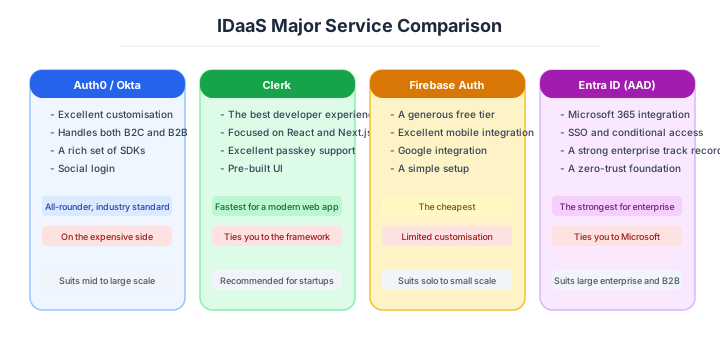
IDaaS is a service that “provides auth functions as SaaS,” reducing the cost and risk of building auth platforms in-house. Password storage, MFA, social login, SSO, passkey support - self-implementing these takes person-months, IDaaS takes days.
Rough decision by scale: personal/small startups go with Supabase Auth / Firebase Auth, B2B SaaS with Auth0 / Clerk, large enterprise/SSO-centric with Okta / Entra ID, AWS-centric with Cognito. Choose with these 3 lines, revisit when growth happens.
| Service | Characteristics | Suited for |
|---|---|---|
| Auth0 | Strongest features, B2B/B2C both | Serious systems |
| Okta | Industry standard, enterprise | Large enterprise, SSO-centric |
| Firebase Auth | Google, cheap | Mobile, small scale |
| Supabase Auth | OSS, PostgreSQL-integrated | Startups |
| Azure AD B2C | Microsoft, low cost | B2C, MS-system companies |
| AWS Cognito | AWS-integrated | AWS-using companies |
Self-building auth is mostly discouraged today. Built by anyone other than security specialists, it becomes hole-ridden.
How to choose — three scenarios by scale
How strict authentication has to be is decided by the sensitivity of the data times the user population. Here are three typical cases.
Solo or startup — use the authentication that comes with your stack
Launching a B2C service with one to five people, use the authentication that ships with the stack (Supabase Auth, Firebase Auth or Clerk) and start with social login (Google and Apple) plus passkey support. The implementation runs to a few dozen lines and stays inside the free tier. Building your own authentication at this size is the worst of both worlds: wasted time and added security risk.

Small or mid-size B2B SaaS — SSO becomes a condition of the deal
In B2B SaaS, the customer’s IT department will ask “can this federate with our IdP over SSO?” as a condition of the contract. Starting on an IDaaS with SAML and OIDC support, such as Auth0 or Clerk, lets you answer that with configuration alone. Staged designs, such as MFA for everyone and stronger authentication again for the admin console, are also features of the IDaaS rather than code you write.
Large enterprise — IdP-centred control and the strongest authentication
Put Okta or Entra ID at the centre as the IdP and bring every system under SSO. General staff use TOTP or push; administrator accounts and privileged operations go up to FIDO2 with hardware keys; and offboarding completes by disabling one account in the IdP. In finance, healthcare and government, layered authentication is mandatory to meet audit requirements.
A practical table of authentication strength
Industry baseline values as of April 2026.
| Type of service | Recommended authentication | MFA |
|---|---|---|
| B2C, free service | password + social login | optional |
| B2C handling money (e-commerce, banking) | MFA required, passkey recommended | TOTP / push |
| B2B business SaaS | SSO + MFA required | TOTP / push / FIDO2 |
| Finance, healthcare, government | FIDO2 + hardware key | FIDO2 required |
| Administrator accounts | FIDO2 + hardware key | required |
Do not forget the user population either. Force FIDO2 on a service for elderly users and nobody will be able to log in. For a non-technical audience, SMS plus attentive support is sometimes the realistic compromise, and you cover the gap with the other layers of defence.
AI decision axes — The AI agent is a new kind of actor
The biggest shift in AI-era authentication design is that not only humans but AI agents are hitting APIs as legitimate actors. GitHub Copilot writes code, Devin opens PRs, custom AI agents operate internal systems via Slack - “what permissions, how far to allow” for these agents is a challenge that didn’t exist in traditional authentication design.
Traditional Machine-to-Machine authentication (batch processing, inter-microservice communication) just repeated fixed processing. AI agents autonomously decide and hit different APIs. Therefore, traditional fixed scopes end up either too broad or too narrow, and the design mindset itself needs to change.
Agent authentication design patterns
| Pattern | Mechanism | Suited for |
|---|---|---|
| OAuth 2.0 Client Credentials + short-lived tokens | Issue client_id/secret to agent, obtain tokens each time | Internal API access. Scope-limited permissions |
| OAuth 2.1 + DPoP (Demonstration of Proof-of-Possession) | Bind token to private key, prevent misuse on token theft | High-security requirements. Finance/healthcare |
| User delegation (On-behalf-of) | Agent acts on behalf of human’s token | When agent works “on behalf of user” |
| Human-in-the-loop approval | Agent requests human approval before operations | Destructive ops, cost-incurring, external sends |
“Give the agent a permanent API key and done” is extremely dangerous. Permanent keys accumulate leak risk over time, and you can’t limit the agent’s action scope. Short-lived tokens + minimum scope + operation logs are the 3 essentials.
Agent operation audit trails
AI agent operations must be fully traceable: “on whose instruction, for what purpose, when executed.” Human operations can be tracked by “login user ID,” but for agents that’s insufficient - record the following:
- Agent ID (which agent)
- Delegating user (whose proxy. For On-behalf-of cases)
- Trigger (what initiated execution. Slack message, schedule, call from another agent, etc.)
- Execution context (prompt summary, reasoning basis)
This is expected to become mandatory for future compliance requirements (EU AI Act, etc.), but adding it retroactively is difficult. Without building it in at the design stage, changing log structure after operations start is unrealistic.
Pitfalls and forbidden moves
Accidents in the authentication area lead straight to impersonation and company-survival-level damage. Here are the six most dangerous.
| Forbidden move | Why it is bad → what to do instead |
|---|---|
| Building authentication yourself | more than ten concerns — reset flows, session fixation, timing attacks — get missed → delegate to an IDaaS |
| Making SMS your only MFA | SIM swapping defeats it (the 2019 Twitter CEO account was taken in ten minutes) → use TOTP, push or FIDO2 |
| Forcing periodic password changes | it only produces weaker passwords, and NIST advises against it → favour length, and change only on compromise |
| Hashing passwords with SHA-256 alone | GPU brute force gets through → use Argon2id or bcrypt |
| Embedding a permanent API key in the app | one accidental Git commit leaks it and the damage runs long → short-lived tokens plus a service account |
| Giving an AI agent the same permissions as a human | fast, high-volume operations enlarge the damage → a dedicated account, held tighter than a human one |
Do not grow over-confident because “we have MFA.” The 2022 Uber internal breach came through an “MFA fatigue attack” — flooding the user with approval prompts until they gave in. The real answer to that class of attack is phishing-resistant FIDO2 and passkeys.
Author’s note - the trap of “I can build auth myself”
Stories of getting hurt from self-building auth are well-known industry talking points. There’s a story about an in-house tool where someone built bcrypt + Cookie sessions naively with the motivation “writing auth myself is more educational” - and at the security review just before release, they were pointed out 10+ angles they hadn’t even imagined: password-reset path, brute-force countermeasures, session-fixation, timing attacks, account lockout - and ended up rewriting the whole thing.
Another famous one is the 2022 Uber internal breach incident, where a contractor’s password leaked and “MFA fatigue attack” (the technique of spamming MFA notifications until the user gives in) landed, and the attacker reached internal Slack/AWS/GCP. A clear case where the “MFA installed = safe” assumption collapsed, and an event that suddenly spread the importance of FIDO2 / Passkey phishing-resistance.
I myself also remember almost trying it as a junior thinking “I can probably write auth,” only to be stopped by a senior with “absolutely don’t self-build.” The reason “what you can learn by self-building is the lesson that you shouldn’t self-build” is said is because the feeling of “auth can be made like a CRUD relative” is an illusion only the writer has.
Self-built auth has a wide chasm between ‘works’ and ‘defends’. By the time you notice the chasm, production is already running.
What to decide - what is your project’s answer?
For each of the following, try to articulate your project’s answer in 1-2 sentences. Starting work with these vague always invites later questions like “why did we decide this again?”
- Auth method (password / MFA / Passkey / SSO)
- MFA method (SMS / TOTP / Push / FIDO2)
- IDaaS adoption (Auth0 / Okta / Firebase / self-build)
- Social login (scope of support)
- Session design (Cookie / JWT / refresh)
- Password policy (length, leak detection)
- Agent auth (Service Account, API Key)
How to record decision reasons
Since auth platforms affect both security and user experience, it’s important to leave why you chose that method/product as an ADR. Below is an example.
| Item | Content |
|---|---|
| Title | Adopt Auth0 (IDaaS) as authentication platform |
| Status | Approved |
| Context | Selecting the auth platform for a B2C SaaS. Social login (Google/Apple) support and mandatory MFA are requirements |
| Decision | Adopt Auth0 as IDaaS, delegating auth externally |
| Reasons | - Achieves password management, MFA, social login, and Passkey support without in-house implementation - Natively supports OIDC/SAML, making future SSO expansion easy - Built-in Breached Password Detection |
| Rejected alternatives | Firebase Authentication: limited custom claims management, hard to handle complex permission models. In-house implementation: operational load of password hashing, session management, and vulnerability response is too high |
| Result | Start with free tier (7,500 MAU); monitor monthly for paid-plan migration threshold |
Auth-method changes affect all users, so successors need to understand “why IDaaS instead of in-house.” The greatest value of an ADR is that “why this choice was made” is clear at a glance when revisited later.
Related Articles
Summary
This article covered auth design, including the 3 auth factors, MFA, Passkey, SSO, social login, IDaaS selection, and modern auth design with both humans and AI agents in view.
Delegate to IDaaS, MFA standard + Passkey support, adopt SSO + OIDC, and keep agent auth short-lived and limited. That is the practical answer for auth design in 2026.
Next time we’ll cover authorization and IAM (RBAC, ABAC, ReBAC, least privilege).
Back to series TOC -> ‘Architecture Crash Course for the Generative-AI Era’: How to Read This Book
I hope you’ll read the next article as well.
Also popular with readers
📚 Series: Architecture Crash Course for the Generative-AI Era (53/95)