About this article
As the third installment of the “Solution Architecture” category in the series “Architecture Crash Course for the Generative-AI Era,” this article explains non-functional requirements.
Functional requirements can be written by business; non-functional requirements can’t be written without specialists. Vague non-functional requirements cause post-completion firestorms of “running but slow / stops / ops is hell.” This article handles numerically quantifying performance, availability, security, and operability, IPA non-functional requirement grades, and AI-era non-functional-test automation.
Before you read this
This article is mostly about requirements and cost-benefit across a whole system. If IT vocabulary is unfamiliar, reading the primers "How a Web Service Works" and "Servers and the Cloud" first makes it far easier to follow. You can also look anything up in the glossary as you read.
What are non-functional requirements in the first place
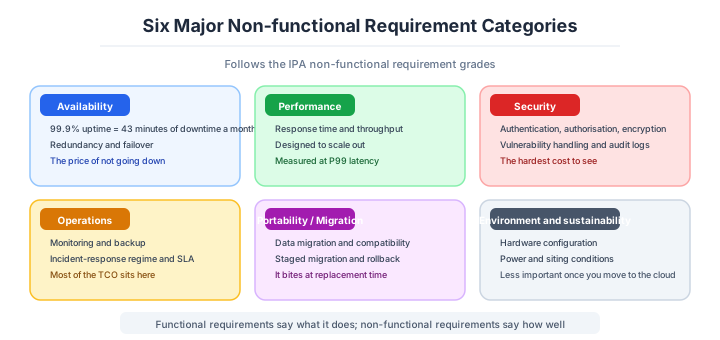
Non-functional requirements are “rules that define not ‘what the system does’ but ‘how well it runs.’”
Think of earthquake resistance and insulation specs when building a house. The floor plan (functional requirements) can be decided by the residents, but “can it withstand a magnitude 6 earthquake?” “can it maintain winter room temperature at a certain degree?” — only specialists can design these. And raising the seismic rating after construction is essentially a rebuild. Software is the same: without settling quality standards like “respond within 1 second” or “maintain 99.9% monthly uptime” upfront, you end up with the post-completion firestorm of “runs but slow, stops, ops is hell.”
Why non-functional requirements are needed
Prevent “completed but unusable”
Even with perfect features, a 10-second-response system isn’t used. Without numerically settled, disputes arise at acceptance.
Becomes basis for cost estimates
“99.9% uptime” and “99.99% uptime” sometimes have 5x build-cost differences. Estimates only emerge once numbers are settled.
Alignment with regulatory requirements
Finance / medical / personal info often have non-functional-requirement levels decided by law - without early clarification, violation risk emerges.
Main NFR categories
IPA’s non-functional requirement grades are the standard classification in Japan. Comprehensive organization in 6 major items.
| Category | Content |
|---|---|
| Availability | Degree of not stopping |
| Performance / scalability | Speed, scale |
| Operability / maintainability | Ease of operations |
| Migratability | Ease of migration |
| Security | Whether protected |
| System environment | Premise environment, requirements |
IPA’s non-functional-requirement grades are a free-to-use template, widely used in Japanese companies.
Availability
Define how much the system doesn’t stop. Same viewpoint as SLO content - numerical quantification required.
| Metric | Content | Typical |
|---|---|---|
| Uptime | What % running monthly | 99.9% (43 min monthly down) |
| RTO | Recovery target time on failure | 1 hour |
| RPO | Allowed data-loss time | 15 min |
| MTBF | Mean time between failures | 30 days |
| MTTR | Mean time to repair | 30 min |
Promising 99.99% is the extremely strict level allowing only 4.3 min monthly down. Cost multiplies several-fold - choose levels matching business requirements.
Performance
Define how fast and many can be processed. Per business nature, clearly numerically quantify response time and throughput.
| Metric | Content | Typical example |
|---|---|---|
| Response time | Per-request processing time | Within 300ms at P95 |
| Throughput | Per-unit-time processing count | 1000 req/sec |
| Concurrent connections | Parallel users | 10,000 |
| Peak multiplier | Peak-time load | 10x normal |
| Latency | Network delay | Under 50ms |
For “within 3 seconds response,” clarify whether average or max. Usually defined at P95 / P99 (95 / 99 percentile) - the modern way.
Scalability, operations, security and migratability
Define whether you can respond to future growth. Beyond service-launch scale, design including growth predictions for years ahead.
| Metric | Content |
|---|---|
| Horizontal | Can add servers to handle |
| Vertical | Can boost CPU / memory to handle |
| Data | DB-capacity growth |
| User | 10x / 100x growth |
| Geographic | Overseas expansion |
Designing all from the start is excessive, but scenarios for phased expansion need consideration.
Operability and maintainability are the next axis.
Define ease of operations. Weakness here makes ops-team load explode, increasing incidents.
| Item | Content |
|---|---|
| Backup | Frequency, retention, restoration test |
| Monitoring | What to monitor at what frequency |
| Log retention | Period, capacity |
| Deploy | Frequency, downtime |
| Documentation | Operational manual setup |
| On-call | 24/7 response regime |
If “premising outsourced operations,” define levels outsourceable.
Security belongs in the non-functional requirements too.
Define levels to protect. Levels vary with handled-data sensitivity and law/regulation.
| Item | Content |
|---|---|
| Authentication | MFA required, password strength |
| Authorization | Permission design, least privilege |
| Encryption | Communication, storage, key management |
| Audit logs | Retention, tamper-prevention |
| Vulnerability response | Patch-application SLA |
| Penetration testing | Frequency, scope |
Always weave in regulatory requirements like Personal Information Protection Act, GDPR, and PCI DSS.
Migratability is the one most often forgotten.
Define ease of migration from existing systems. Cases where projects break down from migration-plan-design lack are many - shouldn’t be underestimated.
| Item | Content |
|---|---|
| Data-migration method | Bulk / phased |
| Parallel operation | New-old coexistence period |
| Rollback | Reversion procedure, conditions |
| System-stop time | At cutover |
| User training | Education plan |
| Business-stop impact | Business-department coordination |
Gaps in the non-functional requirements have standard countermeasures.
Many easily-forgotten items in NFR. Use comprehensive checklists like IPA’s non-functional-requirement grades to eliminate gaps.
| Easily-forgotten items | Content |
|---|---|
| Browser-support scope | IE11? Latest Chrome only? |
| Character encoding | UTF-8, emoji support |
| Timezone | UTC, JST, multiple regions |
| Multilingual support | i18n (internationalization), L10n (localization) |
| Accessibility | WCAG 2.1 compliance |
| Disaster countermeasure | DR, geo-distribution |
| Log retention | Legal requirements |
These are items easily firestormed with “didn’t support that” after completion. Define from start.
How all of this relates to the SLA and the SLO is the last piece.
NFR closely links with SLA / SLO. SLA is external-contractual promise, NFR is target value at design.
| NFR | SLO | SLA | |
|---|---|---|---|
| Phase | At design | At operation | At contract |
| Nature | Target | Internal target | External contract |
| On violation | Design change | Improvement investment | Penalty / reduction |
For NFRs affecting SLA (availability, performance), the iron rule is setting stricter than SLA.
How heavy the requirements should be depends on the nature of the system.
Strictness of NFR varies with business importance and disclosure scope.
| System nature | Availability guideline |
|---|---|
| Internal tools | 99% |
| General B2C services | 99.9% |
| B2B SaaS | 99.95% |
| Finance / payments | 99.99% |
| Power / telecom | 99.999% |
The other axis is the operational regime you actually have.
Realizability of NFR varies with ops-team scale. Without 24/7 regime, can’t keep 99.99%.
| Ops regime | Possible availability |
|---|---|
| Business hours only | 99% |
| Extended hours | 99.5% |
| 24/7 on-call | 99.9% |
| 24/7 SRE dedicated | 99.95% |
| Multi-region / Follow-the-Sun | 99.99%+ |
By case, the level lands like this.
In-house tools used during business hours. Availability 99% + response 3 sec + daily backup. IPA non-functional grade equivalent to “Model System 1.” SLA unneeded, RTO 24 hours / RPO 1 day enough. Security covers minimum with internal ID linkage + TLS.
A general B2C web service. Availability 99.9% + P95 500ms + 24/7 on-call + auto backup. IPA “Model 2,” introduce SLO management, PII masking for Personal Information Protection Act, annual pentest. Optimize cost via AWS / GCP managed services.
B2B SaaS with enterprise customers. Availability 99.95% + SLA contract + 7-year audit logs + SOC 2 (US standard auditing service-organization security/availability) compliance. IPA “Model 3” equivalent, individual SLA agreements per customer, RTO / RPO clearly stated in contract, eyeing ISO 27001 acquisition. Include multi-tenant separation design in NFR.
Finance, payments and healthcare. 99.99%+ availability + multi-region DR + FISC / PCI DSS / HIPAA compliance. IPA “Model 4,” 24/7 dedicated SRE, annual pentest / quarterly vulnerability scans, encryption with FIPS 140-2-certified HSM, tamper-proof audit logs. NFR integrated with regulations themselves.
Three scenarios
If it is an in-house tool used during business hours
Availability of 99 percent, a three-second response and a daily backup is a perfectly fine level. In IPA non-functional grade terms that is “model system 1”: no SLA is needed, and an RTO of 24 hours with an RPO of one day is enough. Cover the minimum on security with internal identity federation and TLS. If the operational regime only covers business hours in the first place, 99 percent is the ceiling of what you can actually hold.

If it is a general B2C web service or a small-to-mid SaaS
For B2C, the guideline is 99.9 percent availability, P95 at 500 ms and 24/7 on-call (IPA “model 2”); for B2B SaaS it is 99.95 percent availability with an SLA contract, seven years of audit logs and SOC 2 compliance (“model 3”). Introduce SLO management, and state RTO and RPO explicitly in the per-customer SLA. Multi-tenant isolation belongs in the non-functional requirements at this stage too.
If it is finance, payments or healthcare
This is the world of 99.99 percent availability and above, multi-region DR, and compliance with FISC, PCI DSS or HIPAA (IPA “model 4”). A dedicated 24/7 SRE regime, annual penetration testing and quarterly vulnerability assessment, encryption on FIPS 140-2 certified HSMs, tamper-proof audit logs — the non-functional requirements fuse with the regulations themselves. You cannot hold 99.99 percent without a 24/7 regime, so consistency with the operational regime is the precondition.
Numeric gates by service type
Note: Industry baseline values as of April 2026. Will become outdated as technology and the talent market shift, so requires periodic updates.
NFR is the area where discussion starts the moment numbers are agreed. Below is the industry-standard correspondence table.
| Service type | Availability | RTO | RPO | Response time (P95) | Monthly-cost guideline |
|---|---|---|---|---|---|
| Internal tools | 99% | 24 hours | 1 day | 3 sec | Tens of thousands of yen |
| General B2C web | 99.9% | 1 hour | 15 min | 500ms | Hundreds of thousands |
| B2B SaaS | 99.95% | 30 min | 5 min | 300ms | Hundreds of thousands to millions |
| Finance / payments | 99.99% | 5 min | 1 min | 100ms | Millions+ |
| Telecom / power | 99.999% | 30 sec | 10 sec | 50ms | Tens of millions+ |
The empirical rule: 99.9% and 99.99% have several-times build-cost differences. Even when business requests “non-stopping system,” presenting numerically often gets “99.9% is enough.” IPA non-functional-requirement grades are Japan’s standard checklist, comprehensively covering easily-forgotten items (timezone, browser support, i18n, WCAG, etc.).
“Don’t stop” discussion only starts when presented numerically. In words, never aligns.
Pitfalls and forbidden moves
Here are the six most dangerous of the typical ways non-functional requirements go wrong. Every one of them produces a system that runs but cannot be used.
| Forbidden move | Why it is bad → what to do instead |
|---|---|
| Deciding the non-functional requirements later | retrofitting costs ten times as much → settle them numerically at the start of design |
| Agreeing availability vaguely as “as high as possible” | without a number you can neither design nor estimate → present it as downtime and agree on that |
| Applying 99.99 percent to every system out of habit | the build cost differs several times over between 99.9 and 99.99 → pick the level the business requirement justifies |
| Defining response time as an average | the slowest one percent of users is invisible → measure at P95 and P99 |
| Promising 99.99 percent with no operational regime | without dedicated 24/7 SRE you cannot hold it → set a level consistent with the regime |
| Never turning the non-functional requirements into tests | written in the design document and discovered in production → verify them automatically in CI/CD |
The Knight Capital incident of 2012 was fatal because staged rollout (canary), automatic rollback and monitoring — all non-functional requirements — were absent together (details in the appendix on major incidents). Non-functional requirements are the insurance against “it runs but cannot be used”.
AI decision axes — Putting numbers on it is the premise for AI test automation
Auto-generating NFR tests with AI
When NFR is defined numerically, AI can generate corresponding test code with high accuracy. Given a requirement like “response within 200ms, 1000 concurrent users,” it can produce k6 or Locust load-test scripts nearly as-is.
Conversely, word-only NFR like “make it fast” or “don’t let it stop” makes test generation impossible. Without criteria for what constitutes a pass, neither AI nor humans can write tests.
The habit of numerically defining NFR from the start is now mandatory not just for document quality but as a prerequisite for AI-powered test automation. Use IPA’s non-functional requirement grades to cover items comprehensively, and put concrete numbers on each item at the early stage.
AI-generated infra design goes haywire without NFR numbers
When you ask AI to propose infra configurations, vague NFR leads to either over-design or under-design. Writing just “high availability” can yield a full multi-region, multi-AZ, auto-failover setup, with monthly cost several times over expectations.
Numbers change the game. Specifying “99.9% uptime, RPO 1 hour, RTO 4 hours” enables AI to correctly judge that single-region, multi-AZ with daily backup suffices.
This problem isn’t AI-specific — human infra engineers face the same issue — but AI differs in “outputting without asking for confirmation.” A human would ask “do you really need 99.99%?” but AI does its best with given conditions. Locking down NFR numbers at the requirements-definition stage becomes the safeguard against AI-era infra design going haywire.
What to decide - what is your project’s answer?
For each of the following, try to articulate your project’s answer in 1-2 sentences. Starting work with these vague always invites later questions like “why did we decide this again?”
- Availability target (99.X%, RTO, RPO)
- Performance target (response time, throughput)
- Scalability (growth scenarios)
- Operational requirements (monitoring, backup, on-call)
- Security level (authentication, encryption, audit)
- Migration plan (parallel operation, rollback)
- Comprehensive check (IPA non-functional-requirement grade, etc.)
Author’s note - cases of “no NFR” producing firestorms
Cases of postponing NFR and firestorm-ing are continuously told in the SI industry.
The 2012 Knight Capital incident is symbolic of the result of underestimating NFR (especially deploy safety) - subsequent investigation determined “complete absence of NFR like phased deployment (Canary), auto-rollback, and monitoring” was the lethal blow (details in appendix “Critical Incident Cases”).
Another, Amazon Prime’s first-year Prime Day stoppage is also cited. Sloppy estimation of performance NFR for peak traffic caused checkout to be down for hours, with estimated billion-dollar-class opportunity loss. Thereafter, Amazon updates performance requirements actuals-based quarterly and built in mechanisms auto-verifying with chaos engineering.
Domestically too, a major EC site released new UI for year-end shopping, with undefined response-time NFR causing 30-second-plus response delays at peak, SNS firestorm, and emergency rollback to old UI 4 hours later - cases continuously told. “Even with completed features, undefined non-functional makes the system unusable” - this reality is repeatedly slapped home in the history of NFR underestimation.
Related Articles
Summary
This article covered non-functional requirements design, including availability, performance, operations, security, IPA grades, SLA/SLO relationship, and AI-era auto-test-ization.
Decide numerically first, comprehensive via IPA, align with ops regime, auto-test-ize. That is the practical answer for NFR design in 2026.
Next time we’ll cover “estimation and ROI.” Plan to dig into the practice of 3-point estimation, buffers, 3-year ROI, break-even points, and how to build numbers to pass approvals.
Back to series TOC -> ‘Architecture Crash Course for the Generative-AI Era’: How to Read This Book
I hope you’ll read the next article as well.
Also popular with readers
📚 Series: Architecture Crash Course for the Generative-AI Era (83/95)