About this article
As the second installment of the “Solution Architecture” category in the series “Architecture Crash Course for the Generative-AI Era,” this article explains bridging requirements to design.
Requirements-definition failure becomes 10x cost in later phases. This article handles the practice of converting business “want to do” into tech design - hearings, As-Is/To-Be, MoSCoW priorities, scope management, requirements traceability - the first job of solution architects.
Before you read this
This article is mostly about requirements and cost-benefit across a whole system. If IT vocabulary is unfamiliar, reading the primers "How a Web Service Works" and "Servers and the Cloud" first makes it far easier to follow. You can also look anything up in the glossary as you read.
What is requirements definition in the first place
Imagine the pre-construction meeting for building a house. “I want a spacious living room,” “plenty of storage” — the architect translates the client’s vague wishes into concrete specs that can be converted into floor plans, structure, and budget. Skip this translation and go straight to drawing blueprints, and “this isn’t what I had in mind” will inevitably follow completion.
Requirements definition is the process of organizing business “want to do” into concrete specifications that can be converted into technical design. It clarifies the boundary of what to build and what not to build.
Without requirements definition, the dev team builds off-target features, and rework cost balloons 10x with each later phase.
Why requirements definition is needed
Business and technology speak different languages. Even when business says “the system has problems,” the real problem may be the business process. Conversely, even when tech says “technically can’t,” reviewing requirements often makes it possible. A translation specialist is needed.
Even the person asking does not know what they want. Business departments also don’t fully know what they want - typical. The architect’s job is drawing out requirements through dialogue.
There is more than one design that satisfies the same requirement. For the same requirement, 5x cost differences emerge from tech choice. Grasping the essence of business requirements lets you propose cheap, fast, easy-to-operate options.
3 tiers of requirements
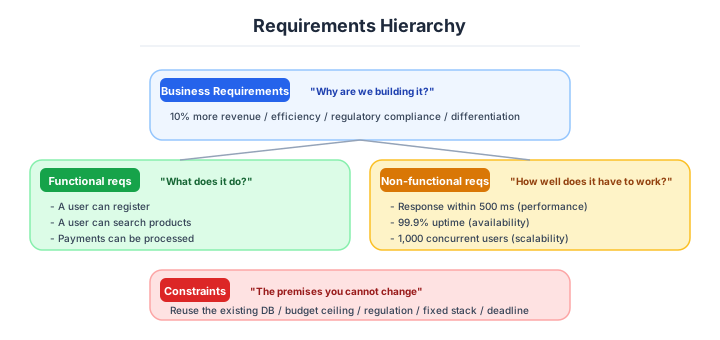
Requirements have a hierarchical structure. The principle is clarifying in order from upper to lower - mixing here results in shaky design.
| Tier | Content | Example |
|---|---|---|
| Business requirements | Why do it, purpose | Increase revenue 10% |
| User requirements | Who, what to do | Customers can find products |
| System requirements | What the system does | Provide product-search API |
Starting from system requirements is the worst - the cause of building with unclear purpose. Always descend from business requirements.
Business hearings and analysis of the current state
The starting point of requirements definition is careful hearings to business departments. Not one-way questioning - combine field observation, Q&A, document analysis.
| Hearing technique | Content |
|---|---|
| Interview | Deep-dive 1-on-1 |
| Workshop | Discussion with multiple |
| Field observation | See actual operations |
| Document analysis | Existing manuals, Excel |
| Competitor analysis | Other-company cases |
Field observation is often most valuable. Verbally “we input in Excel” but observing reveals complexity like “we go back and forth across 3 Excel files.”
Analysing the current state is what turns those hearings into something usable.
Requirements definition draws both current state (AS-IS) and target (To-Be). Without considering current state, alignment with existing operations / systems breaks down.
| AS-IS analysis | To-Be design |
|---|---|
| Current business flow | New business flow |
| Current system composition | New system composition |
| Issues and constraints | Solutions |
| KPI actuals | KPI targets |
| Bottlenecks | Improvement scope |
Detailing AS-IS too much without reaching To-Be is typical failure. Practical to stop at granularity needed for issue identification in AS-IS.
Requirements prioritization (MoSCoW)
Implementing all requirements is impossible. The framework clearly prioritizing is MoSCoW. Narrow by objective criteria, not vibe.
| Rank | Meaning | Content |
|---|---|---|
| Must | No value without it | Include in MVP |
| Should | Usable without | Add in v1.1 |
| Could | Nice to have | If margin |
| Won’t | Not doing this time | Out of scope explicitly; future consideration |
The explicit Won’t is important - promising not to do prevents scope creep.
User stories are how a requirement gets written down at a usable size.
The technique describing requirements as user-perspective stories. Standard format for engineers and business to share understanding.
As a [role],
in order to [purpose],
I want [function].

Example:
As a sales rep,
in order to confirm history before customer visits,
I want to view customer info on mobile.
Co-write acceptance criteria to clarify the criteria for “completion.” Define producing business value as completion, not “running = complete.”
Business flow and data flow diagrams make the same thing visible.
Drop requirements as diagrams into business flow and data flow. Text alone breeds misunderstanding - visualize for agreement.
| Diagram | Use |
|---|---|
| Business flow (BPMN, international standard for business-process description) | Business flow, who does what |
| Use case diagram (UML, Unified Modeling Language) | Relationship of users and system |
| Data flow diagram (DFD, Data Flow Diagram) | Data flow |
| Sequence diagram | Order of screens / processing |
| Wireframe | Screen composition |
The ideal: business and tech departments discussing same diagrams. Miro / Figma / Lucidchart are better for collaborative editing than PowerPoint.
Gaps between what was asked for and what gets built have standard countermeasures.
Requirements gaps become fatal in later phases. Use checklists to comprehensively identify.
| Viewpoint | Items to confirm |
|---|---|
| Happy path | Main business flow |
| Error path | Error handling, exceptions |
| Boundaries | Max value, min value, 0 items |
| Security | Authentication, authorization, audit |
| Performance | Response time, concurrent users |
| Operations | Backup, monitoring |
| Retirement | Data deletion, service end |
“Defining only happy path and finishing” is typical failure. Error path is worth spending time defining.
Getting down to design, and the requirements document
Once requirements are settled, drop into tech design. The iron rule here is producing multiple cases for comparison - with just 1 case, you can’t judge “if it’s optimal.”
| Design-case viewpoints | Content |
|---|---|
| Functional implementation scope | How far to implement |
| Tech stack | Languages, FW, DB |
| Buy / Build / Subscribe | Off-the-shelf / self-build / SaaS |
| Cloud / on-prem | Execution environment |
| In-house / outsource | Implementation regime |
| Deadline, cost | Constraints |
The iron rule for solution architects is at least 3 cases - 2 cases decide via superiority, 3+ allow considering middle cases.
The requirements document itself has a standard composition.
The final output of requirements definition is the requirements-definition document. Generally created with the following composition. Templates vary by company, but essential items are common.
| Chapter | Content |
|---|---|
| 1. Background and purpose | Why do it |
| 2. Scope | What to do, what not to do |
| 3. Stakeholders | Relevant parties, roles |
| 4. Business requirements | Goals, KPI |
| 5. Functional requirements | What can be done |
| 6. Non-functional requirements | Performance, availability, etc. |
| 7. Constraints | Budget, deadline, tech |
| 8. Migration / operations | Migration plan from existing |
Non-functional requirements is an important area covered in detail in the next article.
How far to take it depends on the scale of the project.
Requirements-definition detail varies with project scale. Excessive detail at small scale makes writing longer than building.
| Scale | Recommended |
|---|---|
| Small (~3 months) | User stories + screen mockups |
| Mid-size (3-12 months) | Standard requirements doc |
| Large (1+ years) | Detailed requirements + design doc + verification plan |
| Super-large | Phased requirements definition + PoC co-use |
And on whether you are working agile or waterfall.
Approach varies with requirement-change frequency. Operations with little change firm up requirements and proceed; areas with intense change suit phased-evolution approaches.
| Change | Recommended |
|---|---|
| Low (core operations) | Waterfall requirements definition |
| Mid (general B2B = enterprise business) | Hybrid |
| High (B2C = consumer business / new business) | Agile, per-sprint review |
By case, the depth lands like this.
A small web service, inside three months. User stories + Figma wireframes + MoSCoW for prioritization. Requirements doc unneeded, 1 Notion page enough. Roughly grasp AS-IS via 1-day field observation + several interviews, build To-Be prototype early to verify.
A mid-size B2B SaaS, six to twelve months. Requirements doc (standard template) + BPMN business flow + use-case diagrams + acceptance criteria. Periodic workshops with 3-5 business-side key persons, agree implementation scope via MoSCoW, define non-functional requirements early too. Consensus-build via collaborative editing on Figma / Miro.
A large core-system replacement, one to three years. AS-IS detailed analysis + To-Be design doc + PoC co-use + phased-release plan. Dedicated user representatives from business departments, 3-6 months for requirements-definition phase alone, BPMN L1-L3 layered, prepare doc set including migration plan and data-conversion specs.
A new business or B2C product. Lean canvas + MVP user stories + per-sprint review. On premise of not fixing requirements, early-release minimum features → add via user feedback. Prototype and real data over spec docs, operations of PM and engineers sitting together.
Three scenarios
If you are building solo or at a startup
User stories, wireframes in Figma and MoSCoW prioritisation are enough. You do not need a requirements document — fit it on one Notion page. Get a rough grasp of the AS-IS from a day of observation and a handful of interviews, then verify the To-Be by building a prototype early. Invest the time in building and checking rather than in writing.
If you are a small or mid-size SaaS
Build a requirements document from the standard template, BPMN business flows and acceptance criteria, through regular workshops with three to five key people on the business side. Agree the implementation scope with MoSCoW, and put numbers on the non-functional requirements at this stage too. Running the consensus-building through collaborative editing in Figma or Miro is the trick.
If you are a large enterprise
Detailed AS-IS analysis, a PoC alongside it and a staged release plan mean spending three to six months on the requirements phase alone. Have the business side nominate dedicated user representatives, layer the BPMN from L1 to L3, and build out the document set as far as the migration plan and the data-conversion specification.
Numeric gates for requirements effort and duration
Note: Industry baseline values as of April 2026. Will become outdated as technology and the talent market shift, so requires periodic updates.
The empirical rule: requirements definition is 20-30% of project period. Below are per-scale guidelines.
| Project scale | Requirements-definition period | Effort ratio | Output |
|---|---|---|---|
| Small (~3 months) | 1-2 weeks | 10-15% | User stories + Figma wireframes |
| Mid-size (6-12 months) | 1-3 months | 15-25% | Standard requirements doc + BPMN |
| Large (1-3 years) | 3-6 months | 25-30% | AS-IS / To-Be detail + PoC co-use |
| Super-large / core reform | 6 months-1 year | 30%+ | Multi-stage requirements definition + multiple PoC |
| Agile new business | Per-sprint | Continuous | Lean canvas + MVP |
Metrics measuring requirements-definition quality: acceptance-criteria numerical-rate 90%+, scope (Won’t) explicit-rate 100%, field-observation rate (business-flow verification) 80%+, prototype/wireframe-share rate 100%. Stating Won’t in MoSCoW is the strongest weapon preventing scope creep.
Requirements-definition failure is 10x cost in later phases. Initial care is everything.
AI decision axes — Machine-readable requirements become instructions for the AI
Machine-readable requirements become instructions for AI
When requirements docs are written only as natural language in PowerPoint or Word, a human “translation” step is needed before passing them to AI coding tools. Defining requirements in machine-readable formats from the start eliminates that translation cost.
Specifically, writing user stories in Markdown and acceptance criteria in Gherkin format (Given-When-Then) is effective. Requirements in this format become direct input for test-code generation, enabling AI to autonomously run the implement-test-fix cycle.
Keep PowerPoint diagrams and tables as supplementary human-facing materials, but manage official requirements as Markdown in a Git repo. To avoid dual maintenance, explicitly declare “Markdown is the source of truth” and treat PPT as a generated artifact — this is the pragmatic approach.
AI-powered ambiguity detection in requirements
The most dangerous thing in requirements definition is “ambiguous expressions making it into the design phase unnoticed.” Requirements with only adjectives like “fast,” “user-friendly,” and “secure” are interpreted differently by each implementer, causing rework.
Feeding the requirements doc to AI and instructing “list all quality requirements without numerical targets” comprehensively detects such ambiguities. The strength is mechanically surfacing spots human reviewers tend to miss — especially gaps in preconditions and exception-path descriptions.
That said, not every item AI flags as “ambiguous” needs to be numerically defined. Requirements intentionally left flexible (such as room for future expansion) lose design flexibility if forcibly quantified. Using AI’s findings as a checklist and having humans make the final call is the right approach.
Pitfalls and forbidden moves
Here are the six most dangerous of the typical ways requirements definition goes wrong. Every one of them has the destructive power to lose half the project.
| Forbidden move | Why it is bad → what to do instead |
|---|---|
| Defining requirements from interviews alone, without observing the work | the pattern of the Target Canada withdrawal (a two-billion-dollar loss) → always go and look at the work |
| Starting from the system requirements | you build with no clear purpose and end at “this is not it” → come down from the business requirements |
| Not writing down the Won’t in MoSCoW | scope creep explodes the budget and the schedule → promise in writing what you will not do |
| Writing a 1,500-page requirements document | like the NHS NPfIT, cancelled after nine years and twelve billion pounds → stop at the granularity that gets used |
| Not making the acceptance criteria explicit | it becomes “it runs, so it is done” and produces no business value → put numbers on them and agree |
| Spending too long on AS-IS | you stall in analysing the present and never reach the To-Be → cut AS-IS off at the granularity that identifies the problems |
Swallowing “requirements definition is done by asking the users” whole is dangerous too. Users normally cannot state precisely what they want; it is drawn out through observation and prototypes.
Author’s note - cases of “requirements-definition failure” sinking enterprises
Cases showing how heavy a price requirements-definition laxness produces are repeatedly carved into industry history.
The Target Canada 2013-2015 withdrawal incident is a symbolic case where requirements-definition failure erased one business itself. US retail giant Target entered Canadian market in 2013, deploying 133 stores at once. But the requirements definition for the new SAP-core system was sloppy, with mass missing product-master field data (size / barcode / weight), continuing the situation of stores opening with empty shelves. The direct cause was writing requirements without seeing operational reality, withdrawing in 2 years with 17,600 jobs and about $2B in losses - studied as a failure remaining in management history.
Another, the UK NHS (National Health Service) NPfIT project 2002-2011 is also a famous case. The UK government ordered a national unified electronic-medical-record system, ending up as a 1,500-page-plus lengthy requirements-definition document, with the result that operational realities differing per regional hospital couldn’t be reflected, and after 9 years and an estimated GBP 12B, the project was halted. A case slapping home that “perfect requirements on paper” and “field-usable design” are completely different things.
Both have requirements definition skipping field observation as the lethal blow, showing that implicit business logic uncatchable via desk interviews alone decides projects’ life or death.
What to decide - what is your project’s answer?
For each of the following, try to articulate your project’s answer in 1-2 sentences. Starting work with these vague always invites later questions like “why did we decide this again?”
- Hearing method (interviews, workshops)
- Prioritization (MoSCoW etc.)
- Description format (user stories, business flow)
- Requirements-doc template (in-house standard)
- Acceptance-criteria definition method
- Change-management process (requirement-change approval)
- AS-IS / To-Be granularity
Related Articles
Summary
This article covered bridging requirements to design, including 3 tiers, MoSCoW, field observation, acceptance criteria, and AI-era spec meaning.
Descend from business requirements, state Won’t, AS-IS rough, write specs deliverable to AI. That is the practical answer for requirements definition in 2026.
Next time we’ll cover “Non-functional requirements design.” Plan to dig into the practice of numerically defining performance, availability, security, and operations, plus numerical gates preventing flame-ups from “slow” / “stops.”
Back to series TOC -> ‘Architecture Crash Course for the Generative-AI Era’: How to Read This Book
I hope you’ll read the next article as well.
Also popular with readers
📚 Series: Architecture Crash Course for the Generative-AI Era (82/95)