![[DevOps Architecture] Dev Environment and Local Execution](/uploads/2026/04/arch-intro-cat-devops.png)
About this article
As the fourth installment of the “DevOps Architecture” category in the series “Architecture Crash Course for the Generative-AI Era,” this article explains dev environment and local execution.
The time from a new-hire joining to first commit is the most honest indicator of team maturity. This article handles devcontainer/docker-compose/secret distribution/IDE settings as practical design making “first commit in half a day” achievable. The moment someone says “works on my machine,” the mechanism is unmaintained.
Before you read this
This article is mostly about the flow of building, testing, releasing and monitoring a service. If IT vocabulary is unfamiliar, reading the primer "From Development to Operations" first makes it far easier to follow. You can also look anything up in the glossary as you read.
What is a dev environment, anyway?
Imagine moving into a new apartment. Furniture, appliances, Wi-Fi, gas hookup — whether it takes a week or just one day to be livable depends on how much has been prepared in advance.
A dev environment is the complete workspace — software, configuration, credentials, test data — that an engineer needs to start writing code. Preparing this workspace so that anyone can reproduce it quickly is what “dev environment design” means.
Without dev environment design, it takes days to a full week for a new hire to write their first line of code. On top of that, environments subtly differ between team members, and “it works on my PC” becomes a daily occurrence.
Why development-environment design matters
First, because how fast a new joiner gets going measures the maturity of the team. Between a team where the first commit takes a week and one where it takes half a day, the return on hiring and the ability to scale are in different leagues. Where the procedure lives in individuals’ heads, the productivity of whoever is teaching is sacrificed too.
Second, because differences between environments breed bugs. Most of the “it works on my machine but falls over in production” problem comes from differences between the development and production environments, and without machinery to unify them you chase environment-dependent bugs for ever.
Third, it is a premise of the remote-work era. The days of verbal support from the next desk are over, and being able to reproduce the same environment instantly from anywhere has become a precondition.
4 generations of dev environments
The history of dev environments is continuous improvement of “absorbing environment differences.” Per generation, who/where/how-much-effort to prepare environments has changed.
| Gen | Method | Representative |
|---|---|---|
| 1st | Direct install on each PC | Distribute manuals with brew install / apt install |
| 2nd | Unify with VM | Vagrant + VirtualBox |
| 3rd | Unify with containers | Docker Compose (current mainstream) |
| 4th | Declarative dev env | devcontainer / Nix / Gitpod / GitHub Codespaces |
Today, docker-compose is already the baseline, with “declarative environments” like devcontainer and Nix stacking on top in growing compositions. There’s no reason to return to gen 1 manual distribution, and VMs have lost reason to choose due to startup slowness and resource consumption.
docker-compose - the baseline
docker-compose is a tool for defining multiple containers (app, DB, cache, queue) in one YAML and starting them all at once. Today, its position as the skeleton of local development is unshaken.
# example compose.yaml
services:
  app:
    build: .
    ports: ["3000:3000"]
    depends_on: [db, redis]
  db:
    image: postgres:16
    volumes: [pgdata:/var/lib/postgresql/data]
  redis:
    image: redis:7
volumes:
pgdata:| Pros | Cons |
|---|---|
Start environment with 1 command (docker compose up) | Host-OS-dependent (especially Windows file I/O is slow) |
| Use the same middleware as production locally | On Mac, ARM/x86 image differences can trip you up |
| Low learning cost | Config management balloons with multiple services |
| CI’s integration tests can use the same definition | Per-environment overrides clutter via override.yml |
The value of using the same PostgreSQL version as production locally is overwhelming. The composition of “develop on SQLite, production on PostgreSQL” is a landmine - dialect-difference bugs surface only in production.
devcontainer - declarative dev environment
devcontainer (Dev Containers, the mechanism where VS Code/GitHub Codespaces/JetBrains auto-deploy a dev environment wrapped in a container) is the gen-4 way that shares editor settings, extensions, and shell settings as well.
// .devcontainer/devcontainer.json
{
  "image": "mcr.microsoft.com/devcontainers/typescript-node:20",
  "features": {
    "ghcr.io/devcontainers/features/docker-in-docker:2": {}
  },
  "postCreateCommand": "npm install",
  "customizations": {
    "vscode": {
      "extensions": ["dbaeumer.vscode-eslint", "esbenp.prettier-vscode"]
    }
  }
}
VS Code extensions specified here auto-install, and postCreateCommand even completes dependency resolution. New hires reach an environment with the same Node.js version, same Lint settings, same key bindings in the 2 steps “clone repo → open Dev Containers.”
Commit devcontainer.json and Mac and Windows new hires get the same environment.
Codespaces takes the same declaration into a zero-install, cloud-hosted world.
GitHub Codespaces is a service that stands up a full dev environment in the cloud based on devcontainer definitions, realizing a world where you can develop with just a browser on your local PC. For new-hire onboarding, it has the destructive power to skip PC distribution, internal-VPN connection, and setup time.
| Case | Suitability |
|---|---|
| Speed up new-hire onboarding | Front-runner (no PC prep needed) |
| Low-spec PCs (mobile devices, Chromebook) | Offload machine power to cloud |
| Contractors / external partners | Participate in dev without distributing internal env |
| Offline / dev on planes | Net-required, unsuited |
| Highly confidential code | Depends on internal policy |
Codespaces is time-billed, around 2h/day x 20 days = $15-30/month. From the labor-cost view it’s a rounding error - just freeing one new hire from 2 weeks of setup pays back the investment. JetBrains Gateway and Gitpod are similar options - “remote dev environments” today are no longer a minority choice.
Nix goes one step further in declarativeness, at the price of a steeper learning curve.
Nix (precisely the Nix package manager and NixOS ecosystem) is the ultimate declarative environment that fixes all dev-env dependencies by hash. Node.js version, PostgreSQL version, shell settings - all fixed purely functionally, principally erasing the “works on my machine” problem.
| Where Nix is strong | Where Nix is hard |
|---|---|
| Want to maximize env reproducibility | Steep learning cost (functional language Nix lang) |
| OSS / research projects with multi-env support | Whole-team mastery needed |
| Long-term-maintenance dependency lock | Troubleshooting is hard |
Today, Nix is a tool that only lands for teams it lands for - too early for 90% of teams. Consider it only when reproducibility unreachable by docker-compose + devcontainer is needed - safe. I myself once fell for Nix and tried company-wide adoption, and know multiple cases of “underestimating team learning cost” and retreating in 3 months.
What to automate in env setup - phased practice
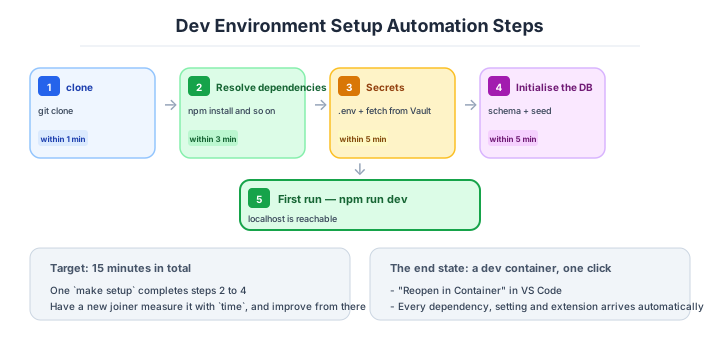
Env setup isn’t “shell-ize all README steps” - it’s practical to split phases by timing of human intervention. Set target times per phase, considering things exceeding them as automation candidates.
| Phase | What to do | Target time |
|---|---|---|
| 1. Get repo | git clone | Within 1 min |
| 2. Resolve dependencies | npm install / bundle install / pip install | Within 3 min |
| 3. Get secrets | Copy .env template + fetch keys from internal Vault | Within 5 min |
| 4. Init DB | Create schema + load seed data | Within 5 min |
| 5. First start | npm run dev to access localhost | Within 1 min |
| Total | clone to localhost | Within 15 min |
Within 15 min total is the front-runner target. Teams exceeding this are typically not measuring “where time melts.” Have one new hire actually time it with time, and crush bottlenecks - works on the ground. The goal is a state where make setup finishes 2-4 in one shot.
Handling secrets and production data
Distributing API keys, DB connection strings, and auth tokens to developers’ PCs is already old operation today. Sending .env via Slack, putting in Google Drive, sharing in 1Password - leak risk is constant.
| Method | Security | Operational load | Recommended |
|---|---|---|---|
Send .env via Slack/Drive | Extremely low | Low | Abolish immediately |
| 1Password / Bitwarden share | Mid | Mid | Small scale only |
| HashiCorp Vault | High | Mid | Mid-large scale |
| AWS Secrets Manager / Parameter Store | High | Low | Front-runner for AWS env |
| Doppler / Infisical | High | Low | Front-runner for SaaS-oriented |
| Don’t distribute directly (developer permission only) | Highest | Mid | Ideal |
The ideal is operations that don’t distribute secrets to developers. Developers fetch temporary tokens with their own IAM role, never touching production keys. Doppler and Infisical have mechanisms for centrally managing .env and CLI-deploying to local, becoming realistic options even for small/mid-size teams.
IDE settings sharing
For homogenizing dev experience, IDE settings sharing works. With VS Code, committing .vscode/settings.json to the repo, with JetBrains specific .idea/ files, aligns formatter, Lint, save-time actions across the team.
| Should share | Shouldn’t share |
|---|---|
| formatter settings (save-time formatting etc.) | Personal key bindings |
Recommended extensions (.vscode/extensions.json) | Personal themes/colors |
Debug config (.vscode/launch.json) | Personal AI completion settings |
| Workspace-specific Lint exceptions | Personal font settings |
Just listing extensions in .vscode/extensions.json’s recommendations prompts VS Code “install these extensions?” the moment the repo is opened. It mundanely cuts new-hire setup effort - a low-cost measure with only benefits from putting it in.
Production data is the other half of this decision.
The demand “want to verify on production data” always comes up, but distributing production DB dumps as is is a forbidden move today. Risks of leaking PII (Personally Identifiable Information), payment info, medical info become uncontrollable.
| Method | Content | Recommended |
|---|---|---|
| Distribute production dumps | Production data sits on developer PCs | Absolutely don’t |
| Distribute masked dumps | Names/addresses/CC numbers replaced with dummies | Front-runner |
| Generate synthetic data (Faker etc.) | Same volume / distribution as prod, full PII avoidance | Best when PII must be avoided entirely |
| Direct staging-environment access | Connect to stg from local | Depends on scale/policy |
The standard is setting up auto-generation of masked dumps (pg_dump + masking SQL + daily schedule). With regional regulations like Japan’s Personal Info Act, GDPR, and HIPAA, production-data exfiltration becomes illegal in some cases - the line of “don’t put PII on developer PCs” becomes the first design decision.
Distributing production dumps is forbidden. Mask or synthetic - the two choices.
Three scenarios
If you are building solo or at a startup
docker-compose, a .env.example and a README is enough. Stand up the same database version as production in compose, and provide a script that generates .env from .env.example. That alone removes most of the “it works on my machine” problem.

If you are a small or mid-size SaaS
docker-compose plus a dev container, Doppler (or a secrets manager), and a daily masked dump is the reliable set. Keep the state where a single make setup brings localhost up within fifteen minutes of cloning, and actually measure against a target of half a day to a new joiner’s first commit.
If you are a large enterprise
A cloud development environment such as GitHub Codespaces becomes the main candidate. It removes machine provisioning and VPN setup, and — importantly — it means contractors need no copy of the internal environment. Highly confidential code is a conversation with internal policy, and even in regulated industries the direction of “no source on the endpoint” is increasingly making cloud environments the preferred option.
AI decision axes — A declarative environment is the AI’s premise
devcontainer guarantees AI-coding reproducibility
Defining the dev environment with devcontainer eliminates the problem of “AI-generated code works in my environment but not others.” Node.js versions, database settings, and OS-dependent libraries are all unified inside the container, so test results of AI-generated code are consistent across environments.
When using cloud dev environments like GitHub Codespaces or Gitpod, the same devcontainer definition can be used, guaranteeing reproducibility of AI-written code in both local and cloud environments.
Automated environment setup enables AI onboarding support
When dev environment setup completes with a single docker-compose up, AI can support new-member onboarding. When asked “teach me the steps from cloning this repo to starting the dev environment,” AI can give accurate answers by reading the README and devcontainer definition.
Conversely, with environments requiring 10+ manual installation steps, AI can’t provide accurate guidance either, and a human still needs to sit alongside for support.
Pitfalls and forbidden moves
Ninety-nine percent of the accidents where something ran locally and fell over in production come from an environment subtly different from production. Here are the six most dangerous.
| Forbidden move | Why it is bad → what to do instead |
|---|---|
| SQLite locally and PostgreSQL in production | dialect differences stop the query working → use the same middleware as production, in a container |
| Drifting language runtime versions | incompatible dependencies bring it down → pin it with a dev container or .tool-versions |
| Mixed time zones, Asia/Tokyo and UTC | date-boundary bugs only surface in production → standardise on UTC, CI included |
Everybody hand-writing their own .env | a typo in a key name produces behaviour nobody can detect → generate it automatically from .env.example |
| Believing that “a good README is enough” | a README always goes stale → let executable code (compose, dev container) be the truth |
| Distributing production database dumps as they are | the risk of leaking personal data is uncontrollable and may break the law → masked dumps or synthetic data, nothing else |
Author’s note - mid-size SaaS with 2-week first commit
A widely-known industry case: at a mid-size SaaS company, a newly-onboarded engineer was in a state of 2 weeks to first commit. Causes: env-setup steps shared verbally, having to hunt down DB-dump holders every time, install steps for required internal auth tools scattered across multiple Confluence pages - small frictions one by one accumulating to 2 weeks - the typical case.
This team set up devcontainer + automation of fetching keys from internal Vault + daily masked-DB-dump distribution, shortening first-commit time to half a day. Subsequent onboarding effort plummeted each time, and even new-hire retention improved - reportedly. Env-setup friction is investment that directly affects ramp-up speed of hired talent.
“Works on my machine” must not be made culture.
What to decide - what is your project’s answer?
For each of the following, try to articulate your project’s answer in 1-2 sentences. Starting work with these vague always invites later questions like “why did we decide this again?”
- Baseline env (docker-compose / VM / bare metal)
- Adoption of declarative env (devcontainer / Nix / none)
- Adoption of cloud env (Codespaces / Gitpod / none)
- First-commit target time (half day / 1 day / 1 week)
- Secret distribution method (Vault / Secrets Manager / Doppler)
- Production-data handling (masked / synthetic data)
- Timezone unification policy (UTC fixed recommended)
- IDE settings share (commit
.vscode/settings.json)
Related Articles
Summary
This article covered dev environment and local execution, including docker-compose, devcontainer, Codespaces, secret distribution, production-data handling, and IDE settings sharing.
Baseline with docker-compose, share settings via devcontainer, move secrets to non-distributing operations, set first-commit target to half a day. That is the practical answer for dev-environment design in 2026.
Next time we’ll cover code review (PR operation, CODEOWNERS, merge queue).
Back to series TOC -> ‘Architecture Crash Course for the Generative-AI Era’: How to Read This Book
I hope you’ll read the next article as well.
Also popular with readers
📚 Series: Architecture Crash Course for the Generative-AI Era (63/95)