![[DevOps Architecture] Version Control](/uploads/2026/04/arch-intro-cat-devops.png)
About this article
As the third installment of the “DevOps Architecture” category in the series “Architecture Crash Course for the Generative-AI Era,” this article explains version control.
Version control is the land registry. With Git as the de facto today, repo structure, branch strategy, and tag operation are premises of every dev process - getting them sloppy spins everything else. This article covers the use of Trunk-Based / GitHub Flow / Git Flow, monorepo vs multi-repo, SemVer/tag operation, and SVN→Git migration.
Before you read this
This article is mostly about the flow of building, testing, releasing and monitoring a service. If IT vocabulary is unfamiliar, reading the primer "From Development to Operations" first makes it far easier to follow. You can also look anything up in the glossary as you read.
What is version control in the first place
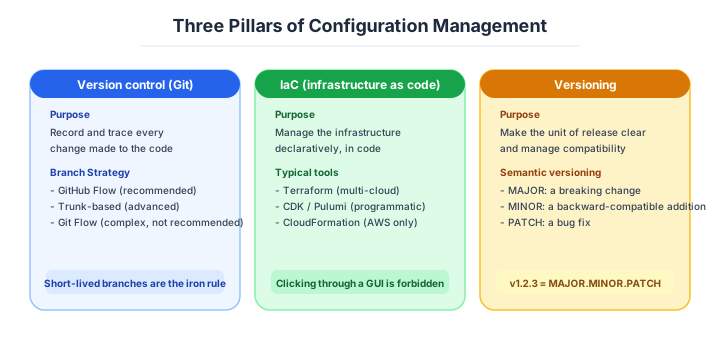
Picture the “Track Changes” feature in a Word document. It records when, who, and what was changed, and you can always revert to a previous state. Without this feature, everyone has experienced the file-name hell of “final_v3_revised_truly_final.docx.”
Version control is the mechanism for recording change history of source code so you can always revert to any past state. Today Git is the de facto standard, and version control encompasses everything from repo structure and branch strategy to tag operation - the “land registry of code.”
Without version control, someone’s changes overwrite another’s, you can’t trace “when did things go wrong” during incidents, and team development simply doesn’t work.
How Git became the standard
In 2005, Linus Torvalds built Git in 2 weeks for Linux kernel development. The direct trigger was the licensing trouble between the prior commercial VCS (BitKeeper) and the kernel community, and Git arrived with what’s now obvious traits: “no central server, distributed, fast, lightweight branches.”
After GitHub’s 2008 launch, OSS standards converged to Git, and corporate closed development largely unified to Git. Commercial VCSes (Perforce, ClearCase) still remain in some large enterprises and the gaming industry, but there’s almost no reason to choose them for new selection. Today, Git is the only choice in reality.
| Generation | VCS | Characteristics |
|---|---|---|
| 1st | RCS, CVS | Per-file, centralized |
| 2nd | Subversion (SVN), Perforce | Per-repo, centralized |
| 3rd (modern) | Git, Mercurial | Distributed, fast, lightweight branches |
Why Git won comes down to a few properties.
Technically, Git’s strengths were “distributed, fast, lightweight branches,” but the factor that sealed the deal was socialization via GitHub. Mechanisms like PR (Pull Request), Issues, and Stars fundamentally changed code-review and OSS-contribution experience, swinging developers in one go to the state of “use Git in order to put it on GitHub.”
| Element | Why Git is superior |
|---|---|
| Distributed | Even if central server goes down, everyone has a complete copy |
| Lightweight branches | Created/switched in milliseconds, no resistance to discarding |
| Rich merge strategies | Use rebase / squash / merge commit per situation |
| Hosting integration | PR flow standardized via GitHub / GitLab / Bitbucket |
| AI training-data depth | ChatGPT / Copilot perfectly understand Git operations |
In the AI-driven dev era, AI’s fluency in writing Git operations became a major reason for selection. Perforce and ClearCase have thin training data, and AI agents can’t correctly handle commits or conflict resolution. That alone is reason enough to drop them from new selection.
The five axes to decide in version control
Version control design doesn’t end with “use Git” - decide by combining the following 5 axes. Each is high-cost to change later, so the rule is to decide at project start.
| Axis | Choices |
|---|---|
| Repo structure | Monorepo, multi-repo, hybrid |
| Branch strategy | Trunk-Based, GitHub Flow, Git Flow |
| Merge method | Squash merge, Rebase merge, Merge commit |
| Tag/release operation | Semantic Versioning, date tags, none |
| Large files | Git LFS, Git Annex, separate management |
This 5-axis combination decides the premises of CI/CD, test strategy, and review operation. Repo structure in particular is the most upstream - getting it wrong means redoing everything.
Monorepo vs multi-repo
The biggest issue in repo structure is monorepo (everything in one repo) vs multi-repo (separate repo per service). The impression “monorepo is for big enterprises” is outdated, and today monorepo is strong even for small/mid-size teams.
| Axis | Monorepo | Multi-repo |
|---|---|---|
| Version management | Common version for all code | Independent per service |
| Cross-cut changes | Complete in 1 PR | Multiple PRs needed |
| CI | Change-range testing required (slow) | Per-repo, fast |
| Permission management | Controlled by CODEOWNERS | Per repo |
| Representative tools | Nx, Turborepo, Bazel, pnpm workspace | (no special tools) |
Google, Meta, Uber, Airbnb use monorepo. Amazon leans multi-repo (the “two-pizza team, one service one repo” philosophy). It’s not which is correct, but matching the organization’s communication structure (Conway’s law).
The criteria for choosing a monorepo are as follows.
Monorepo is favorable under “code mutually depends” and “frequent need for bulk changes.” Conversely, with highly independent service groups, multi-repo is lighter to operate.
| Situation | Recommended |
|---|---|
| Front + back + shared types | Monorepo (TypeScript power maxed by centralized types) |
| 10+ microservices held by independent teams | Multi-repo (clarify team boundaries) |
| Library + using app dev simultaneously | Monorepo (instant verification via local references) |
| Acquired/subsidiary independent organizations gathered | Multi-repo (often not worth integration cost) |
In my experience, monorepo lands well for 80% of teams. Multi-repo only functions when “the org is truly independent,” which is limited to clear division-of-labor at dozens-to-hundreds-of-people scale. When in doubt, start with monorepo and decompose to multi-repo as scale demands - the safe order.
Monorepo is the top candidate when in doubt. Multi-repo carries the burden of proof for independence.
Branch strategy — how short-lived the branches are is the core
Branch strategy is also touched in CI/CD article, but from version control’s perspective, the core is how short-lived. The longer-lived branches are, the heavier merge conflicts get and the slower reviews become.
| Strategy | Characteristics | Suited for |
|---|---|---|
| Trunk-Based Development | Short-lived feature branches, hours-to-day to main | High-grade CI/CD, expert teams |
| GitHub Flow | feature branch + PR + main | Web services, modern dev standard |
| Git Flow | main + develop + release + hotfix | Packaged products, version-parallel management |
For new projects, GitHub Flow or Trunk-Based is the standard. Git Flow is too complex - excessive for continuously-deployed services. Git Flow only shines in cases like packaged products and on-prem distributed software where “version-unit independent operation is needed,” but those business models are decreasing.
Merge method - Squash / Rebase / Merge
There are 3 ways to merge a PR, and which you adopt greatly changes commit-history readability. Not which is superior - what matters is unifying within the team.
| Method | Result | Pros | Cons |
|---|---|---|---|
| Squash merge | Compress whole PR into 1 commit | Concise main history, per-PR revert | Fine-grained PR-internal history lost |
| Rebase merge | Stack PR commits onto main in order | Linear history, easy to follow | Premise: thorough commit conventions |
| Merge commit | Leaves PR branch and merge commit | History of “merged this PR” remains | main history gets complex |
The current mainstream is Squash merge. Especially in small/mid teams, following history at PR granularity is more practical and pairs well with auto-generation of release notes. Rebase merge functions when expert teams thoroughly use Conventional Commits.
Mixing the 3 is the worst. Unifying on Squash causes the least friction.
Tags, releases and large files
Tags identifying releases tend to be undervalued in version control. Teams that can’t instantly identify “which code is in production” always get stuck on incidents.
| Naming | Format | Suited for |
|---|---|---|
| Semantic Versioning (SemVer) | v2.3.1 (Major.Minor.Patch) | Libraries, packaged products |
| CalVer (Calendar Versioning) | 2026.04.01 | SaaS, frequently-released products |
| Build numbers | build-1234 | Internal CI/CD identification |
| Date + Git hash | 20260422-abc123 | Simple production tracking |
SemVer functions only on teams that can guarantee the semantics of “major shows compatibility break.” Won’t work if breaking changes are dumped into Major without planning. CalVer has the benefit of glance-clear “from when is this code,” good chemistry with SaaS.
Standard practice is leaving tags and changelogs together via GitHub Releases or GitLab Release. Conventional Commits + auto-release-note generation (release-please, semantic-release) is the modern standard.
Large files are the other half of this.
Git is bad at large binary files. Normally committing several-GB videos, images, ML models, or game assets bloats the repo to where clone takes hours.
| Method | Characteristics |
|---|---|
| Git LFS (Large File Storage) | Git manages just pointers, body in separate storage |
| DVC (Data Version Control) | ML-oriented, integrates with S3 etc. for data version control |
| External storage (S3, GCS) + reference | Don’t put in Git at all, only version managed separately |
| Git Annex | More flexible than Git LFS but high learning cost |
Git LFS is most adopted, with GitHub/GitLab/Bitbucket standard-supporting it. But LFS has pitfalls too - mass branch creation balloons storage costs, so hundreds-of-GB-scale ML datasets suit DVC or S3 references better.
Normally committing binaries kills the repo. Design with LFS or external references from the start.
Migrating off SVN is a related decision.
There are still sites with SVN (Subversion) today, mainly large enterprises with 10+ years of operation or organizations with underdeveloped CI/CD. SVN-to-Git migration takes large effort, but you can see there’s almost no option to continue.
| SVN-continuation downside | Content |
|---|---|
| Heavy branches | Designed via directory copies, high switching cost |
| Not distributed | All stop on central-server failure |
| AI tools unsupported | Copilot/Cursor etc. premise Git |
| Bad chemistry with modern CI/CD | GitHub Actions / GitLab CI premise Git |
| Hiring disadvantage | New grads to mid-career have almost no SVN experience |
The standard migration tool is git-svn (Git-ize while preserving history). Full migration takes weeks to months, but from the 3 viewpoints of “hiring, dev speed, AI usage,” reasons to continue no longer remain. Once migration is decided, the rule is short-decisive battle, finishing it in one go. Phased migration becomes hell during “the period of maintaining both SVN and Git.”
The longer SVN is kept on life support, the more debt accumulates. End migration with a short decisive battle - the front-runner.
.gitignore and handling secrets
The No.1 source of accidents in version control is accidentally committing secrets (API keys, passwords, tokens). Once committed, they remain in Git history, and even force-push can’t erase them from history caches, treated as effectively leaked.
| Countermeasure | Content |
|---|---|
Thorough .gitignore | Always exclude .env, *.pem, secrets/ |
| pre-commit hooks | Auto-detect with gitleaks, detect-secrets |
| Secret Scanning (GitHub standard) | Detect secrets at push, block before public |
| Rotation on leak | Instantly invalidate all leaked keys/tokens |
In 2022, a Toyota subsidiary accidentally published an access key to GitHub, leaving about 300,000 customer records accessible for 5 years. After discovery they invalidated the key, but there’s no way to zero out 5 years of leak risk. .gitignore and pre-commit hooks are an area where “later because it’s annoying” isn’t allowed.
Three scenarios
If you are building solo or at a startup
GitHub with a monorepo, GitHub Flow and squash merge is the shortest reliable combination. Put frontend, backend and shared types in one repository and manage it with a pnpm workspace. Secret Scanning is on by default, so adding gitleaks to pre-commit to block a leak is all that remains. For tags, CalVer or the automatic notes in GitHub Releases is enough.

If you are a small or mid-size SaaS
A monorepo with trunk-based development (or GitHub Flow), Conventional Commits and semantic-release. Take direct pushes to main to zero with branch protection, and control the mandatory review scope with CODEOWNERS. For monorepo CI, use the changed-scope testing in Nx or Turborepo to hold pull requests under ten minutes.
If you are a large enterprise
If the organisation is genuinely independent, multi-repo — one team, one service, one repository; if a shared platform or shared types matter, a monorepo. Choose along Conway’s law. Where a legacy VCS such as SVN remains, make the migration plan the first priority, and enforce audit requirements such as forbidding history rewriting and requiring signed commits through branch protection.
Numeric gates and operational metrics for version control
Note: Industry baseline values as of April 2026. Will become outdated as technology and the talent market shift, so requires periodic updates.
Version control health is practically tracked numerically. Below are industry-standard metrics.
| Metric | Recommended | What to do if exceeded |
|---|---|---|
| Feature branch lifespan | 2-3 days | Consider forced merge over 1 week, long-life is conflict hell |
| Lines changed per PR | ~400 | Split over 1000, review formalizes |
| Direct push to main | 0 | All via PR, enforce by branch protection |
| Commit unit | Conventional Commits compliant | feat:/fix:/docs: etc., auto-versioning via semantic-release |
| Repo clone time | ~30 seconds | Consider LFS / shallow clone if exceeded |
| Secret Scanning alert response | Within 5 minutes | Instantly rotate leaked keys |
.gitignore leak incidents | 0 | Physically block via pre-commit hook |
| Tagging rule | Unified SemVer/CalVer | Mixing makes history untraceable |
| Monorepo CI runtime | Within 10 min on PR | Shorten via change-range testing (Nx / Turbo) |
Secret Scanning becoming a GitHub-standard feature since 2022 dramatically shortened the time to incident discovery. The “Toyota subsidiary 300k customer records 5-year-accessibility incident” (2022) symbolizes the cost of the era before Secret Scanning.
Secrets get physically blocked before commit. “Be careful” is operations that don’t function.
AI decision axes — Produce a history the AI can read
Monorepo helps AI grasp context - the structural reason
In a monorepo, all services’ type definitions, API specs, and tests are consolidated in a single repository. When asking AI to modify code, all related files are in the same repository, making them easy to pass as context and enabling AI to accurately grasp dependencies.
In a multi-repo setup, when a change to Service A requires an API spec change in Service B, you need to assemble context across two repositories, and AI accuracy drops.
Conventional Commits enable AI-powered changelog analysis
When commit messages are structured with prefixes like feat:, fix:, chore:, AI can automatically list “feature additions, bug fixes, and breaking changes included in this release” from Git history. CHANGELOG auto-generation and release-note creation also become tasks AI can handle accurately.
With free-form commit messages (like “fix” or “update”), AI can only guess at commit intent, and release-note generation accuracy drops significantly.
Pitfalls and forbidden moves
Here are the six most dangerous ways version control goes wrong. Every one ends in breaking the history of the code, or losing the organisation’s trust.
| Forbidden move | Why it is bad → what to do instead |
|---|---|
Committing .env or a private key to Git | it stays in the history cache and is effectively unrecoverable (the Toyota subsidiary case, 300,000 records) → block it physically in pre-commit |
| Force-pushing to main or develop | other people’s work disappears and rewritten history fails an audit → forbid it with branch protection (rebasing a feature branch is fine) |
| Leaving a branch open for more than a week before merging | conflicts snowball → get back to main within two or three days |
| Committing binary files normally | the repository swells to tens of gigabytes and a clone takes hours → design for LFS or an external reference from the start |
| Mixing merge strategies | the history gets complicated and reverting a single pull request becomes impossible → standardise on squash |
| No commit-message convention | searching history and generating release notes both become impossible → adopt Conventional Commits |
Do not take comfort in “we use Git, so version control is handled.” With the repository structure, branching strategy and merge policy undesigned, you have a land registry but no map.
Author’s note - GitLab January 2017 DB-deletion incident
To talk version control, you can’t skip GitLab’s January 31, 2017 production-DB-deletion incident. The on-call engineer, during midnight incident response, accidentally deleted the production PostgreSQL database directory. The command was supposed to run on the standby system.
What deepened the severity: despite having 5 types of backups, 4 of them weren’t functioning. Eventually recovered from a 6-hour-old snapshot, losing about 300 projects and 5,000 comments in between.
GitLab livestreamed the incident on Twitter and fully published a detailed postmortem. Lessons like “backups are evaluated not just by ‘taken’ but by ‘periodic restore drills, otherwise meaningless’” and “minimize human manual work, thoroughly use IaC and automation” had strong impact on industry standards thereafter. The very stance of broadcasting live without hiding during the incident is told as a fine example of blameless culture.
Backups are evaluated by “restorable” not “taken”. Backups without drills are just comfort.
What to decide - what is your project’s answer?
For each of the following, try to articulate your project’s answer in 1-2 sentences. Starting work with these vague always invites later questions like “why did we decide this again?”
- VCS (Git only)
- Repo structure (monorepo / multi-repo)
- Branch strategy (Trunk-Based / GitHub Flow / Git Flow)
- Merge method (Squash / Rebase / Merge commit)
- Tag-naming rule (SemVer / CalVer / build numbers)
- Large-file handling (LFS / DVC / external reference)
.gitignoreand secret-detection policy- SVN etc. legacy-VCS migration plan (if applicable)
Related Articles
Summary
This article covered version control, including Git’s superiority, monorepo vs multi-repo, branch strategies, merge methods, tag operation, LFS, secrets, and the AI-era optimal form.
Default to monorepo, choose GitHub Flow or Trunk-Based, structure history via Squash merge + Conventional Commits, physically block leaks with Secret Scanning + pre-commit. That is the practical answer for version control in 2026.
Next time we’ll cover dev environment and local execution (Docker Compose, Dev Container, cloud IDE).
Back to series TOC -> ‘Architecture Crash Course for the Generative-AI Era’: How to Read This Book
I hope you’ll read the next article as well.
Also popular with readers
📚 Series: Architecture Crash Course for the Generative-AI Era (62/95)