![[DevOps Architecture] Ticket and Project Management](/uploads/2026/04/arch-intro-cat-devops.png)
About this article
As the fifteenth installment (final) of the “DevOps Architecture” category in the series “Architecture Crash Course for the Generative-AI Era,” this article explains ticket and project management.
Tickets are not “to-do lists” but the org’s memory device. Beyond 10 people, individual memory becomes unmanageable, and getting this design sloppy hits the org against cognitive walls. This article handles selection of Jira/Linear/GitHub Issues, epic splitting, sprint design, and release-note linkage as mechanisms that don’t break down even as headcount grows.
Before you read this
This article is mostly about the flow of building, testing, releasing and monitoring a service. If IT vocabulary is unfamiliar, reading the primer "From Development to Operations" first makes it far easier to follow. You can also look anything up in the glossary as you read.
What is ticket management in the first place
Picture a hospital reception number. When a patient arrives, a reception number is issued, and symptoms, attending physician, test results, and prescriptions are all recorded linked to that number. Without numbers, confusion of “how far did we examine that patient?” arises, with missed responses and duplicate handling becoming frequent.
Ticket management is the reception-number system for software development. By assigning a unique number to each task and recording who, when, what, and how far it was done, everyone on the team shares the same situational awareness.
Why ticket management matters
First, because memory stops working past a certain headcount. Once three or more people are involved, “who is doing what, and how far along” disappears from anybody’s head, and the same work gets done twice while something else is dropped.
Second, because past context has to be traceable. Six months later, “why was this specification chosen?” is answered by the ticket, not by memory. A ticket is a record of a decision as much as a unit of work.
Third, because progress becomes visible and predictable. Velocity measured over past sprints is the only basis for saying when something will be finished.
Choosing a tool — pick on how well it integrates with the source code
Today, ticket-management tools roughly split into 3 lineages. The basic is choosing by the tradeoff between source-code integration and customizability.
| Tool | Characteristics | Suited for |
|---|---|---|
| GitHub Issues / Projects | Tightly coupled with repos / PRs, free | OSS, web services, new SaaS |
| GitLab Issues | Native integration if using GitLab | GitLab env, enterprise |
| Linear | Overwhelmingly fast UI, modern | Startups, studio-style |
| Jira | High-feature, de facto standard for large enterprises | Large scale, regulated industries, complex workflows |
| Notion | Unified with documentation | Lightweight ops, early-stage startup |
| Asana / Trello | Task-management-leaning | Mixed with non-engineer departments |
For new SaaS / web services, GitHub Projects or Linear is the front-runner. GitHub Projects was significantly revamped in 2022, with usability approaching Linear. Jira remains strong in large enterprises but easily falls into the custom-field swamp, safer to avoid for new adoption.
The three tiers — epic, story, task
“Lining up tickets flatly” breaks down at hundreds of items. The industry rule is organizing in 3-tier hierarchy - Jira, GitHub Projects, and Linear all premise this structure.
| Tier | Granularity | Period | Example |
|---|---|---|---|
| Epic | Large feature chunk | 1-3 months | ”Payment-feature redesign” / “Passkey-auth introduction” |
| Story | Unit producing user value | 1 day-2 weeks | ”User can pay with Apple Pay” |
| Task | Technical work unit | Hours-2 days | ”Stripe SDK integration” / “Payment UI implementation” |
The iron rule for stories is writing in units completing user value from user perspective. “Integrate Stripe SDK” is a task, not a story - because just SDK integration delivers no value to users. Writing in the template “As a [user], I want [behavior], so that [value]” aligns granularity.
Ticket granularity — “finishable in a day” is the target
Misjudging ticket granularity breaks operations. With 1 ticket = completable in 1 day as the goal, progress becomes visible, PRs are easy to split small, and reviews go fast. Conversely, teams of “1 ticket = 1 week” fall into the state of repeating “80% done” for 3 weeks in progress reports.
| Granularity | State |
|---|---|
| Hours | Too fine, task-management overhead bloats |
| 1 day (4-8 hours) | Front-runner |
| 2-3 days | Tolerable as mid-size Story |
| 1 week | Consider splitting |
| 2+ weeks | Always split. Promote to Epic and divide into Stories |
The emergence of “80% complete” is a warning that ticket-granularity design is broken. The remaining 20% is often actually 40-60% equivalent, becoming the major cause of sprint delays. Dividing into sizes answerable in the binary of “done / not done” is the front-runner operation.
When told “80% complete,” that ticket is too big. It’s the signal to split.
Estimation, sprints and priorities
Task estimation has two main schools. Time estimation (X hours / X days) and Story Points (relative size in Fibonacci 1/2/3/5/8/13). A long-debated topic, with which is superior depending on situation.
| Viewpoint | Time estimation | Story points |
|---|---|---|
| Learning cost | Low | Mid (need team alignment on number meaning) |
| Individual-difference absorption | Weak (implementation-speed gaps emerge) | Strong (relative comparison, individual differences disappear) |
| Customer reporting | Easy | Hard (needs time conversion) |
| Velocity measurement | Inaccurate (time and completion diverge) | Accurate (stable team-unit indicator) |
| AI-generated estimation | Relatively accurate | Bad for AI (needs team context) |
Today, the field’s intuitive balance is time estimation for startups / small scale, story points for mid-large scale / multi-team. Linear and GitHub Projects also support story points. Hybrid operation (estimate in points, report in time conversion) is also a realistic answer many teams use.
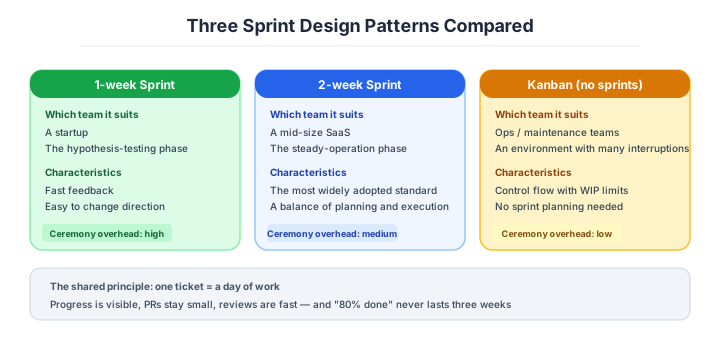
Sprint length is the next decision.
Whether to introduce “sprints” (a planning-execution-review cycle delimited by fixed periods) or use Kanban (no period, flow continuously) as the dev unit is also a decision item.
| Method | Period | Suited for |
|---|---|---|
| 1-week sprint | 7 days | Fast iteration, startups |
| 2-week sprint | 14 days | Front-runner (mid-size, SaaS) |
| 3-4 week sprint | 21-28 days | Large scale, regulated industries |
| Kanban (no period) | - | Operations-centric, inquiry-based |
2-week sprint is the front-runner for mid-size SaaS today. 1-week feels heavy with planning overhead, 3+ weeks lets plans go stale midway. Kanban is “flow management over planning,” suited for SRE teams and operations-centric orgs, but for feature-development-centric teams, no period = no rhythm tends to result, requiring caution.
Backlog priority runs in five tiers.
Operating priorities in 3 tiers of “high / mid / low” quickly results in all becoming “high” and not functioning. With 5 tiers + numbers, ordering forcibly emerges.
| Priority | Meaning | Upper-bound guideline |
|---|---|---|
| P0 | Incident response, immediate | Always 0 ideal |
| P1 | Definitely finish in this sprint | 60% of sprint capacity |
| P2 | This sprint if margin available | 30% of sprint capacity |
| P3 | Next sprint or later | No upper bound |
| P4 | Idea pool (may not be done) | No upper bound |
The state of “10 P1 tickets” is a warning that priorities aren’t functioning. Define “P1 is what definitely finishes this sprint,” and parts exceeding velocity (average completion of past sprints) get demoted to P2 - the iron rule. Priorities aren’t “prayer” but numbers reverse-derived from capacity constraints.
A backlog all P1 is the same as no priorities.
What to write on a ticket — the acceptance criteria matter most
Ticket bodies tend to polarize into “title only” or “too detailed, no one reads.” Practical to vary content by stage, deciding what to write / who writes at each stage.
| Stage | When to write | What to write | Who writes |
|---|---|---|---|
| 1. Submission | When thought of | Title and 1-paragraph “want to do” | Anyone |
| 2. Refinement | Before sprint planning | Acceptance criteria, rough estimate | PM + assignee |
| 3. Start | Sprint start | Tech-design overview, subtask split | Assignee |
| 4. Completion | After PR merge | How verification was done, screenshots | Assignee |
| 5. Review | End of sprint | Learnings, stumbling points | Assignee |
Acceptance criteria (concrete conditions for judging “done”) is most important. “User can log in” is weak; writing in verifiable behavior from outside like “can sign in with Apple ID, first time confirms email, second time onward completes with passkey” is the front-runner.
Velocity is measured for stability above all.
Velocity (the total of story points or ticket count completed in one sprint) is the indicator measuring “what the team can promise in this period.” It immediately degrades when management sets it as KPI, but is extremely useful for raising in-team planning accuracy.
| Viewpoint | Content |
|---|---|
| Stability is top priority | Suddenly-rising velocity is a sign of point-padding |
| See average of past 3 sprints | Single numbers have no meaning |
| Don’t make management-reporting KPI | Point / ticket-count inflation occurs |
| Don’t show individual velocity | Tying to individual evaluation stops cooperation |
If velocity suddenly rises 20%+, point-padding, incident-response concealment, or ticket-granularity collapse is likely happening. Velocity is a prediction tool, not an evaluation tool - breaking this line makes all org numbers untrustworthy.
Numeric gates and sprint metrics for ticket operation
Note: Industry baseline values as of April 2026. Will become outdated as technology and the talent market shift, so requires periodic updates.
Ticket operations are standardly disciplined by numbers. Below are mid-size SaaS standards.
| Metric | Recommended | What to do if exceeded |
|---|---|---|
| 1-ticket granularity | 1 day (4-8 hours) | Force-split over 2 weeks |
| 1 PR lines | ~400 | Split over 1000 |
| Sprint period | 2 weeks | 1-week excessive planning, 3-week stale plans |
| P1 ticket count | 60% or less of sprint capacity | Capacity over: demote to P2 |
| Sprint completion rate | 80%+ | Under 50% three times in a row suspects granularity collapse |
| Velocity variation | Within ±20% | Rapid increase signs point-padding |
| Backlog stagnation | 1 year or less | P3/P4 over 1 year close in principle |
| Triage frequency | Monthly | Unimplemented becomes graveyard backlog |
| Acceptance-criteria-stated rate | 100% | Unstated leads to “done” disputes |
| Ticket submission to PR merge | 1-3 days | Over 1 week, review granularity |
“80% complete continues 3 weeks” is the certain sign of ticket-granularity collapse. All-P1 backlog equals zero priority - the standard cause of mid-size SaaS achievement-rate dropping below 50%.
Ticket-granularity goal is completable in 1 day. Split into sizes answerable in the binary of “done / not done.”
Three scenarios
If you are building solo or at a startup
Plain GitHub Issues is enough. You need neither sprints nor points. Keep one “this week” label and build the habit of turning everything that occurs to you into an issue. The purpose is to get the to-do list out of your head entirely.

If you are a small or mid-size SaaS
This is the stage for establishing a shape: GitHub Projects or Linear, two-week sprints, priorities from P0 to P4, and acceptance criteria on everything. Discipline it with numeric gates — one-day granularity, P1 up to 60 percent of capacity, a monthly triage. Honestly, going to Jira at this size leads into a swamp of custom fields.
If you are a large enterprise
Once several teams and regulatory work are involved, Jira with an epic / story / task hierarchy and portfolio management becomes the standard. The reasons are that change history and approval records are retained for audit, and that workflows connect to other functions such as QA and legal. That said, adopting a tool with no operational design fails at any size.
AI decision axes — A ticket is a set of instructions for the AI
Ticket acceptance criteria become instructions for AI
When tickets have clear acceptance criteria (e.g., Given-When-Then format), they function directly as code-generation instructions for AI. Concrete conditions like “when a user enters an invalid email address in the login form, a validation error is displayed” become input for AI to accurately generate both test code and implementation code.
Conversely, vague tickets like “build login feature” require re-explaining what to implement to AI every time, and effort doesn’t decrease.
GitHub Issues / Linear API integration completes the AI workflow
GitHub Issues and Linear have rich CLI, API, and MCP support, enabling AI agents to automate the entire workflow: read ticket contents → implement code → create PR → close ticket. GUI-only ticket management tools make this integration difficult.
Pitfalls and forbidden moves
Here are the six most dangerous ways ticket operation goes wrong. Every one ends with the organisation’s memory accumulating inside individual heads.
| Forbidden move | Why it is bad → what to do instead |
|---|---|
| Passing requests around in Slack DMs | unsearchable, invisible to others, forgotten for ever → every request becomes a ticket |
| A backlog where everything is P1 | it is the same as having no priorities, and thirty items carry over every time → cap P1 at 60 percent of capacity |
| Tickets larger than two weeks | the hell of “80 percent done” lasting three weeks → split towards one-day granularity |
| No acceptance criteria | people argue about “done” and quality varies → make 100 percent coverage a rule |
| Management turning ticket counts and points into a KPI | padding and slicing make the numbers untrustworthy → keep velocity purely for the team’s own forecasting |
| Never triaging the backlog | hundreds of dead hopes from a year ago remain → triage monthly and close anything over a year old by default |
Relying on the tool — “operation will improve once we have Jira or Linear” — is a failure pattern too. Give a team with no settled granularity, priorities or acceptance criteria a high-function tool and all you add is a graveyard of custom fields.
Author’s note - “all P1” that killed a release plan
There’s a case at a mid-size SaaS where the backlog was filled with 100+ P1 tickets, and quarterly plans dropped achievement rate below 50% three times in a row. The cause was the vague operation of “important things are all P1,” resulting in deciding what to start on at sprint start, with 30-40 P1 carryovers untouched every sprint.
This team redefined P1 as “what’s promised to complete this sprint” and force-limited P1 count from velocity, recovering achievement rate to over 90%. Just laying down the rule “P1 upper bound is 60% of sprint capacity” makes priority design work. Priorities aren’t prayers but reverse-derived from capacity constraints - this paradigm shift recovers organizational predictability.
Priorities are math. Deciding by feel makes everything “high.”
What to decide - what is your project’s answer?
For each of the following, try to articulate your project’s answer in 1-2 sentences. Starting work with these vague always invites later questions like “why did we decide this again?”
- Ticket-management tool (GitHub Projects / Linear / Jira / Notion)
- Ticket-hierarchy operation (Epic / Story / Task)
- Ticket-granularity goal (1-day completion as goal)
- Estimation method (time / story points)
- Sprint period (1 week / 2 weeks / Kanban)
- Priority hierarchy (P0-P4)
- Acceptance-criteria template
- Backlog-triage frequency (monthly recommended)
Related Articles
Summary
This article covered ticket and project management, including tool selection, 3-tier hierarchy, granularity, sprints, priorities, velocity, and AI-era MCP integration.
Organize in 3-tier Epic/Story/Task, 1-day granularity as goal, reverse-derive from velocity in P0-P4, state acceptance criteria 100%. That is the practical answer for ticket operations in 2026.
And this was the final installment of the “DevOps Architecture” category. Next time we’ll start a new category (Enterprise Architecture).
Back to series TOC -> ‘Architecture Crash Course for the Generative-AI Era’: How to Read This Book
I hope you’ll read the next article as well.
Also popular with readers
📚 Series: Architecture Crash Course for the Generative-AI Era (74/95)