![[DevOps Architecture] Documentation](/uploads/2026/04/arch-intro-cat-devops.png)
About this article
As the fourteenth installment of the “DevOps Architecture” category in the series “Architecture Crash Course for the Generative-AI Era,” this article explains documentation.
For documentation, deciding “where to place it” before writing comes first - misplacing erases the meaning of writing. This article handles ADR, README, API docs, and docs-as-code as practice maintaining the state of “what’s written gets read / AI can read / not rotted half a year later.”
Before you read this
This article is mostly about the flow of building, testing, releasing and monitoring a service. If IT vocabulary is unfamiliar, reading the primer "From Development to Operations" first makes it far easier to follow. You can also look anything up in the glossary as you read.
What is documentation, anyway?
Imagine leaving handover notes for your family. “Trash goes out Monday and Thursday,” “press this button for the water heater” — it’s the act of leaving behind the information needed to keep things running even without you. Without it, nobody knows the correct procedures while you’re away.
Software documentation works the same way. It’s the activity of recording why this design was chosen, how to start the system, and how to use the API so that your future self or new team members won’t be lost six months later.
Without documentation, design rationale vanishes into the heads of people who have left, and new-member onboarding becomes nothing but verbal “ask the person next to you” tradition.
Why documentation matters
First, because the “why” of a design vanishes within six months. Reading the code tells you “what it does”; it does not tell you “why it was designed this way.” Second, to keep onboarding from depending on individuals. With a maintained README, the time until somebody can work unaided drops dramatically. Third, because this is an era in which AI reads documentation and makes decisions on it. With ADRs and OpenAPI in Git, an AI agent can generate code having understood the design intent. Documents now have machine readers as well as human ones.
Distinguish 4 types of documents
What’s called “documentation” actually mixes 4 types differing in purpose, lifespan, and update frequency. Without distinguishing, “putting everything in Confluence” simultaneously degrades searchability and updatability.
| Type | Purpose | Lifespan | Place |
|---|---|---|---|
| README (repo intro / startup) | Entry signposting | Mid (same as repo) | Repo root |
| ADR (design decision record) | Why that choice was made | Permanent (append-only) | Repo docs/adr/ |
| API docs | Machine-readable spec definitions | Code-synced | OpenAPI YAML / TypeDoc |
| Business knowledge / ops procedures | Accumulating org knowledge | Short-mid (easily outdated) | Confluence / Notion / Wiki |
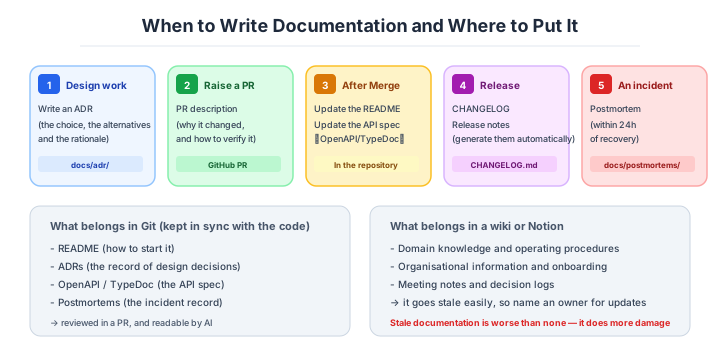
The modern standard is committing the first 3 types to Git repos. PR / review / history management together with code, AI can read too. Confluence / Notion is design balancing searchability and updatability by narrowing to “business knowledge / ops procedures” only.
ADR - design-decision record
ADR is the format Michael Nygard proposed in 2011, leaving “why this technology was chosen” with one file per decision. Today, regardless of OSS, SaaS, or enterprise, it’s the de facto standard format for design records.
# ADR-0007: Adopt PostgreSQL as main DB

## Status
Accepted (2026-03-15)

## Context
SQLite can't meet concurrent-connection / read-replica requirements.

## Decision
Adopt PostgreSQL 16. Compared with MySQL and MongoDB, valued
the combination of JSON type and relational design.

## Consequences
- Secure extensibility for full-text search and geospatial
- For special horizontal distribution, separate products needed
The trick: short (within 1 page), append-only without overwrite (set Status to Superseded by ADR-XX for past decisions). With decision history remaining, new hires half a year later can reconstruct “why it’s like this” from Git history.
When to write an ADR — the one-way-door test
ADRs aren’t to be written for “every design decision.” Writing too many leads to obsolescence and no one reads. Practical to narrow to those that fall under One-way Door (decisions hard to reverse once passed, Amazon’s decision-making framework).
| Decisions to write | Decisions not to write |
|---|---|
| DB selection (PostgreSQL vs MongoDB) | Switching from library A to B |
| Adding language / framework | Changing function arg types |
| Auth method decision (OAuth / Passkey) | Changing endpoint names |
| Microservice splitting | Refactoring individual APIs |
| Cloud-vendor selection | Changing EC2 instance size |
| Fundamental data-model change | Adding a column |
The ADR-line guideline is “redoing takes 3+ months.” Lighter than this, PR description suffices. Conversely, not leaving One-way Door decisions in ADRs means no one can explain “why we did this” 3 years later - the entry point of debt frequent in enterprises.
README and docs-as-code
README is the signpost the person opening the repo first sees. In many teams, READMEs polarize into “just project name and 1-line description” or “everything-in-one but no one reads.” The standard is composition narrowing to steps to start in 5 minutes + minimum context needed.
| Should include | Shouldn’t include |
|---|---|
| Project purpose (1 paragraph) | Detailed design explanations (-> ADR / docs/) |
| Startup steps (copy-paste-runnable) | All-features usage |
| Dev-env premises (runtime version requirements etc.) | API reference (-> separate file) |
| License / contact | Personal TODO memos |
| Related links (CONTRIBUTING / docs/) | Incident history |
Most important is “startup by copy-paste.” Guarantee in README a state where just pasting commands in order works, from git clone to localhost:3000. READMEs left with old commands or changed dependencies become devices frustrating new hires within their first 30 minutes.
The principle behind it is docs-as-code: lean towards Markdown in Git.
docs-as-code is the thinking of managing documentation with the same mechanism as code (Markdown + Git + PR review). The flow today mainstream is leaning from GUI-centric tools like Confluence and Notion to in-repo Markdown.
| Viewpoint | docs-as-code (Markdown + Git) | Confluence / Notion |
|---|---|---|
| Version control | Complete via Git history | Limited (edit history only) |
| Review | PR with same workflow as code | Comment feature only |
| Searchability | Instant via grep / IDE | Search-accuracy issues |
| AI-readable | Excellent (standard format) | Marginal (custom API, scraping difficult) |
| Diagrams | Code-ize with Mermaid / PlantUML | Embedded images (manual update) |
| Learning cost | Markdown knowledge only | Tool-specific UI |
Confluence / Notion is suited for business knowledge / org info, but placing code-tightly-coupled documents there degrades searchability and reviewability. The modern standard is leaning all of API specs / design decisions / READMEs to in-repo Markdown.
Stages for writing documentation - phased practice
Vague “when to write docs” also formalizes. Practical to split timing and granularity by stage, deciding what to leave where at each stage.
| Stage | When to write | What to write | Where to place |
|---|---|---|---|
| 1. Design consideration | Before implementation | ADR (chosen / alternatives / reasons) | docs/adr/NNNN-title.md |
| 2. PR submission | Just after implementation | PR description (changes / verification) | GitHub PR |
| 3. After merge | As needed | README update / API doc generation | In repo |
| 4. Release | At feature publication | CHANGELOG / release notes | CHANGELOG.md (auto-generated) |
| 5. Incident | Within 24h of recovery | Postmortem | docs/postmortems/ |
PR description aims for “the level where full context is understandable from that commit alone.” The standard is writing 3 points - “why this change is needed,” “whether alternatives were considered,” “verification steps” - in the body. Just thoroughly doing this lets people tracing with git blame 3 years later instantly reconstruct context.
OpenAPI and Mermaid — generating from the code
Hand-writing API specs always rots them. Using OpenAPI (formerly Swagger, machine-readable spec format for REST APIs) or TypeDoc (auto-generated from TypeScript comments), code and spec stay constantly in sync.
| Tool | Target | Characteristics |
|---|---|---|
| OpenAPI (YAML / JSON) | REST API | De facto standard, visualized via SwaggerUI |
| GraphQL Schema (SDL) | GraphQL | Types are the spec |
| gRPC + Protocol Buffers | gRPC | .proto is the spec |
| TypeDoc | TypeScript libraries | HTML generated from comments |
| Sphinx + autodoc | Python | HTML generated from docstrings |
| rustdoc | Rust | Built-in standard |
The modern standard is design where comments / types in code become documentation as is. Using OpenAPI lets you generate server implementation, client SDK, mock server, and HTML docs from one YAML. Manage OpenAPI YAML in Git and verify “code and YAML stay in sync” in CI - the biggest defense line preventing API-doc decay.
Diagrams go the same way, as code.
Diagrams are representative of things that rot easily. Pasting PNGs created in Lucidchart or draw.io to repos frequently causes accidents where sources go missing and updates become impossible. Mermaid and PlantUML are mechanisms defining diagrams as text, with best chemistry with docs-as-code since they can be written directly in Markdown.
sequenceDiagram
  User->>Frontend: login request
  Frontend->>AuthAPI: POST /auth/login
  AuthAPI->>DB: user authentication
  DB-->>AuthAPI: auth result
  AuthAPI-->>Frontend: JWT issued
GitHub, GitLab, Notion, and VS Code render Mermaid as standard. Being text means overwhelming strength on 3 points - diffs readable, change-reviewable in PRs, AI-understandable. The cost gap between “drawing diagrams” and “updating diagrams” shrinks dramatically, getting the mechanism of “diagrams don’t rot.”
Postmortems - mechanism for learning from incidents
Postmortems (literally “post-death examination,” in IT industry meaning incident review docs) are the core of SRE practice. Written within 24-48 hours of incidents, documents for improving mechanisms not blaming individuals.
# Postmortem: 2026-03-20 auth incident (45 minutes)

## Impact
All users couldn't log in / impact 14:23-15:08 JST / opportunity loss about 1.2M yen

## Timeline
- 14:23 alert fired
- 14:38 cause identified (Redis connection-pool exhaustion)
- 15:08 normalization confirmed

## Cause (5 Whys analysis)

## Action items
- [ ] Add connection-pool monitoring to Grafana
- [ ] Add this case to load-test scenarios
Blameless (no blame) is the iron rule. Writing not “Person A made a mistake” but it was a mechanism that couldn’t prevent mistakes changes recurrence prevention from individual-dependent to mechanism-improvement. What’s written is published to all internal staff, turning learning into organizational knowledge - Google SRE’s operational style.
Even with documentation-writing culture, mixing in the following antipatterns drastically reduces effect.
| Antipattern | Why it’s bad |
|---|---|
| Throw everything into Confluence | Unsearchable, no PR review, AI-unreadable |
| Only “responsible person” updates docs | Bottleneck-ization, instant outdated when they leave |
| Don’t evaluate “writing” but only “writing code” | Culture of no one writing settles |
| Cram all-feature usage into 1 file | Bloated, not read |
| Write important info in Slack and share via DM | Unsearchable, new hires can’t access |
| Treat docs as confidential and partially disclose | Reviews don’t turn unless everyone sees same info |
Design decisions shared in Slack DM are equivalent to non-existent for the org. Slack logs are searchable but buried in unintended flows and undiscoverable, requiring the line “Slack is for discussion, conclusions go to Git.”
Three scenarios
If you are building solo or at a startup
The startup steps in the README and a lightweight ADR are enough. Defend the property that the README gets you “to localhost by copy and paste”, and record only the one-way-door decisions — the database choice, the authentication method — in three lines of ADR. The first reader is your future self.

If you are a small or mid-size SaaS
This is the stage for establishing docs-as-code, a pull-request description template and generated OpenAPI as a culture. Everything tightly coupled to the code goes into Git, and Notion is narrowed to organisational information. Putting diagrams into Mermaid text gets you the machinery for “diagrams that do not rot.”
If you are a large enterprise
With hundreds of repositories, the subject becomes cross-cutting search through a documentation portal such as Backstage TechDocs, and company-wide templates for ADRs and postmortems. To stop Confluence turning into a graveyard, write the boundary down as governance: “tightly coupled to code goes in Git; organisational information goes in Confluence.”
AI decision axes — Documents in Git become the AI’s knowledge base
Git-repository documentation becomes AI’s knowledge base
When README, ADR, and OpenAPI YAML live inside the Git repository, AI can directly reference them to improve code-generation accuracy. For example, if an ADR records “chose Cookie sessions over JWT for authentication,” AI will propose Cookie-based implementations for new auth-related code as well.
Documentation placed in Confluence or Notion can’t be directly referenced by AI dev tools (Copilot, Claude Code, etc.), requiring manual context-copying each time.
ADRs become guardrails for AI design decisions
When past design decisions and their reasons are recorded in ADRs (Architecture Decision Records), you can point out “this contradicts the ADR policy” when AI writes code that goes against those decisions. Even in human reviews, having “why it was decided this way” in ADRs makes the basis for judgment clear.
Pitfalls and forbidden moves
The biggest trap in documentation is never being updated after it is written. A document carrying stale information is worse than “no documentation”, because it sends the reader in the wrong direction. Here are the six most dangerous.
| Forbidden move | Why it is bad → what to do instead |
|---|---|
| Old commands left in the README | a new joiner fails on day one and gives up → keep the startup steps executable in CI |
| Distributing the API specification as Word or Excel | it falls out of sync with the code and is a mass of misinformation within six months → generate it from the code with OpenAPI |
| Keeping diagrams only as PNG or JPG | the source goes missing and it cannot be updated → put it in text with Mermaid or PlantUML |
| Throwing everything into Confluence | unsearchable, unreviewable in a pull request, unreadable by an AI → anything tightly coupled to code goes in Git |
| Sharing a design decision in a Slack DM | as far as the organisation is concerned it never existed → Slack for discussion, the conclusion in Git |
| Rewarding “writing code” but not “writing” | a culture where nobody writes sets in → enforce it structurally with pull-request templates and ADRs |
The core of the remedy is to put documents in the same place as the code and force the update through the pull request. Automate every kind that can be generated from code, and minimise the documents a human updates by hand — that is the modern line of defence.
Author’s note - “Confluence graveyard” that killed a migration project
There’s a case at a mid-size SaaS where 3 years of architecture decisions, ops procedures, and incident responses were all accumulated in Confluence. The problem: new hires couldn’t find needed info. Searches hit 10-year-old drafts, old design proposals from other teams, and duplicate pages copied and left, with the state of taking hours to find correct info becoming normal.
This team conducted phased migration from Confluence to in-repo Markdown, ultimately organizing as “all code-tightly-coupled info to Git, only org info in Confluence.” Beyond drastically shortening new-hire ramp-up time, AI agents could read Git docs and generate code, raising dev speed too - the case. It’s becoming the era where doc placement decides organizational competitiveness.
Confluence easily becomes the graveyard of information. Move code-tightly-coupled info to Git.
What to decide - what is your project’s answer?
For each of the following, try to articulate your project’s answer in 1-2 sentences. Starting work with these vague always invites later questions like “why did we decide this again?”
- Documentation placement (repo Markdown / Confluence / Notion)
- ADR operation (write targets / template / placement)
- README minimum line (whether startup steps work via copy-paste)
- API-spec management (OpenAPI / GraphQL SDL /
.proto) - Diagram management (Mermaid / PlantUML / images)
- PR description template
- Postmortem operation (writing timing / publication scope)
- Doc-update responsibility rule (simultaneous update in change PRs)
Related Articles
Summary
This article covered documentation, including 4-type distinction, ADR, README, docs-as-code, OpenAPI, Mermaid, postmortems, and AI-era placement.
Lean documentation toward Git repos, leave One-way Door in ADRs, auto-sync code and spec, force intent via PR description. That is the practical answer for documentation design in 2026.
Next time we’ll cover ticket / project management (Issue, Kanban, WIP limits).
Back to series TOC -> ‘Architecture Crash Course for the Generative-AI Era’: How to Read This Book
I hope you’ll read the next article as well.
Also popular with readers
📚 Series: Architecture Crash Course for the Generative-AI Era (73/95)