![[DevOps Architecture] Log Design](/uploads/2026/04/arch-intro-cat-devops.png)
About this article
As the tenth installment of the “DevOps Architecture” category in the series “Architecture Crash Course for the Generative-AI Era,” this article explains log design.
Logs are a letter to your future self - their true value is asked half a year later, not at writing time. This article covers structured logs (JSON), log levels, correlation IDs, PII masking, retention, and log-aggregation foundations (CloudWatch / Loki / Datadog), handling design that leaves necessary-and-sufficient information in machine-readable form with appropriate retention.
Before you read this
This article is mostly about the flow of building, testing, releasing and monitoring a service. If IT vocabulary is unfamiliar, reading the primer "From Development to Operations" first makes it far easier to follow. You can also look anything up in the glossary as you read.
What is log design, anyway?
Picture an airplane’s flight recorder (black box). When an accident happens, the only reason investigators can determine what occurred is that all in-flight data was automatically recorded. “Starting the camera after the crash” is too late.
Log design means deciding in advance what to record, in what format, where to store it, and for how long about your system’s operational records. Incident investigation, security audits, business analysis — none of it can begin without logs.
Without log design, when an incident occurs there are zero clues to identify the cause. Nobody can answer “what happened last night,” and the same failures keep repeating.
Why log design is needed
First, because logs are the primary evidence in an incident investigation. Metrics tell you something is wrong; only the log tells you what happened. Second, for audit and compliance. Many regimes require a record of who did what, and that record has to be tamper-evident. Third, for business analysis and improvement. Behavioural logs are the raw material for understanding how a product is actually used.
Log levels — INFO and above in production
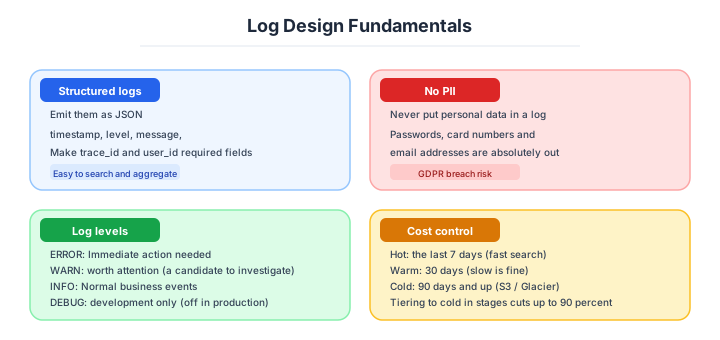
Standard practice is severity-staging logs. At runtime, you can filter by level - production at INFO+, development at DEBUG+. Log libraries in each language standard-support this.
| Level | Use case |
|---|---|
| TRACE | Most detailed, usually disabled |
| DEBUG | Debug info during development |
| INFO | Milestones of normal processing |
| WARN | Notable situations (auto-recovery etc.) |
| ERROR | Errors occurred, needs investigation |
| FATAL | Critical incident, immediate response |
Outputting DEBUG in production is the start of hell. Volume explodes and storage cost balloons several-fold.
Structured logging
The method outputting logs in machine-readable structures like JSON. Legacy free-text logs are human-readable but search, aggregation, and correlation analysis were difficult. With structured logs, all become easy.
{
  "timestamp": "2026-04-18T10:23:45Z",
  "level": "ERROR",
  "service": "order-api",
  "trace_id": "abc123",
  "user_id": "u42",
  "message": "Payment failed",
  "error_code": "CARD_DECLINED",
  "latency_ms": 1234
}
Free-text output is now an antipattern. All new projects should start with structured logs.
“A log writing only ‘an error occurred’ is the same as a will writing only ‘someone died’” - the standard maxim of log design. In late-night incident response, facing logs lined with just [ERROR] Payment failed, having to reverse-engineer “which user, what amount, why payment failed” via “timestamp” and “Stripe-management-screen cross-reference” alone often happens in the field. Stories of struggling 3 hours to finally reach the cause and adding user_id, amount, and error_code that very night - aren’t rare.
What to put in a log line follows from that.
Standardize info included in logs and unify across all services. Without deciding standard items, things become disparate per service, making cross-search hard.
| Required fields | Content |
|---|---|
| timestamp | ISO 8601, UTC recommended |
| level | ERROR / INFO etc. |
| service | Service name |
| trace_id | Link with distributed tracing |
| user_id / request_id | Subject / request identification |
| message | Content humans read |
| context | Structured additional info |
Personal info, passwords, tokens absolutely never written to logs - the iron rule. Once output, irrecoverable.
Collecting and storing logs
Beyond outputting from apps, foundations to aggregate, store, and search are needed. The modern mainstream is the composition apps to stdout, collection in separate processes (12-Factor App, the cloud-era app-architecture guideline proposed by Heroku), letting apps not worry about log destinations.
| Collection tool | Characteristics |
|---|---|
| Fluent Bit | Lightweight, CNCF graduated |
| Vector | Rust-built, high-perf |
| Fluentd | Veteran, feature-rich |
| Promtail | Loki-dedicated, lightweight |
The storage backends divide as follows.
Choose log storage by search demand, cost, and data volume. High-speed-searching mass logs is unexpectedly costly, and “all logs into Elasticsearch for now” is a breakdown-prone approach.
| Backend | Characteristics | Cost |
|---|---|---|
| Elasticsearch | Strongest search, heavy ops | High |
| Loki | Label-based, cheap | Low |
| Datadog Logs | SaaS-integrated | High |
| Splunk | Veteran, high-feature | Highest |
| Cloud Logging (GCP) | Managed | Mid |
| CloudWatch Logs | AWS-integrated | Mid |
| S3 / GCS | Archive | Lowest |
Loki by Grafana Labs has extremely good cost efficiency and has rapidly spread recently. Drawing attention as Elasticsearch’s alternative.
Retention, sampling and audit logs
Logs cost increases proportionally to retention, so permanent storage isn’t realistic. Considering legal and investigative requirements, phased cold-tiering is general.
| Tier | Period | Use case |
|---|---|---|
| Hot (high-speed search) | 7-30 days | Incident investigation |
| Warm (slightly slow) | 3-6 months | Analysis, audit |
| Cold (archive) | 1-7 years | Audit requirements, legal retention |
| Deletion | Beyond | Erase unneeded info |
Audit logs at 7 years are required by many regulations, but app logs are often enough at 30 days. Categorize and handle - realistic.
Sampling is how you keep the cost down.
In large systems, storing all logs explodes cost, so reduce by sampling. But the principle is storing 100% of error logs, sampling only successful requests.
| Strategy | Content |
|---|---|
| Fixed rate | Store only 1/100 |
| Tail sampling | Store all on errors |
| Importance-based | Vary by amount, user type |
| Adaptive sampling | Auto-adjust by traffic volume |
OpenTelemetry’s tail sampling is the modern answer, judging storage after seeing the whole trace.
Audit logs are handled separately from the rest.
Special logs recording “who did what when,” requiring tamper-proof and long-term retention. Manage through different routes from general logs, ideally storing on WORM (Write Once Read Many) storage.
| Required record fields | Content |
|---|---|
| Who | User ID, IP |
| What | Operation contents |
| When | Timestamp |
| Where | System, resource |
| Result | Success / failure |
AWS CloudTrail and GCP Audit Logs provide cloud-level audit logs as standard. App-level audit logs are safer separated to different tables or different log streams.
Handling personal data is the constraint that overrides all of it.
The principle is don’t output personal info to logs. Strictly regulated by GDPR and Personal Information Protection Act - “leaked from logs” isn’t an excuse.
| Treatment | Content |
|---|---|
| Masking | Mask like user***@gmail.com |
| Hashing | One-way conversion for analysis |
| Exclusion | Don’t output in the first place |
| PII-detection tools | Auto-detect and block |
CC numbers, My Number, passwords, API keys - take measures via frameworks and log libraries to absolutely not output these to logs.
Three scenarios
If you are building solo or on a small web service
Emitting structured logs to CloudWatch Logs or Cloud Logging gets you started with no extra platform. Thirty days of retention is enough; forward only the audit logs to S3 for long-term storage. Up to around 10 GB a month this costs between nothing and a few dollars.

If you are a small or mid-size SaaS
Grafana Cloud (Loki) with OpenTelemetry Logs is cost-efficient and lets the same platform carry metrics and traces too. For personal data, use defence in depth: a pre-commit hook and a Fluent Bit filter. Once you approach a terabyte a month, it is time to consider self-hosting Loki and archiving to S3, which two or three SREs can run.
If you are a large or regulated enterprise
Splunk or Elastic Cloud with WORM storage and tamper protection. Keep audit logs on a separate path with separate permissions and long retention — seven years in finance, at least a year for PCI DSS — and sign and hash-chain every log so tampering can be detected.
Log-volume / retention numerical gates
Note: Industry baseline values as of April 2026. Will become outdated as technology and the talent market shift, so requires periodic updates.
For logs, “take everything” explodes the bill, so per-use-case retention strategies are required.
| Item | Recommended | Reason |
|---|---|---|
| Production log level | INFO+ | DEBUG forbidden (10x volume) |
| Hot retention period | 7-30 days | Immediate response in investigation |
| Warm retention period | 3-6 months | Analysis, audit |
| Cold retention period (audit) | 1-7 years | Regulation (finance: 7 years, PCI DSS: 1 year) |
| Log volume per request | Under 1KB | Prevent bloat |
| Error-log storage | 100% (no sampling) | Keep all |
| Success-log storage | 1-10% sampling | Cost reduction |
| Log format | Structured JSON | AI / machine-readable |
| Required fields | timestamp / level / service / trace_id | Cross-search |
| PII output | Absolutely forbidden | Masking required |
Monthly log volume guidelines: ~10GB on CloudWatch free-thousands of yen, ~1TB on Loki tens of thousands of yen, ~10TB on self-built Elasticsearch hundreds of thousands of yen, beyond at Splunk Enterprise millions+. Past monthly 1TB is the line to consider migration to Loki / Grafana Cloud.
For logs, leave them in restorable form more than “take them.” Control cost via phased cold-tiering and sampling.
AI decision axes — Logs have become messages addressed to AI
Structured logs enable AI fault diagnosis
When JSON-format logs contain trace_id, service, level, and timestamp, AI can instantly analyze “which service has concentrated errors in this time window” and “where did processing for this trace_id fail.” With unstructured text logs, parsing with regex is needed first, and analysis accuracy drops.
As of 2026, the major observability tools - Datadog, New Relic, and Honeycomb - all ship “ask AI about logs” features, with structured logs as a prerequisite.
Log-level design and AI
In AI-generated code, log-level design tends to be vague. AI overuses console.log or logger.info, outputting at INFO level even where ERROR or WARN would be appropriate.
Documenting log-level criteria in the project (ERROR = immediate action, WARN = investigation needed, INFO = normal flow confirmation, DEBUG = dev only) and verifying appropriate levels via CI lint is effective.
Pitfalls and forbidden moves
Here are the six most dangerous ways logging goes wrong. Every one leads to a leak, a cost explosion, or an investigation you cannot carry out.
| Forbidden move | Why it is bad → what to do instead |
|---|---|
| Writing personal data to the log | the 2018 GitHub plaintext-password incident forced 4.7 million resets → enforce masking at the implementation level |
| Logging the whole HTTP body | authentication tokens stay in the audit log, as in the 2021 Twitter incident → put the logged fields on an allow-list |
| Leaving DEBUG level on in production | the classic route to a five-figure monthly bill → restrict to INFO and above |
| Running microservices with no trace ID | cross-service search is impossible and an investigation takes days → standardise it as a required field |
| Sampling error logs | the evidence of the incident disappears → keep 100 percent of errors and thin out only the successes |
| Storing logs in the same storage and under the same permissions as the application | a breach deletes the logs along with everything else → separate them into another account with WORM |
Wanting to “keep logs for ever” leads to storage bills in the tens of thousands a year. Tiering to cold storage in stages is essential.
Author’s note - cases where “writing everything to logs” turned into info leaks
Cases where “outputting everything to logs for now” linked to incidents are perennial industry lessons.
In the 2018 GitHub plaintext-password log incident, due to a password-reset-feature implementation error, plaintext passwords of some users were recorded in internal logs. Fortunately no external leak, but for internal investigation about 4.7M forced password resets were performed, told as a case where the premise “logs are a safe place” collapsed.
Another, in 2021 Twitter internal-log API-Key inclusion was reported. Developers had whole HTTP bodies output to logs, resulting in auth tokens recorded in 6 months of audit logs - a case where every employee with log-viewing permission effectively knew those tokens. A case highlighting the structural problem of readable logs = readable production data.
Both have lax design of “what to output, what not to output” as the lethal blow, and the discipline of not outputting PII / tokens / passwords to logs must be enforced at implementation level, not operational rules.
What to decide - what is your project’s answer?
For each of the following, try to articulate your project’s answer in 1-2 sentences. Starting work with these vague always invites later questions like “why did we decide this again?”
- Log format (JSON-structured recommended)
- Log-level strategy (production INFO / dev DEBUG)
- Required-field standardization (timestamp, trace_id, service)
- Collection foundation (Fluent Bit / Vector / each cloud)
- Storage destination (Loki / Elasticsearch / Datadog)
- Retention period (hot / warm / cold)
- PII countermeasure (masking, detection)
Related Articles
Summary
This article covered log design, including log levels, structured logs, required fields, collection and storage, retention, sampling, PII protection, and the message-to-AI viewpoint.
Default to structured logs, absolutely forbid PII output, phased cold-tiering, correlate via trace_id. That is the practical answer for log design in 2026.
Next time we’ll cover SLO and SLI (reliability targets and error budgets).
Back to series TOC -> ‘Architecture Crash Course for the Generative-AI Era’: How to Read This Book
I hope you’ll read the next article as well.
Also popular with readers
📚 Series: Architecture Crash Course for the Generative-AI Era (69/95)