![[Frontend Architecture] Auth - F12-Premised Browser Security](/uploads/2026/04/arch-intro-cat-frontend.png)
About this article
As the seventh installment of the “Frontend Architecture” category in the series “Architecture Crash Course for the Generative-AI Era,” this article explains frontend-side authentication and authorization.
The frontend runs in the user’s hands - and the attacker’s hands. We treat browser-specific defenses on the premise that F12 can peek into and rewrite every variable. This article covers XSS/CSRF defenses, Cookie attributes, CSP, token storage locations, and refresh strategies, while leaving authentication methods (MFA, Passkey, IDaaS selection) to the security chapter and session implementation to the software chapter.
Before you read this
This article is mostly about how the browser side — the screen — works. If IT vocabulary is unfamiliar, reading the primers "How a Web Service Works" and "Programs and APIs" first makes it far easier to follow. You can also look anything up in the glossary as you read.
What is frontend auth design in the first place
Frontend auth design is, roughly speaking, “deciding how to safely handle user credentials inside the browser — an environment in the enemy’s hands.”
Imagine a glass safe. The contents are fully visible and the keyhole is exposed — that’s the browser environment. Opening F12 (DevTools) lets you peek at every variable and Cookie. Designing “where to store tokens” and “how to build a mechanism that can’t be stolen via XSS” under this premise is frontend auth design.
Why frontend auth design is needed
Server-side code is accessible only to administrators, but browser JavaScript is fully visible and modifiable via F12. A design that ignores this premise renders all authentication meaningless.
And the choice of where tokens are stored becomes a vulnerability immediately. Put JWT in localStorage and it’s stolen by XSS; mis-set Cookie attributes and it’s exploited by CSRF — the choice of storage location and attributes directly determines the security level.
Authentication doesn’t complete on the frontend alone. Without designing it as a pair with the backend’s auth and session design, one side’s defenses become meaningless.
Frontend authorization checks are just UI decoration. UX control like showing/hiding the admin button is fine in the frontend, but real security checks must always happen on the server side. The moment you bend this principle, auth design collapses.
I had an experience as a junior - thinking my design that checked role === 'admin' only on the frontend was “fine because it doesn’t show the admin screen” - shattered in one shot by a senior saying “open F12 and you can see everything.” Hitting the limits of frontend authorization usually happens after taking this kind of hit.
Frontend authorization is just for UI conditional rendering. The real lock goes on the server - that’s the rule.
Authorization in the frontend centers on UI conditional rendering like “show/hide admin button.” This is a UX matter, not security - hiding the screen and actual permission control are different things.
{user.role === 'admin' && <AdminPanel />}This stops the admin features from rendering, but an attacker can rewrite the condition to true in F12 and display AdminPanel. At that point, the admin API must not be callable - so permission checks must always exist on the API side.
Design principles:
- Data returned by APIs is permission-filtered
- Page-transition guards (router middleware) are auxiliary
- Don’t even fetch info you don’t want shown
Authorization model design (RBAC / ABAC / ReBAC) is consolidated in the security chapter because it isn’t frontend-specific. What the frontend side of this article should grasp is the principle: “no matter which authorization model you adopt, doing the permission check on the frontend collapses the design.”
Frontend authorization is UX decoration. Real security always sits on the server.
Four authentication choices
From the frontend’s perspective, there are essentially only 4 patterns. “SPA so JWT” is an old 2010s indoctrination - the modern standard is Cookie + BFF.
| Method | Detail |
|---|---|
| Server session (Cookie) | Same-domain standard, simplest |
| JWT in localStorage | Landmine - one XSS leaks everyone’s tokens |
| JWT in httpOnly Cookie | Hybrid, the realistic top choice |
| OAuth/OIDC delegation | External platforms like Auth0 / Cognito / Firebase Auth |
“SPA so put JWT in localStorage” is a trap still mass-produced by old sources. If even one XSS gets through, all users’ tokens are taken. Even when using JWTs, put them in “httpOnly Cookie.” Raw localStorage operation is synonymous with accidents.
“SPA = JWT in localStorage” is a finished design. Cookie + BFF is the modern first choice.
Authorization Code + PKCE is the standard login flow for modern SPAs. Third-party auth from Google, Apple, GitHub, etc. all adopt the same shape. PKCE (Proof Key for Code Exchange, an extra check to prevent code interception) is an additional verification step to crush “code-interception attacks” on public clients.
1. User → redirect to auth server (with code_challenge)
2. After login, code is returned
3. Get tokens with code + PKCE verifier
4. BFF verifies and issues a Session Cookie
5. Subsequent API calls use the CookiePKCE’s idea is simple: the client makes a random verifier and passes its hash (challenge) on the first request. Later, when exchanging the code for tokens, the original verifier must be presented. Even if the code is stolen mid-flight, an attacker without the verifier can’t use it. Required for public clients like mobile and SPAs.
Authorization Code with PKCE - the only choice. Never use the old Implicit Flow.
XSS and CSRF
The two big threats facing the frontend are XSS and CSRF. They’re different things, but each collapses an auth system in one shot. Always design countermeasures as a set.
| Attack | Content | Countermeasure |
|---|---|---|
| XSS (Cross-Site Scripting) | Inject malicious JS into the page | CSP / escaping / HttpOnly Cookie |
| CSRF | Fire authenticated requests from another site | SameSite Cookie / CSRF token |
The moment XSS gets through, auth is effectively void. Once attackers can run JS, all info except Cookies is taken, and APIs can be hit while impersonating the user. So frontend security goes XSS countermeasures first, CSRF second - in that order.
The moment XSS is allowed, you’ve lost. Other countermeasures collapse from a broken premise.
The centrepiece of XSS defence is CSP (Content Security Policy).
CSP is a mechanism for declaring to the browser “the allowed sources of scripts, styles, and images on this page.” It’s the trump card of XSS countermeasures - just the setting “no inline scripts” neutralizes most XSS attacks.
Content-Security-Policy:
  default-src 'self';
  script-src 'self' https://trusted.cdn.com;
  style-src 'self' 'unsafe-inline';
  object-src 'none';
Banning inline scripts is a powerful move that wholesale invalidates injections like <script>alert('xss')</script>, but applying it suddenly to existing pages breaks the site - so phase it in. Next.js and Astro auto-inject CSP nonces, so the entry barrier dropped a lot from the modern-FW side.
CSP is the heart of XSS countermeasures. With a modern FW there’s no reason not to introduce it.
Token storage and refresh strategy
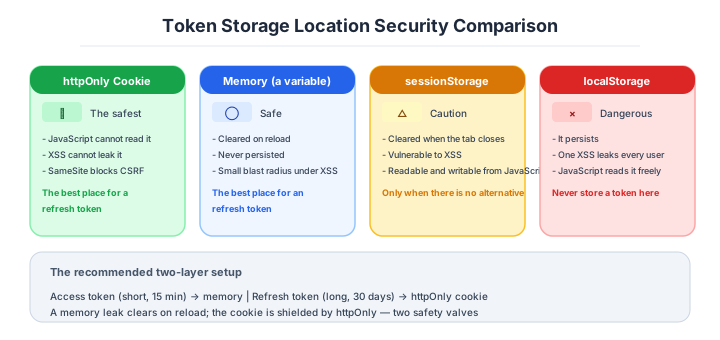
Where you place auth tokens makes a vast difference in security level. The modern standard is httpOnly Cookie as the base, used together with memory.
| Location | Safety | Notes |
|---|---|---|
| httpOnly Cookie | Excellent | Unreadable from JS, doesn’t leak via XSS |
| Memory (Redux / variables) | Good | Disappears on reload |
| sessionStorage | Marginal | Cleared on tab close, but XSS-vulnerable |
| localStorage | Bad | Avoid - one XSS leaks everyone’s tokens |
The recommended composition is “short-lived Access Token in memory, long-lived Refresh Token in httpOnly Cookie.” The memory side auto-clears on reload; the Cookie side is shielded by httpOnly - a two-layer defense stands up.
Splitting Access Token and Refresh Token is the modern standard pattern for session management. Hit daily APIs with the short-lived Access Token, and refresh with the long-lived Refresh Token when it expires.
1. Access Token (15 min) expires
2. Client sends Refresh Token (30 days, Cookie)
3. BFF issues a new Access Token
4. Optionally rotate the Refresh Token (re-issue)
Refresh Token Rotation is a mechanism that issues a new Refresh Token each time it’s used, immediately invalidating the old one. If the old token is reused, it’s detected as stolen and the entire session is revoked. Auth0 and Firebase Auth support this natively, and adding it raises safety one rank.
Refresh Token Rotation + httpOnly Cookie is the modern recommended composition.
Logout matters more than it looks, too.
Logout tends to be taken lightly, but it’s quietly central to security. Just “delete Cookie when button clicked” isn’t enough - the server must also revoke the Refresh Token.
| Item | Design |
|---|---|
| Logout | Delete Cookie + revoke Refresh Token on server |
| All-device logout | Discard all of the user’s Refresh Tokens |
| After password change | All sessions auto-revoke |
| On suspicious-behavior detection | Admin can force-revoke |
“All-device logout” is for emergency stops in case of theft or loss, and is required for high-importance services. The accident “logged out but old tab still works” is a direct line to incident.
Numeric gates for authentication settings
Note: Industry baseline values as of April 2026. Will become outdated as technology and the talent market shift, so requires periodic updates.
Leaving the “correct defaults” vague in frontend auth always opens holes. Below are the modern Web standard values.
| Setting | Recommended | Reason |
|---|---|---|
| Access Token expiry | 15 minutes | Minimize damage on leak |
| Refresh Token expiry | 14-30 days | Balance with UX |
| Refresh Token Rotation | Enable | Detects theft, revokes all sessions |
| Cookie HttpOnly | Required | Cannot be read by XSS |
| Cookie Secure | Required | HTTPS-only |
| Cookie SameSite | Lax (minimum) or Strict | CSRF countermeasure |
CSP script-src | ’self’ + nonce | Inline forbidden |
| Lighthouse Best Practices | 100 | Comprehensive security basics |
| Auth-failure rate limit | 5 attempts / 15 min | Brute-force countermeasure |
| Passkey support | Required to consider from 2026 | Standard SMS-MFA replacement |
“HttpOnly / Secure / SameSite=Lax” as a triad is the minimum line for Cookies. Missing even one is out of the question - it’s a basic check verifiable instantly in Chrome DevTools.
Forgetting one attribute and it’s over. Verify mechanically with a checklist.
Three scenarios
If you are building solo or at a startup
Delegate all of it to Clerk, Auth.js or Supabase Auth. The parts that are easy to get wrong — where the token is stored, the cookie attributes, session management — are handled correctly by the SDK, which structurally removes the accident of putting a JWT in localStorage yourself.

If you are a small or mid-size SaaS
Auth0 or Cognito, with tokens managed through an httpOnly cookie and a BFF, is the configuration to back. B2B contracts frequently require SAML or OIDC support, so check the conditions on the higher plans when you select an IdP. Do not forget the numeric gates either: a 15-minute access token, and rotation enabled on the refresh token.
If you are a large enterprise
SSO integration with the internal IdP (Entra ID or Okta) is the premise. The frontend holds no authentication state of its own and follows the IdP session instead. Nonce-based CSP operation, all-device logout and automatic revocation of every session on password change all have to be in the design from the start as audit requirements.
AI decision axes — SDKs are accurate; where you put authorization needs care
Auth SDK setup is an area AI writes accurately
Auth.js (NextAuth) and Clerk setup code can be generated with high accuracy by AI, and the Passkey (WebAuthn) frontend implementation is accurate too, being RFC-compliant boilerplate around navigator.credentials.create() and navigator.credentials.get(). From providers array configuration to protected-path specification in middleware.ts and session extension in callback functions - abundant implementation examples in training data.
AI tends to finish authorization on the frontend
The problem that shows up most often in AI-written frontend auth code is “finishing the authorization decision on the frontend.” AI readily writes a check like if (user.role === 'admin') on the frontend alone, with no authorization check on the server-side API behind it. The principle that “authorization is always verified on the server” has to be stated explicitly as a project rule.
Pitfalls and forbidden moves
Here are the six most dangerous direct causes of all-user leaks, impersonation and session hijacking.
| Forbidden move | Why it is bad → what to do instead |
|---|---|
| Storing a JWT in localStorage | one XSS leaks every user’s token → put it in an httpOnly cookie |
Authorizing on the frontend role === 'admin' branch alone | anyone can rewrite it in F12 → always check the permission on the server |
| OAuth without PKCE, or Implicit Flow | code interception finishes you → use Authorization Code with PKCE |
Leaving unsafe-inline in the CSP | it stops functioning as an XSS defence → move to the nonce approach |
| A logout that only deletes the cookie | the refresh token stays alive on the server → implement a revocation API |
| Implementing authentication yourself | it ends up full of holes → delegate to Clerk, Auth.js or Auth0 |
The reality is that even security specialists get breached, as the Okta intrusion and the LastPass leak of 2022 showed. Even after delegating, monitoring “the delegate’s MFA, audit logs and least privilege” on the operational side is essential. For authentication: do not write it, borrow it, and watch it — all three.
Author’s note - cases where “looking-defended-only” collapsed
In 2022, it was reported that Slack had some employee tokens stored on GitHub stolen, and through those tokens, parts of internal private repos were accessed. The mechanism itself was “general token-based auth,” and the code worked correctly. Even so, it was breached due to laxness in storage location and revocation operations - a story still talked about today.
In the same 2022, there was also the report that a Sitel device entrusted with Okta support work was breached, and the LAPSUS$ group reached the level of taking screenshots of Okta’s internal screens. The very source of SSO - the auth platform - was shaken via a contractor’s terminal.
I’ve seen with my own eyes in past projects the structure where “the code is perfect, but breached through operational gaps,” and from then on I’ve thought of these stories as not someone else’s problem. All of them happen in situations where “the frontend code is clean” and “the protocols are standard.” Authentication is something defended by both wheels of code-correctness and operational-correctness; cases that drove home, even from the outside, the fact that one wheel alone leaves holes.
Authentication is both wheels of code and operations. With one alone, holes always remain.
What to decide - what is your project’s answer?
For each of the following, try to articulate your project’s answer in 1-2 sentences. Starting work with these vague always invites later questions like “why did we decide this again?”
- Auth method (Cookie / JWT / external delegation)
- Auth platform (self-built / Auth0 / Cognito / Firebase Auth / Clerk)
- Cookie attribute settings (HttpOnly / Secure / SameSite)
- Mandatory MFA (admins only / all users)
- Timing of Passkey support
- SSO support (SAML / OIDC)
- Authorization model (RBAC / ABAC / ReBAC)
- Session timeout and refresh strategy
Related Articles
Summary
This article covered frontend auth, including browser-premised XSS/CSRF defenses, Cookie attributes, CSP, token storage, Refresh Token Rotation, and external-platform delegation.
Identify what’s defendable on the F12 premise, place httpOnly Cookie + BFF as the base, and delegate authentication to external platforms. That is the practical answer for frontend auth in 2026.
Next time we’ll cover SEO (search engine optimization, OGP, sitemap, structured data).
Back to series TOC -> ‘Architecture Crash Course for the Generative-AI Era’: How to Read This Book
I hope you’ll read the next article as well.
Also popular with readers
📚 Series: Architecture Crash Course for the Generative-AI Era (43/95)