About this article
This article is the first deep dive in the “Frontend Architecture” category of the Architecture Crash Course for the Generative-AI Era series, covering hosting.
On mobile, 53% of users abandon a load that takes 3+ seconds (Google study). Hosting design decides the floor of UX. The article covers CDN, static hosting, edge computing, cache strategy, image optimization, Core Web Vitals — landing on the two principles “Static First” and “Git push = production deploy.”
Before you read this
This article is mostly about how the browser side — the screen — works. If IT vocabulary is unfamiliar, reading the primers "How a Web Service Works" and "Programs and APIs" first makes it far easier to follow. You can also look anything up in the glossary as you read.
What is hosting in the first place
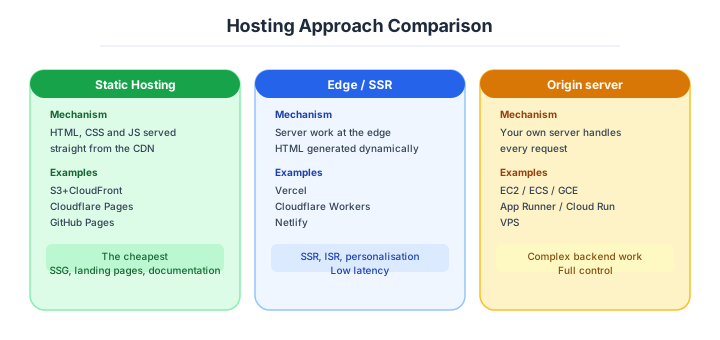
Hosting is, roughly speaking, “the system for placing the files of your website or app and delivering them to users worldwide.”
Imagine a delivery network’s distribution hubs. If the warehouse (server) is in only one location like Tokyo, shipping to Hokkaido or Okinawa takes time. Placing relay hubs (CDN) across the country enables fast delivery from the nearest hub. Furthermore, “pre-stocking frequently ordered items at each hub” (caching) eliminates even the need to check with the main warehouse. Hosting design is the process of deciding how to build this delivery network.
Why hosting design matters
What happens if you neglect hosting design? On mobile, 53% of users abandon a load that takes 3+ seconds (Google study) — no matter how good the features and pages you’ve built, if delivery is slow, users won’t see them.
Deciding where to place and how to deliver HTML, CSS, JS, and images built by the frontend is hosting design. Where backend “runs logic on a server,” frontend “delivers many static files to users worldwide” — required traits differ entirely. Deciding “use a CDN,” “process at the edge,” “how to cache” is the work of shaving UX in milliseconds.
This domain should be designed independently from the backend. Delivery speed is UX itself.
How HTML / CSS / JS / images built by frontend get placed and delivered is hosting design. Where backend “runs logic on a server,” frontend “delivers many static files to users worldwide” — required traits differ entirely. Deciding “use a CDN,” “process at the edge,” “how to cache” is the work of shaving UX in milliseconds.
Design independent from backend. Delivery speed is UX itself.
The main hosting forms
Frontend hosting splits into five forms; selection changes by project scale and operational style. From personal sites to large-scale services, each has appropriate options.
| Form | Examples | Trait |
|---|---|---|
| Self-server delivery | Distribute via Nginx / Apache | Classical, controllable, heavy ops |
| Cloud static storage | S3 / GCS / Azure Blob | Cheap and durable, CDN integration assumed |
| CDN delivery | CloudFront / Cloudflare / Fastly | Fast delivery from worldwide edge |
| Platform | Vercel / Netlify / Cloudflare Pages | Auto-deploy via Git integration |
| Full-stack | Next.js + Vercel / Nuxt + NuxtHub | Framework and hosting unified |
The modern favorite is platform-type: just git push and the auto-build, deploy, and CDN delivery complete. For personal projects, free tiers are practically usable.
CDN basics
A CDN (Content Delivery Network) places content copies on edge servers distributed worldwide and delivers from the nearest edge to the user. Closer physical distance lowers communication latency, dramatically improving perceived speed.
Tokyo users hitting US servers directly take 200+ms round trip; edge cache hits in Tokyo return in under 10ms. Beyond latency reduction, CDNs offer defensive effects: “reducing origin load” and “absorbing DDoS attacks.” They’re nearly required infrastructure for modern web services.
CDNs aren’t just “to be fast” but “to stay up.” Two-fold value.
The major CDNs compare as follows.
CDN products are competitive, each with strong points. CloudFront for AWS-centered systems; Cloudflare for free-tier and feature richness — modern standards.
| CDN | Trait |
|---|---|
| CloudFront | Full AWS integration, transparent pricing, simple S3 integration |
| Cloudflare | Wide free tier, rich edge features, strong DDoS protection |
| Fastly | High config flexibility; many media / e-commerce adoptions |
| Akamai | Enterprise default, strong in finance / government |
| Vercel Edge | Tightly coupled with Next.js, dev experience focused |
For personal-to-mid-scale, Cloudflare Pages / Vercel / Netlify; for AWS-centered, “CloudFront + S3” is the gold standard. Akamai-class is for large enterprises; no need at personal or small scale.
Cache strategy — hashed filenames are the premise
For CDN, “how to manage caches” is the design crux. File types differ entirely in update frequency and acceptable staleness, so a uniform TTL can’t optimize.
| Target | Recommended strategy |
|---|---|
| HTML | Short-lived (minutes / no-cache) + ETag (content identifier triggering re-fetch only on change) |
| CSS / JS | Hashed filename + long cache (1 year) |
| Images | Long cache + CDN-side transformation |
| API responses | Cache-Control + Vary headers, individual control |
The decisive technique: filename hashing. Embedding content hash like main.abc123.js instead of main.js means filename changes when content changes — eliminating the “when to invalidate cache” worry.
main.abc123.js ← Content change = filename change
                  → Long-term immutable possible
HTML short-lived, others long. Hashed filenames are the modern frontend’s default assumption.
Invalidation is the other half of the story.
The biggest CDN-operational theme: solving “users hold old caches at deploy.” Three methods exist; the conclusion: hashed filenames mostly solve it.
| Method | Trait |
|---|---|
| Hashed filenames | New URL automatic — no invalidation needed (default) |
| Explicit invalidation | Manual delete via CDN API; cost and propagation time |
| Short TTL | Disappears fast but cache efficiency drops |
CloudFront’s explicit invalidation is free for first 1000/month, but takes minutes to propagate worldwide and frequent issuance costs money. Hashed filenames let new URLs naturally cache-miss → fetch latest from origin, so invalidation itself is unnecessary. Modern build tools like Next.js / Vite / webpack ship this pattern by default.
Edge computing and static / dynamic delivery
Running code at CDN edges is edge computing. Traditionally CDNs were “just file delivery”; now lightweight processing runs at edges, enabling low-latency dynamic processing. A major trend in the late 2020s.
| Platform | Languages | Trait |
|---|---|---|
| Cloudflare Workers | JS / WASM (WebAssembly, browser/edge-runnable binary format) | V8 Isolate fast startup, Durable Objects |
| Vercel Edge Functions | JS / WASM | Tight Next.js Middleware integration |
| AWS Lambda@Edge | JS | CloudFront request modification |
| Deno Deploy | JS / TS | TypeScript-native, edge-first |
Strong areas: A/B test routing, auth pre-filters, country-based redirects, image transformation, lightweight APIs. Cold start is near-zero (ms-tens of ms), so suited for processing requiring real-time response — beyond traditional Lambda.
Edge: “light processing at low latency” is the optimum. Heavy processing remains origin-side.
Whether a page is served statically or dynamically follows from that.
Page delivery splits broadly into static and dynamic; the modern favorite is “Static First (static first, only required parts dynamic).”
| Delivery | Examples | Trait |
|---|---|---|
| Static (pre-rendered) | Astro / Next.js SSG / Jekyll | Fast, cheap, CDN-complete, outage-resilient |
| Dynamic (SSR) | Next.js SSR / Remix / Rails | Per-request, server required, latest data |
| ISR / OnDemand | Next.js / Gatsby | Periodic regeneration |
Static delivery puts all pages on CDN, so server outages don’t affect; delivery cost stays extremely low. Blog / docs / marketing sites: static is enough. SSR is needed for login-after screens with per-user content.
Design with Static First. Reasons to make everything dynamic are surprisingly few.
Domains, certificates and images are the remaining basics.
When publishing under a custom domain, three pieces are needed: domain registration, DNS config, SSL certificate. Modern automation completes much of it in minutes.
| Item | Point |
|---|---|
| Custom domain | Route 53 / Cloudflare Registrar / OnamaeCom etc. |
| SSL certificate | Auto-issuance on the CDN side (Let’s Encrypt / ACM) |
| HTTP/2 / HTTP/3 | Auto-handled by CDN (no setup) |
| HSTS (HTTP Strict Transport Security) | Header forcing HTTPS (recommended) |
Modern hosting services (Vercel / Netlify / Cloudflare Pages) “auto-issue and renew SSL certificates” just by setting a custom domain. HTTPS is required (Chrome warns), and HTTP/3 support is essentially standard.
Image optimisation is where most of the measurable gain sits.
Images often take the biggest payload of a site. HTML is KBs but a single 2MB hero image is common; whether you optimize here changes display speed by seconds.
| Method | Substance |
|---|---|
| Next-generation formats | WebP / AVIF (half-to-third the size of JPEG) |
| Responsive images | srcset / Picture tag for screen-size delivery |
| Lazy loading | loading="lazy" attribute, off-screen deferred |
| CDN transformation | Cloudflare Images / imgix / Next/Image, etc. |
Next/Image and Astro’s <Image> auto-generate WebP / AVIF / multiple sizes / lazy load from one source image at build / request time. Using framework components beats hand-writing <img> tags decisively.
Image optimization directly affects LCP. Give up manual; rely on framework features.
Image optimisation and Core Web Vitals
Core Web Vitals are Google’s perceived-speed metrics that directly affect SEO (search ranking). Aware of these three as frontend-design targets is the basic posture in modern web development.
| Metric | Meaning | Target |
|---|---|---|
| LCP (Largest Contentful Paint) | Time to largest content paint | < 2.5s |
| INP (Interaction to Next Paint) | Click responsiveness | < 200ms |
| CLS (Cumulative Layout Shift) | Layout-shift quantity | < 0.1 |
LCP improves via CDN, image optimization, initial-HTML size; INP improves via JS-execution reduction and main-thread freeing; CLS improves via specifying image / ad sizes upfront. Free measurement via Google PageSpeed Insights; regular checks help SEO.
The numeric gates to hold are these.
Note: industry rates as of April 2026. Periodic refresh required.
Don’t aim at vague “fast site”; chase numerical targets — modern frontend operations. Google’s official thresholds are the industry standard.
| Metric | Good | Needs Improvement | Poor |
|---|---|---|---|
| LCP | < 2.5s | 2.5-4.0s | > 4.0s |
| INP | < 200ms | 200-500ms | > 500ms |
| CLS | < 0.1 | 0.1-0.25 | > 0.25 |
| TTFB | < 800ms | 800-1800ms | > 1800ms |
| JS bundle (after gzip) | < 170KB | 170-350KB | > 350KB |
| Image size (LCP image) | < 200KB | 200-500KB | > 500KB |
LCP 2.5s, CLS 0.1, INP 200ms tie directly to Google SEO judgment; “75% of page views in Good” is the criterion. PageSpeed Insights / Lighthouse / Search Console: “weekly measurement” and immediate response to drops — operational rule.
Bad Core Web Vitals drop search ranking. Embed measurement into operations.
Three scenarios
If you are building solo or at a startup
The free tiers on Vercel, Netlify or Cloudflare Pages are what to back. A git push gives you SSL, a CDN and preview environments, all automatic, so the time spent thinking about infrastructure is literally zero. You can stay on the free tier up to tens of thousands of page views.

If you are a small or mid-size SaaS
Putting the marketing site and landing pages on a hosting PaaS such as Vercel, and moving the application itself — everything behind the login — onto ECS Fargate or Cloud Run, is the realistic split. When traffic grows and the PaaS metered charges start to jump, that is the line at which to consider moving to CloudFront and S3.
If you are a large enterprise
At this size, consistency with the internal platform and the audit requirements comes first, so CloudFront and S3 (or Azure Front Door) combined with your own CI/CD is the standard. Check at the outset whether data-sovereignty, IP-restriction and WAF requirements can be met by the hosting PaaS features alone; if they cannot, move to your own cloud without arguing about it.
Which form to take by phase lines up as follows.
Optimal hosting configuration changes by project scale and requirements. Personal development and global large-scale deployment use entirely different stacks.
| Scale / requirement | Recommended |
|---|---|
| Personal blog / portfolio | Vercel / Netlify / Cloudflare Pages (free tier sufficient) |
| Mid-sized SaaS | CloudFront + S3 or Vercel Pro |
| Global large-scale | Fastly / Akamai + own origin (CDN tuning freedom) |
| Security-priority / internal | Private CDN / closed CDN |
This series’s host, senkohome.com, runs on “CloudFront + S3.” Vercel-family is easy, but for full self-management with “cost transparency”, hitting AWS directly is also practical.
AI decision axes — Git push equals deploy is the premise of AI-driven development
Git push = deploy is the premise of AI-driven development
With Git-integrated platforms like Vercel, Netlify, and Cloudflare Pages, pushing to main branch immediately becomes production deployment. The entire flow of AI generates code → creates PR → merges → auto-deploys runs without human intervention, maximizing deploy frequency in AI-driven development.
With manual FTP or custom deploy scripts, human manual operations sit between AI-written code and production deployment, creating a deploy bottleneck.
Edge functions and AI combination
Edge functions (Cloudflare Workers, Vercel Edge Functions) execute at CDN edge locations worldwide, achieving single-digit-ms latency. AI-generated API endpoints and middleware deployed to edge suit use cases like personalization, A/B testing, and geolocation routing where latency matters. The constrained runtime (no Node.js full API) actually helps AI write more focused, correct code.
Pitfalls and forbidden moves
Here are the six most dangerous causes of a site going fully dark, serving a stale version, or producing an exploding invoice.
| Forbidden move | Why it is bad → what to do instead |
|---|---|
| Serving HTML with a long cache lifetime | you deploy and the old version keeps appearing → keep HTML short-lived, around s-maxage=60 |
| Long-caching files whose names are not hashed | every update then needs an invalidation → use the build tool’s automatic hashing |
| Serving straight from the origin with no CDN | a DDoS takes you down overnight → put one in front, even Cloudflare’s free tier |
| Serving images at their original size | the classic way to wreck LCP → convert automatically with next/image or the equivalent |
Omitting width and height on images | a direct cause of poor CLS → always give a fixed size |
| Making every page SSR | function-execution charges grow linearly → design static-first |
A CDN does not protect you by being present. Its value is decided by configuration and operation.
Author’s note — the “we have a CDN, so we are fine” trap
Cloudflare’s July 2019 large-scale outage is remembered as showing CDNs can themselves be SPOFs. A “single regular expression” deployed caused 100% CPU at all edges, affecting global traffic for ~30 minutes. The June 2021 Fastly outage (Amazon, GitHub, Reddit, NYTimes simultaneously down) was the same family — making “CDNs don’t fall” premise visibly invalid.
Stories of touching personal dashboards exactly during the Fastly outage and GitHub also dropping, taking minutes to grasp what was happening, are common. Rather than “we have CDN, so safe” thought-stoppage, designs include origin-direct fallback paths and incident-status-page operations — the shared lesson.
Multi-CDN (normally A, switch to B via DNS during outage) adoption is increasing among major media; sites pushing availability to extremes are heading toward “design that doesn’t trust CDNs too much.”
What you must decide — what’s your project’s answer?
Articulate your project’s answer in 1-2 sentences for each:
- Origin (S3 / VPS / platform-type)
- CDN product (CloudFront / Cloudflare / Fastly, etc.)
- Cache TTL strategy (HTML short, static long)
- Custom domain and SSL automation
- Edge-computing scope of use
- Image-optimization policy (formats, CDN transformation)
- Core Web Vitals targets and measurement
Related Articles
Summary
This article covered hosting — CDN, cache strategy, edge, Core Web Vitals.
CDN-first, Static First, hashed filenames, Git push = production deploy. Locking these four down makes delivery fast, robust, and lightweight in operations.
The next article covers rendering methods (MPA / SPA / SSR / SSG / ISR).
Back to series TOC -> ‘Architecture Crash Course for the Generative-AI Era’: How to Read This Book
I hope you’ll read the next article as well.
Also popular with readers
📚 Series: Architecture Crash Course for the Generative-AI Era (37/95)