![[Frontend Architecture] State Management](/uploads/2026/04/arch-intro-cat-frontend.png)
About this article
As the third installment of the “Frontend Architecture” category in the series “Architecture Crash Course for the Generative-AI Era,” this article explains state management.
This is the most difficult area to design in modern frontend development. This article covers the classification of state into 5 types (UI, domain, server, URL, persistent), modern standard stacks like Zustand, TanStack Query, and React Hook Form + Zod, design principles, and the iron rule of “never write the same fact in two places.”
Before you read this
This article is mostly about how the browser side — the screen — works. If IT vocabulary is unfamiliar, reading the primers "How a Web Service Works" and "Programs and APIs" first makes it far easier to follow. You can also look anything up in the glossary as you read.
What is state management in the first place
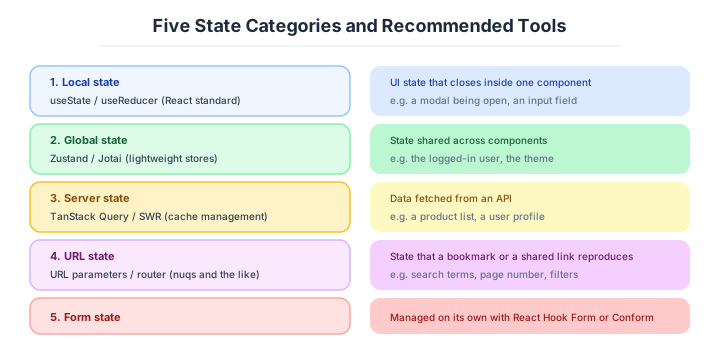
State management is, roughly speaking, “deciding where in the app to hold the data and status displayed on screen, and how to update them.”
Imagine sharing info on whiteboards. A small team (small app) can check info on one whiteboard (useState). But as departments grow, each needs its own board (Zustand), plus a system to fetch the latest from the company-wide bulletin (server state = TanStack Query). Without rules for what goes where, someone will make decisions based on stale info.
Why state management design matters
What happens if state management is left vague? Confusion like “where is this value managed?” and “I updated it but it’s not reflected” is almost always caused by failed state design. The bigger the app, the more brutally it shows in code quality — and once tangled, fixing it is harder than rewriting from scratch.
State has different optimal management methods per type. Lumping them together always breaks down.
The bigger an app gets, the more brutally state-management quality shows up in code quality. Confusion like “where is this value managed?” or “I updated it but it’s not reflected” is almost always caused by a failed state design. Once tangled, fixing it later is harder than rewriting from scratch.
State has different optimal management methods for different types. Treating them all the same will always break down.
The five kinds of state
The first key insight is that “state” is not one thing - 5 types with completely different properties exist. Trying to manage them all with the same mechanism (like Redux) is doomed to fail.
| Type | Examples |
|---|---|
| UI state | Modal open/close, input values, loading indicators |
| Domain state | Cart contents, favorites list |
| Server state | User list, product details fetched from API |
| URL state | Query parameters, pagination, search conditions |
| Persistent state | Login info, theme settings, drafts |
The classic failure is “mixing server state and UI state.” The two have fundamentally different properties - whether caching is needed and when they go stale. The first step in state design is identifying which type your data belongs to.
The modern consensus is to “manage server state with TanStack Query, UI state with useState/Zustand” - separately.
UI state — promote it in stages, starting from useState
The simplest and most-used kind is local state. If a value is used only inside one component, holding it with useState is the simplest path with the fewest issues.
const [count, setCount] = useState(0)
const [isOpen, setIsOpen] = useState(false)
The key principle is “lift it up only when multiple components need it.” There is no need to put state in a global store from day one. Abstracting before you need it leads to design failure.
When state needs to be shared across components, the basic approach is to lift it up to the common parent. This is called Lift State Up.
  [Parent]   ← useState lives here
   ├─ Child1 ← receives via props
   └─ Child2 ← receives via props (and the setter)
This is React’s textbook pattern - simple and explicit. But once the hierarchy gets deep, props pass through intermediate components like a bucket brigade - the infamous “Prop Drilling”. When you hit 4-5 layers, it’s time to consider Context or an external store.
Simple values are fine with useState. Premature abstraction is the biggest enemy.
Once lifting state up stops being enough, the global options come in.
For state shared across the entire app (logged-in user info, theme, sidebar open/close), use a global store. There are several options - pick based on team preference and app size.
| Library | Characteristics |
|---|---|
| Redux / Redux Toolkit | Veteran, huge ecosystem, lots of boilerplate |
| Zustand | Lightweight, hook-driven, simple to write |
| Jotai | Atom-oriented, supports React concurrent mode |
| Recoil | From Facebook but maintenance has stalled - avoid |
| Valtio | Proxy-based, natural feel |
| MobX | Observable-driven, Vue-like feel |
For new projects, Zustand or Jotai are the front-runners. Redux is reserved for complex large-scale SPAs or cases where Redux DevTools’ debugging power is essential. Redux’s “action → reducer → store” diagram is conceptually elegant, but its verbosity tends to be disliked.
For new adoption, choose Zustand / Jotai. If you choose Redux, do so with a clear reason.
React Context comes with a caveat worth stating plainly.
React’s standard Context API can be used as a lightweight global store. However, there’s a major constraint: when even one value in Context changes, every subscribed component re-renders.
❌ Stuffing the entire form state into Context
   → every keystroke re-renders all subscribers (catastrophic perf)

✅ Limit Context to low-frequency information
   → theme / auth info / i18n (language settings)
For this reason, “putting frequently-changing values in Context is an antipattern.” Form input values or counters should never go on Context. On the other hand, Context is ideal for “rarely-changing values” like theme, auth state, and i18n.
Server state — TanStack Query is the first choice
Data fetched from APIs (server state) has fundamentally different properties from UI state, so the same mechanism cannot be used for both. This is the most important principle in modern frontend design.
| Property | UI state | Server state |
|---|---|---|
| Source of truth | Local | Server |
| Goes stale? | No | Yes (re-fetch needed) |
| Sync needed? | No | Yes (cache control) |
| Needed across components? | Sometimes | Frequently |
Without understanding this, you end up jamming a fetched user list into Redux, hand-coding “when to refresh” yourself, and falling into the classic ordeal of cache bugs and stale data display. The right move for server state is a dedicated library.
The libraries in this space line up as follows.
Dedicated server-state libraries handle the tedious work of cache management, re-fetching, and optimistic updates for you. The modern de facto standard is TanStack Query (formerly React Query).
| Library | Characteristics |
|---|---|
| TanStack Query (React Query) | De facto. Cache, re-fetch, optimistic updates - all included |
| SWR | From Vercel. Lighter and simpler |
| Apollo Client | GraphQL-only |
| RTK Query | Redux Toolkit integrated version |
const { data, isLoading, error } = useQuery({
  queryKey: ['users', id],
  queryFn: () => fetchUser(id),
  staleTime: 60_000,  // do not re-fetch for 60 seconds
})queryKeymanages the cache (same key shares the same cache)staleTimecontrols re-fetch frequencyinvalidateQueriesinvalidates the cache after a mutation, triggering automatic re-fetch
These three mechanisms alone solve the majority of state-management problems.
TanStack Query is the default first choice. It includes everything and the learning cost is reasonable.
URL state, forms and persistence
Information like pagination, search conditions, and tab selection is best held in the URL as a modern best practice. Putting it in React state loses the information on browser back or share.
❌ setState({ page: 2, search: "foo" })
   → cannot bookmark, lost on reload

✅ router.push('?page=2&search=foo')
   → bookmarkable, shareable, back-button works
URL state’s benefits:
- Bookmarkable (the state can be saved)
- Browser back/forward works (history works naturally)
- Shareable (just send the URL to reproduce the screen)
- Server can know the state (can return data on SSR)
The iron rule is “if a value would still matter after a navigation, put it in the URL.”
Form state is the next one that tends to be mishandled.
For forms that handle user input, dedicated libraries make implementation dramatically easier. Once a form has more than 10 inputs, sticking with useState is unmanageable.
| Library | Characteristics |
|---|---|
| React Hook Form | Uncontrolled, fast, de facto |
| Formik | Controlled, classic, somewhat heavy |
| TanStack Form | New, strong type system |
| Zod (validation) | The decisive schema-driven validation library |
The “uncontrolled” approach is a design that does not update React state on every keystroke, so re-renders barely happen even on large forms - making it fast. Today, React Hook Form + Zod is the de facto standard for form implementation.
Controlled forms are fine up to about 10 inputs. Beyond that, React Hook Form is the only choice.
Persistence is the last of the three.
Information you want to keep after the app closes is saved to browser persistent storage. There is a clear separation of what goes where, and it directly impacts security.
| Target | Storage | Why |
|---|---|---|
| Auth info | httpOnly Cookie (recommended) | Cannot be stolen via XSS (Cross-Site Scripting, script injection attacks) |
| Theme settings | localStorage | Low-sensitivity setting values |
| Draft saves | localStorage / indexedDB | Depends on size |
| Session cache | sessionStorage | Cleared when tab is closed |
| Large data | indexedDB | Can store MB-scale data |
Putting JWT (signed auth token) or session IDs in localStorage is the classic XSS-vulnerability pattern. Storage readable by JavaScript is also readable by attackers, so auth info must always go in an httpOnly Cookie.
Auth info goes in httpOnly Cookie. Putting it in localStorage is a landmine.
How to choose — the recommended stack by scale
“Put everything in Redux” is the start of breakdown. By project size and state type, combining multiple libraries is the modern standard.
| Project scale | UI state | Server state | Forms | Persistence |
|---|---|---|---|---|
| Personal/MVP (~1000 lines) | useState | Direct fetch + useState | useState | localStorage |
| Early startup (~5000 lines) | useState + Context | TanStack Query | React Hook Form + Zod | localStorage |
| Mid-size SaaS (~30,000 lines) | Zustand | TanStack Query | RHF + Zod | localStorage + httpOnly Cookie |
| Large SPA (30,000+ lines) | Zustand + Context | TanStack Query | RHF + Zod | Cookie-centric |
| Next.js App Router | Zustand (Client) + RSC (Server) | Server Components fetch | Server Actions + Zod | httpOnly Cookie |
“There’s almost no reason to newly adopt Redux as of 2026” is the industry consensus. Redux Toolkit lingers only on large projects that lean on Redux DevTools’ time-travel debugging, or teams with existing Redux assets. Jotai / Valtio / Signal are also options, but in terms of information volume and adoption, Zustand is a head above the rest.
For new adoption, Zustand + TanStack Query + RHF + Zod. The reasons to choose Redux are narrow.
Three scenarios
If you are building solo or at a startup
useState and TanStack Query, with React Hook Form and Zod for forms, is enough. There is no need to bring in a global state-management library from the start — considering the promotion once Context stops being sufficient is soon enough. Honestly, “starting from Redux” in a 2026 personal project is over-equipment.

If you are a small or mid-size SaaS
Zustand for UI state, TanStack Query for server state, and React Hook Form with Zod for forms — that trio is the solid configuration. Separating responsibility by the kind of state is what keeps you out of the swamp of “everything in Redux, tightly coupled.”
If you are a large enterprise
Once the SPA is large, the real subject becomes unifying the conventions rather than the state management itself. If you are on the Next.js App Router, moving server state to the server with RSC and Server Actions, and minimising client state, lowers the maintenance cost. Where there are existing Redux assets, do not force a replacement — migrating gradually from new screens onward is the realistic path.
AI decision axes — Schema-driven design underpins AI accuracy
Patterns where AI makes mistakes in state management
When having AI write React state management, these problems tend to occur:
- Putting server state (API responses) in
useStateinstead of TanStack Query (cache/revalidation lost) - Making global state for what should be local component state (unnecessary re-renders)
- Creating circular dependencies between stores
- Mixing server/client state boundaries in Next.js App Router
Deciding the design upfront - Zod schemas for data types, TanStack Query for server state separation - lets AI write accurate code within those constraints.
Zod schemas support both type safety and AI accuracy
Defining API response shapes and form inputs with Zod schemas gives AI explicit contracts to work with. When AI generates a form component, it reads the Zod schema and correctly implements validation, error messages, and type inference. Without schemas, AI guesses at data shapes and produces subtly incorrect type handling.
Pitfalls and forbidden moves
Here are the six most dangerous direct causes of infinite loops, double updates and XSS leaks.
| Forbidden move | Why it is bad → what to do instead |
|---|---|
| Storing a JWT or refresh token in localStorage | one XSS leaks every user’s token → put it in an httpOnly cookie |
| Putting server state in Redux and writing the cache yourself | a breeding ground for stale data and cache bugs → use TanStack Query |
Holding the same fact in two places, e.g. an items array and an itemCount | one of them is guaranteed to start lying → derive the second by computation |
| Putting frequently-changing values in Context | every subscribing component re-renders → limit it to values that rarely change |
Hand-writing data fetching in useEffect | loading, errors and race conditions are all landmines → use TanStack Query |
Keeping pagination and search conditions in useState | they vanish on reload and cannot be bookmarked → put them in the URL query |
Author’s note — “the day I wrote the same fact in two places”
In frontend development, you constantly hear stories like: “I made an items array and a separate itemCount number state, then in the delete handler updated only one of them - that bug bit me over and over.” It could be avoided just by computing items.length on the spot, but people end up splitting the count into a separate state thinking “having the count precomputed seems faster” or “I’ll need it in other places too.” This kind of failure is hit by everyone from new hires to veterans - a classic landmine of state design.
A common anecdote: a similar bug shortly after starting React, getting code-reviewed with “items.length is fine, isn’t it?” The lesson is simple - “if you write the same fact in two places, one of them will eventually become a lie.”
Derive derived state by computation. Put what can be expressed as a URL into the URL. Trust the server with server state. “Keep state minimal” is not abstract aesthetics - it’s a concrete defensive practice learned from past bugs.
The iron rule of state management is “single source of truth.” This one principle dramatically reduces bugs.
A few design principles hold across all of it.
Here are the design principles for managing the 5 state types well. All matter, but especially “single source of truth” and “derived state by computation” must be followed at any scale.
- Single Source of Truth: Never hold the same information in two places. Make one primary and the other derived
- Derive derived state by computation: Don’t keep
items.length === 0as a separate state - compute it on the spot - Don’t mix server and client state: Use TanStack Query and Zustand for their respective jobs
- Keep state minimal: Don’t hold what can be computed (it’s a bug breeding ground)
- What can be in the URL goes in the URL: Pagination, search conditions
What to decide - what is your project’s answer?
For each of the following, try to articulate your project’s answer in 1-2 sentences. Starting work with these vague always invites later questions like “why did we decide this again?”
- Whether to adopt a global state library, and which one (Zustand / Jotai / Redux)
- Server state library choice (TanStack Query / SWR)
- Form library and validation (React Hook Form + Zod)
- Persistence strategy (Cookie vs. localStorage split)
- Scope of URL state usage
- How type definitions are shared (Zod / tRPC / OpenAPI)
Related Articles
Summary
This article covered state management, including the 5 state types, mainstream stacks, URL state, and persistence.
Keep state minimal, split tools by type, lean toward mainstream stacks and schema-driven design. That is the practical answer for state management in 2026.
Next time we’ll cover frameworks in detail (React/Vue/Svelte/Next.js/Astro).
Back to series TOC -> ‘Architecture Crash Course for the Generative-AI Era’: How to Read This Book
I hope you’ll read the next article as well.
Also popular with readers
📚 Series: Architecture Crash Course for the Generative-AI Era (39/95)