![[Frontend Architecture] CSS Design](/uploads/2026/04/arch-intro-cat-frontend.png)
About this article
As the fifth installment of the “Frontend Architecture” category in the series “Architecture Crash Course for the Generative-AI Era,” this article explains CSS design.
CSS is a language that’s easy to write but is guaranteed to collapse at scale. This article compares CSS authoring approaches (Tailwind/CSS Modules/CSS-in-JS), covers design systems and Design Tokens, accessibility, and the AI-era “Tailwind + shadcn/ui + Design Token” triad.
Before you read this
This article is mostly about how the browser side — the screen — works. If IT vocabulary is unfamiliar, reading the primers "How a Web Service Works" and "Programs and APIs" first makes it far easier to follow. You can also look anything up in the glossary as you read.
What is CSS design in the first place
CSS design is, roughly speaking, “defining the rules for safely managing CSS — the language that defines how web pages look — as a team on an ongoing basis.”
Imagine clothes storage. Living alone, you can toss things into drawers however you like. But as the family grows, someone stuffs a coat into the T-shirt drawer, and someone else can’t find their clothes and buys new ones — CSS design is the same. Global style definitions that are fine at small scale collapse at larger scale into name collisions, unintended overrides, and mountains of dead styles.
Why CSS design matters
What happens if you do large-scale development without CSS design? Easy to write but guaranteed to collapse at scale — that’s CSS’s nature. Limiting the impact range of style changes and creating a common language between designers and developers is the purpose of CSS design.
Not just “does it work?” but “can we still safely modify it in the future?” is the quality decider — conventions and automation are needed to maintain order.
The purpose of CSS design is to prevent that collapse, limit the impact range of style changes, and create a common language between designers and developers. The deciding quality factor is not just “does it work?” but “can we still safely modify it in the future?” - and conventions plus automation are needed to keep order.
The easy way to write CSS is also the way that collapses. Conventions and automation are everything.
Main CSS authoring approaches
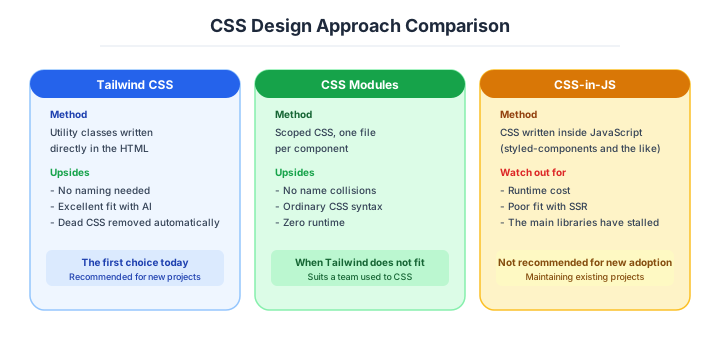
Multiple ways to write CSS have appeared over the years. Each has its own philosophy, and you choose by project size and preference. Today Tailwind and CSS Modules are mainstream, with CSS-in-JS in decline.
| Approach | Examples |
|---|---|
| Global CSS | Plain CSS files (legacy) |
| CSS Modules | styles.module.css (class names auto-localized) |
| CSS-in-JS | styled-components / Emotion |
| Utility CSS | Tailwind CSS (class-list approach) |
| Zero-runtime CSS-in-JS | Vanilla Extract / Panda CSS |
CSS-in-JS once dominated, but issues with runtime overhead and RSC (React Server Components, Reacts components run on the server) incompatibility have been called out, and it’s gradually being replaced by zero-runtime approaches (Vanilla Extract / Panda) and Tailwind.
Tailwind — the biggest current in modern CSS
Tailwind CSS is the approach of lining up utility classes in HTML, and is the largest modern current. You decide styles by listing class names like px-4 py-2 rounded bg-indigo-600 text-white.
<button class="bg-indigo-600 text-white px-4 py-2 rounded hover:bg-indigo-700">
  Submit
</button>| Strengths | Weaknesses |
|---|---|
| Consistency stays naturally maintained | HTML gets long |
| No need to switch between files | Class name vocabulary requires learning |
| Build-time removal of unused CSS, lightweight | Hard to read at first sight |
Often called “ugly HTML,” but its biggest benefit is that the design system’s values (colors, spacing, font sizes) are enforced, making visual consistency easy to maintain on large teams. It’s the “top candidate” for CSS selection on new projects, and VS Code IntelliSense support is also rich.
First choice for new projects. Achieves design consistency and dev speed simultaneously.
CSS Modules — the safe option closest to plain CSS
CSS Modules is a mechanism that auto-localizes class names per file. Just naming a file styles.module.css causes class names to be hashed at build time, eliminating global collisions.
/* Button.module.css */
.primary { background: indigo; color: white; }
import styles from './Button.module.css'
<button className={styles.primary}>Submit</button>Pros: Simple, low learning cost, zero runtime overhead, writing experience close to plain CSS. Cons: Changing styles dynamically via props is annoying, requires JS manipulation.
It’s natively supported by Next.js, Vite, and webpack, making it the go-to when you want to “prevent collisions while keeping a near-plain-CSS writing experience.”
CSS-in-JS — in decline; avoid it for new adoption
CSS-in-JS is the approach of writing CSS inside JavaScript. styled-components / Emotion are the representatives, letting components and styles coexist. The strength is the JS expressiveness - you can switch styles dynamically by props.
| Strengths | Weaknesses |
|---|---|
| Dynamic styles via props | Runtime overhead |
| Type-checkable | Poor RSC compatibility (doesn’t run on server) |
| Self-contained per component | Increases bundle size |
Because runtime processing is involved, it affects display speed; and since it doesn’t work in React Server Components, compatibility with the Next.js App Router era is poor and it’s gradually fading. In March 2024, styled-components officially announced entry into maintenance mode - a textbook case of an OSS that defined an era quietly closing up shop.
The trend today is toward zero-runtime CSS-in-JS (Vanilla Extract / Panda).
The zero-runtime variants are the one branch still worth considering.
What solves the “runtime overhead” of conventional CSS-in-JS is zero-runtime CSS-in-JS. Because “CSS is extracted at build time,” CSS-in-JS processing doesn’t run at runtime.
| Product | Notes |
|---|---|
| Vanilla Extract | Type-safe, theme support, adopted at Adobe |
| Panda CSS | Chakra UI lineage, Design Token integration |
| Linaria | styled-components compatible |
| StyleX | Meta-internal, adopted at Instagram etc. |
A big strength is being usable in RSC environments, so it’s chosen for scenes premised on server-side rendering like Next.js App Router. Vanilla Extract is “highly type-safe” - an option that lands well with TypeScript fans.
Design systems and Design Tokens
A design system is “a set of reusable UI parts and the rules for using them.” Google’s Material Design and Microsoft’s Fluent UI are well-known, bridging design and implementation.
| Element | Content |
|---|---|
| Design Token | Variabilizing colors, fonts, spacing, shadows, etc. |
| Component | Common UI like buttons, forms, modals |
| Pattern | Best practices for combinations |
| Documentation | Usage, principles, prohibitions |
A Design Token is a mechanism for “variabilizing design values like colors and sizes with meaningful names.” Calling it color.primary rather than #4F46E5 makes brand changes, dark-mode support, and theme switching all possible at once.
❌ color: #4F46E5       ← unclear which color is used where
✅ color: var(--color-primary)  ← intent is clear

tokens.json:
{
  "color.primary": "#4F46E5",
  "color.primary.dark": "#818CF8",
  "spacing.sm": "8px",
  "spacing.md": "16px"
}
Tools like Style Dictionary that pull tokens defined in Figma into code have appeared, and “fully syncing tokens between Figma and code” has become the modern mainstream.
Which component library to borrow from is the next question.
Building UI components from scratch takes time, so using a ready-made component library is the modern standard. There are many options - choose to match your project’s color.
| Library | Characteristics |
|---|---|
| shadcn/ui | Copy-paste style, becomes your own code, hugely popular today |
| Radix UI | Accessibility-focused, no visuals |
| MUI (Material UI) | Largest, strong distinct look, feature-rich |
| Chakra UI | Design Token-centric, pleasant to write |
| Ant Design | Best for admin panels, abundant parts |
| HeadlessUI | Tailwind-premised lightweight option |
shadcn/ui is unusual - rather than an npm package, it uses the approach of “copying source code into your own project.” Because there’s no library dependency and you can freely modify, it’s supported by developers who dislike constraints.
Few constraints, want your own flavor: shadcn/ui + Radix. Want immediate results: MUI.
CSS custom properties are what make tokens work at runtime, dark mode included.
CSS Variables (Custom Properties) are the foundational technology for dynamic theme switching. Just defining variables on :root and switching by class or attribute realizes dark-mode support.
:root {
  --bg: white;
  --fg: black;
}
[data-theme="dark"] {
  --bg: #0b0f1e;
  --fg: #e5e5e5;
}
body { background: var(--bg); color: var(--fg); }
Switching is just writing document.documentElement.dataset.theme = 'dark' in JS. Tailwind also natively supports the same mechanism via the dark: variant. Combine with the prefers-color-scheme media query that detects OS settings, and “automatic switching tied to the OS” is achievable.
How to choose — recommended composition by case
The CSS design stack varies by project nature. If you grasp the modern mainstream, you won’t go badly wrong.
- New SPA / mid-size SaaS - Tailwind + shadcn/ui + Design Token. The standard modern composition
- Blog / content site - plain CSS / CSS Modules (Astro’s scoped styles are sufficient)
- Building a large design system - Vanilla Extract / Panda CSS + in-house Design Tokens. Type-safety-focused
- Phased introduction into existing apps - CSS Modules (easy to introduce locally)
- In-house admin panel - MUI / Ant Design (rich parts, fast to build)
Numeric gates for CSS quality and accessibility
Note: Industry baseline values as of April 2026. Will become outdated as technology and the talent market shift, so requires periodic updates.
CSS design quality, today, is “tracked numerically” rather than being “kind of clean.” Accessibility (WCAG 2.2 AA) compliance is becoming a “legal obligation” in more countries.
| Item | Standard | Reason |
|---|---|---|
| Contrast ratio (body text) | 4.5:1 or more | WCAG 2.2 AA |
| Contrast ratio (large text) | 3:1 or more | WCAG 2.2 AA |
| Min size for touch targets | 44x44px | Apple HIG / WCAG |
| Focus ring visible | Required | Lifeline for keyboard users |
| Dark mode support | Recommended | prefers-color-scheme detection |
| Lighthouse Accessibility score | 90 or more | Minimum line for business sites |
| axe-core errors | 0 | Mechanically blocked in CI |
| CSS bundle size | < 50KB (after gzip) | Per-page upper-bound guideline |
Building “axe-core / Lighthouse” into CI is the modern standard. Accessibility lawsuits are increasing year over year in the US and EU, and after the 2019 Domino’s Pizza accessibility lawsuit (which went all the way to the US Supreme Court with the plaintiff prevailing), Web accessibility entered “the legal-risk territory.” Japan’s revised Act for Eliminating Discrimination against Persons with Disabilities (effective April 2024) points the same direction.
WCAG 2.2 AA is enforced mechanically in CI. Auto-check with axe-core + Lighthouse.
Accessibility is the part those gates exist to protect.
Accessibility (a11y) is closely related to CSS design - it’s the metric for building “a UI usable by everyone, not just visually.” You consider screen-reader users, keyboard-only users, the visually impaired, and other diverse users.
| Principle | Examples |
|---|---|
| Sufficient contrast ratio | 4.5:1 or more between text and background |
| Visible focus | Reachable by keyboard Tab |
| Semantic HTML | Use <button>, no <div onclick> |
| ARIA (Accessible Rich Internet Applications) attributes | Auxiliary info for screen readers |
WCAG (Web Content Accessibility Guidelines, the international Web accessibility guideline) 2.2 AA compliance is the modern line for corporate sites, and “more countries are making it a legal obligation” for government sites. Lighthouse and axe-core enable automated checks, so “operations measured in CI” is recommended.
Three scenarios
If you are building solo or at a startup
Build as fast as possible on Tailwind plus copy-and-paste from shadcn/ui. For a blog or a content site, writing plain CSS in Astro scoped styles is perfectly sufficient too. There is no room to build a design system of your own at this stage, so the discipline that matters is customising only where you actually need to.

If you are a small or mid-size SaaS
Tailwind and shadcn/ui with design tokens added on top is the solid configuration. Put colour, spacing and typography into tokens as variables and a rebrand becomes a one-line change. From this stage it is also worth wiring axe-core and Lighthouse into CI so that accessibility is guaranteed mechanically.
If you are a large enterprise
If you are building a large design system, combine Vanilla Extract or Panda CSS with your own design tokens, and borrow parts from MUI or Ant Design to build internal admin screens quickly — separate by purpose. WCAG 2.2 AA compliance is now legal-risk territory, so it belongs in the design from the start as an audit requirement.
AI decision axes — Tailwind is something AI generates perfectly
Why Tailwind is overwhelmingly advantageous for AI generation
Tailwind’s utility classes are written directly in HTML, so AI can grasp the visual intent within a component’s JSX at a glance. A declaration like className="flex items-center gap-4 p-6 rounded-lg bg-white shadow" instantly tells AI “centered, spaced, rounded, white background, shadowed.”
With CSS Modules or styled-components, style definitions live in separate files or functions, increasing the context AI needs to map JSX to styles. This difference directly impacts AI generation speed and accuracy.
shadcn/ui’s copy-paste approach makes AI editing easy
shadcn/ui components are copied into your project as actual source files, not hidden behind node_modules. AI can directly read, modify, and extend these components. Instructions like “make this dialog wider and add a loading spinner” work because AI can see and edit the actual implementation. With traditional component libraries (MUI, Chakra) where implementation is in node_modules, AI can only use the documented API surface.
Pitfalls and forbidden moves
Here are the six most dangerous routes into broken scoping, specificity wars and cascade hell.
| Forbidden move | Why it is bad → what to do instead |
|---|---|
| Global CSS with no naming convention | name collisions make the code untouchable → cut scope with Tailwind or CSS Modules |
Heavy use of !important | the specificity war becomes unwinnable → manage specificity by design instead |
| Hard-coding colour values | a rebrand or dark mode cannot be applied by search and replace → put them in design tokens |
| Adopting CSS-in-JS for something new in an RSC environment | styled-components has gone into maintenance → use Tailwind or Vanilla Extract |
Ignoring semantic HTML, e.g. <div onclick> | a screen reader cannot read it → use <button> and friends correctly |
| Checking contrast ratios by eye alone | colours that miss 4.5:1 appear in quantity → check mechanically with axe-core |
Author’s note — “the old colour that kept bleeding through after the rebrand”
There’s a story of a service handling a rebrand (changing brand color) by find-and-replacing #4F46E5 across all files. Most of the code changed, but inline styles, gradients copy-pasted directly from Figma, and email-template HTML kept the old color, and for a week after release the previous brand color kept bleeding through somewhere on the screen.
It’s a common testimonial: “I learned the hard way through similar experiences that ‘colors that aren’t variabilized cannot be fully grepped.’” If Design Tokens had been defined from the start, the work could have ended with rewriting one line of var(--color-primary). It’s spoken of as a textbook lesson that “hardcoded color codes always become technical debt later.”
Especially in environments where “designers paste colors via Figma copy-paste” or “newsletter HTML is handled by another team,” without tokens, “fully replacing without omissions is practically impossible.”
The moment you write #4F46E5, you’ve taken on a debt to your future self.
What to decide - what is your project’s answer?
For each of the following, try to articulate your project’s answer in 1-2 sentences. Starting work with these vague always invites later questions like “why did we decide this again?”
- CSS authoring approach (Tailwind / CSS Modules / CSS-in-JS)
- UI component library (shadcn/ui / MUI etc.)
- Design Token management (tokens.json / Style Dictionary)
- Naming convention (when adopting BEM etc.)
- Accessibility standard (WCAG AA etc.)
- Dark mode support (OS-linked / toggle)
- RTL (right-to-left scripts, Arabic etc.) support
- Icon system (Lucide / Heroicons etc.)
Related Articles
Summary
This article covered CSS design, including Tailwind/CSS Modules/CSS-in-JS, Design Tokens, and accessibility.
Lean toward Tailwind for CSS, and bake in Design Tokens from the start. Other approaches only when there’s a clear reason - that is the practical answer in 2026.
Next time we’ll cover BFF (Backend For Frontend).
Back to series TOC -> ‘Architecture Crash Course for the Generative-AI Era’: How to Read This Book
I hope you’ll read the next article as well.
Also popular with readers
📚 Series: Architecture Crash Course for the Generative-AI Era (41/95)