![[Security Architecture] Secret Management](/uploads/2026/04/arch-intro-cat-security.png)
About this article
As the seventh installment of the “Security Architecture” category in the series “Architecture Crash Course for the Generative-AI Era,” this article explains secret management.
The mechanisms for storing, distributing, and rotating information like API keys, passwords, certificates, and tokens - things where one person’s slip-up tilts the whole company. AWS Access Keys accidentally committed to GitHub get picked up by bots in seconds, and gigantic Bitcoin-mining instances spin up uninvited - secret leaks lead directly to tens of millions of yen of damage in hours. This article covers selection of Vault/Secrets Manager/Cloud KMS, rotation, least privilege, CI/CD integration, and accidental-commit detection.
Before you read this
This article uses a good deal of security vocabulary — authentication, authorization, encryption. If that is unfamiliar, reading the primer "Security and Authentication" first makes it far easier to follow. You can also look anything up in the glossary as you read.
What secret management is in the first place
Think about managing the keys to a house. Cutting a pile of spare keys, handing them to friends and contractors and losing track of who holds which is dangerous. Leaving a spare under the doormat is the same as not locking the door at all.
Secrets management is the machinery for safely storing, distributing and reclaiming the “spare keys” a system uses — API keys, passwords, certificates, tokens. Always knowing who holds which key, taking back the keys that are no longer needed, changing the locks periodically: the same discipline as physical key management, automated in the digital world.
Without it, passwords end up hardcoded in source, a leaver’s access key stays valid for years, and a single leak leaves every system wide open.
Why secret management is needed
First, because a leak becomes unauthorised access directly. Once a secret is out, the attacker can operate as a legitimate user or system. A WAF, MFA, authorization rules — all of them wave through anybody holding a valid key.
Second, because accidental commits to GitHub happen somewhere every day. “Committed .env by mistake,” “printed an API key to the log while debugging” — once it has been public, “deleting it from the history” does not save you; immediate rotation is mandatory. “A secret pushed to Git has been handed to every bot on the internet” is the standard warning in the industry.
Third, regulatory requirements. SOC 2, ISO 27001 and PCI DSS all require secrets to be managed safely, and finding a plaintext secret in a Git repository or a wiki during an audit is an instant red card.
The secrets you have to protect span a wide range, and any one of them leaking can be fatal, so the rule is to manage every type with the same strictness.
| Type | Example |
|---|---|
| API keys | External services like Stripe, OpenAI, SendGrid |
| DB passwords | Master password, connection strings |
| Certificates and private keys | TLS certs, code signing, host keys |
| OAuth tokens | Refresh tokens |
| SSH keys | Private keys for server access |
| Cloud credentials | AWS IAM access keys, GCP service accounts |
| Encryption keys | Master keys for data encryption |
Secrets Manager — managing them centrally
The modern standard is centrally managing secrets in a dedicated service. Apps fetch via API at startup, with no residue on disk or in code. Each cloud provides this as a standard service, so there’s almost no reason to build encrypted storage yourself.
| Service | Characteristics |
|---|---|
| AWS Secrets Manager | Strong rotation automation and IAM integration |
| AWS Systems Manager Parameter Store | Cheap, simple, small-scale-oriented |
| Google Secret Manager | GCP-native integration |
| Azure Key Vault | Azure-integrated, also encryption-key management |
| HashiCorp Vault | OSS, multi-cloud, strongest features |
| Doppler / 1Password | Developer-oriented SaaS, polished UX |
HashiCorp Vault tops in features but operations are heavy. With AWS alone, cloud-managed often suffices, and Vault is realistically considered after stepping into “multi-cloud + dynamic secrets required.”
Designing the whole lifecycle
Secrets are managed in the lifecycle “issue → distribute → use → rotate → revoke.” Each phase has leakage risk, so countermeasures are needed in all stages.
| Phase | Countermeasure |
|---|---|
| Issue | High-strength random, short-lived tokens recommended |
| Distribute | Encrypted communication, minimum distribution |
| Store | Secrets Manager, encryption |
| Use | Env vars, memory only, no logging |
| Rotation | Automatic, periodic |
| Revoke | Promptly, immediately on leak |
Periodic rotation is insurance on the premise of “leaking someday” - 90 days is a common guideline. Done manually it’s always forgotten, so honestly using Secrets Manager’s auto-rotation is safe.
Handling in dev environments — never put a production secret on a dev machine
Even in development, production secrets shouldn’t be on dev PCs. Use separate secrets (mock/sandbox environment) for dev, and strictly limit production access.
| Use case | Recommended handling |
|---|---|
| Local dev | .env.local + .gitignore + mock |
| CI/CD | GitHub Secrets, GitLab CI Variables |
| Staging | Secrets Manager (separated from prod) |
| Production | Secrets Manager + audit logs |
Putting .env in .gitignore is the minimum. Ideally form the habit of putting .gitignore in first as an empty commit right after repo creation - it’s safer.
Secret Scanning — detecting an accidental commit automatically
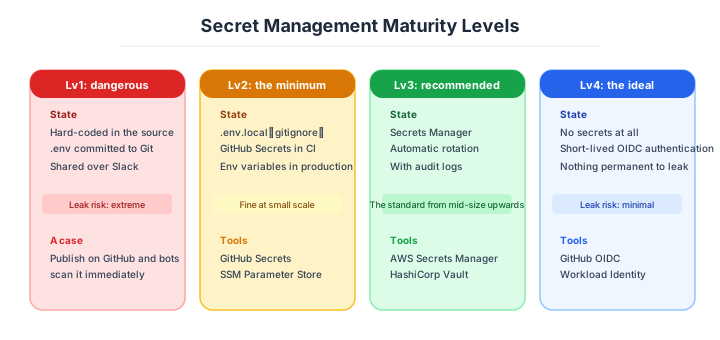
The mechanism that auto-detects whether secrets are mixed into source. GitHub provides Secret Scanning as standard on all repos, with auto-notifications when major-service API keys are detected.
| Tool | Use case |
|---|---|
| GitHub Secret Scanning | GitHub standard, free |
| GitLeaks | OSS, pre-commit-hook detection |
| TruffleHog | OSS, full Git-history scan |
| Detect-secrets | OSS by Yelp |
| GitGuardian | SaaS, high-feature |
Running GitLeaks in pre-commit hooks detects accidental mixing at commit time. The last bastion preventing “noticing after committing” - ideally distributed to all developers.
Rotation is the other half of the lifecycle.
The principle is always periodically changing secrets. Since you can’t know when leakage occurs, periodic invalidation is the only defense. Manual rotation is always forgotten, so accept that automation is required.
| Secret type | Recommended frequency |
|---|---|
| DB passwords | 30-90 days |
| API keys | 30-90 days |
| TLS certs | 60-90 days (Let’s Encrypt is auto) |
| OAuth refresh tokens | Per session |
| Encryption keys | Annually |
| Service accounts | 30 days |
AWS Secrets Manager and Vault have auto-rotation features, updating without human intervention. Design with the acceptance that “rotation that doesn’t run unless humans touch it” doesn’t exist.
Zero-secret architecture — not holding a secret at all
Stepping further, designs that don’t have secrets are a strong modern option. Using IAM Role, Workload Identity, IRSA (IAM Roles for Service Accounts), distributing permanent API keys to apps becomes unneeded.
| Tech | Use case |
|---|---|
| AWS IAM Role | EC2/Lambda/ECS auto-fetch temporary credentials |
| GCP Workload Identity | GKE, Cloud Run |
| Azure Managed Identity | Azure overall |
| IRSA | EKS (K8s Pod → AWS API) |
| OIDC Federation | GitHub Actions → AWS temporary auth |
When deploying from GitHub Actions to AWS, the new best practice is also taking temporary auth via OIDC without API keys. Reducing permanent secrets reduces what can leak in the first place.
Three scenarios
If you are building solo or on a small team
GitHub Secrets, AWS SSM Parameter Store and a .env.local are enough. Use .env.local (git-ignored) while developing, GitHub Secrets in CI/CD, and Parameter Store in production. GitHub’s Secret Scanning is free and on by default, so this minimum setup costs essentially nothing.

If you are a small or mid-size SaaS
AWS Secrets Manager, OIDC Federation and GitLeaks is the combination to aim at. Run automatic rotation in Secrets Manager, go key-less from GitHub Actions to AWS through OIDC, and put a GitLeaks check in pre-commit. The point is to move towards a design that holds as few permanent API keys as possible.
If you are a large or regulated enterprise
On multi-cloud that means HashiCorp Vault, Workload Identity and a dedicated operations team, moving towards dynamic secrets that eliminate permanent ones entirely. In finance, healthcare and government it goes further: Vault Enterprise with a FIPS 140-2 certified HSM, audit logs and segregation of duties. This is a world that asks not for “we do that” but for “we can prove it,” and only a complete trail of issuance, use and change gets you through the audit.
AI decision axes — Never show the AI a secret
Secret leakage to AI tools has become a new risk path
In development flows using AI coding assistants (GitHub Copilot, Claude Code, Cursor, etc.), there’s a risk of .env file and config file contents entering AI context. Incidents where AI proposes code containing secrets as part of API responses and it gets committed as-is have also been reported.
Countermeasures needed:
- Set
.envfiles as AI tool exclusions (.cursorignore,.github/copilot-ignore, etc.) - Run GitLeaks/truffleHog in pre-commit hooks to prevent secret commits
- Document operational rules against pasting secret variable values into prompts
Going secret-less is the ideal form for the AI era
Using OIDC Federation and Workload Identity enables configurations where CI/CD pipelines and inter-service communication hold zero API keys. When deploying from GitHub Actions to AWS, the OIDC-token approach for obtaining temporary credentials eliminates the need to store long-term keys in repository Secrets.
With zero secrets, the risk of leaking into AI context is also zero. Going secret-less is the best strategy for both security and AI utilization.
Pitfalls and forbidden moves
Here are the six most dangerous ways to have an accident with secrets. Every one of them leads straight to a leak becoming unauthorised access.
| Forbidden move | Why it is bad → what to do instead |
|---|---|
| Hardcoding it into source | it stays in Git history for ever; this caused the Uber breach of 57 million records → centralise in Secrets Manager |
| Committing .env to Git | bots pick it up within seconds and start a Bitcoin miner → gitignore it first, and rotate immediately if it escapes |
| Sharing in plaintext over Slack, email or a wiki | it leaks through log archives, and leavers can still read it → distribute through Secrets Manager |
| Sharing one common secret among everybody | there is no way to trace who leaked it → issue individually regardless of headcount |
| Printing secrets to the log | they are stored for ever in the log service and leak from there → make masking mandatory |
| Operating without rotation | no insurance against the assumption that it eventually leaks → configure automatic rotation |
Do not grow over-confident that “it is safe because it is encrypted.” If the decryption key sits in plaintext beside it the encryption means nothing, so separating key from ciphertext through KMS or Vault is essential.
Author’s note - cases where “just one accidental commit” tilted a company
Cases where accidental secret commits link directly to billions in damage have become half-perennial industry talking points.
The 2016 Uber data-leak incident exploited AWS credentials remaining on an internal engineer’s private GitHub, leaking about 57M drivers/users’ data. Uber initially concealed the fact and paid the attackers $100,000 in the name of a “bug bounty” to delay disclosure - resulting in subsequent class-action settlement on the order of $148M. A textbook case where “just one API key” damaged company reputation and finances simultaneously.
Another - in 2023, a Samsung semiconductor-division engineer pasted confidential source code into ChatGPT for consultation, putting the confidential code into a state where it could become external training material - reported as an incident, and the company banned business ChatGPT use company-wide. An AI-era-specific case where the act of “pasting into the prompt area” surfaced as a new leakage path.
Both are cases where one person’s slip-up shook the whole organization’s reputation, slapping home the importance of defending by mechanism (Secret Scanning, AI-purpose filters, going secret-less). Designs depending on individual care break down probabilistically someday - the architect’s responsibility is building mechanisms on that premise.
What to decide - what is your project’s answer?
For each of the following, try to articulate your project’s answer in 1-2 sentences. Starting work with these vague always invites later questions like “why did we decide this again?”
- Secrets Manager selection (AWS / Vault / Doppler)
- Dev-environment separation (no production secrets on dev PCs)
- Secret Scanning introduction (GitLeaks / GitHub standard)
- Rotation frequency (30-90 day standard)
- Scope of going secret-less (IAM Role, Workload Identity)
- Policy during AI development (hiding from AI)
- Incident-response procedures (immediate revocation, incident response)
Related Articles
Summary
This article covered secret management, including Secrets Manager, Secret Scanning, auto-rotation, going secret-less with IAM Role/OIDC, and design that doesn’t show secrets to AI.
No hardcoding, auto-rotation, aim for going secret-less, Secret Scanning + hide from AI. That is the practical answer for secret management in 2026.
Next time we’ll cover vulnerability assessment (SAST, DAST, SBOM, dependency-library management).
Back to series TOC -> ‘Architecture Crash Course for the Generative-AI Era’: How to Read This Book
I hope you’ll read the next article as well.
Also popular with readers
📚 Series: Architecture Crash Course for the Generative-AI Era (58/95)