About this article
As the sixth installment of the “Security Architecture” category in the series “Architecture Crash Course for the Generative-AI Era,” this article explains zero trust.
The security philosophy of “Never Trust, Always Verify” - with Google BeyondCorp as the prototype. This article covers the 5 zero-trust principles, the components of ZTNA/SASE/microsegmentation/continuous monitoring, a phased introduction roadmap, and the AI-era new common sense of treating humans and AI agents as equals.
Before you read this
This article uses a good deal of security vocabulary — authentication, authorization, encryption. If that is unfamiliar, reading the primer "Security and Authentication" first makes it far easier to follow. You can also look anything up in the glossary as you read.
What is zero trust in the first place
Think of airport security. Every passenger — even airline employees — goes through baggage inspection, passport verification, and identity check at the boarding gate. There is no “they’re staff, so face-pass is OK” system.
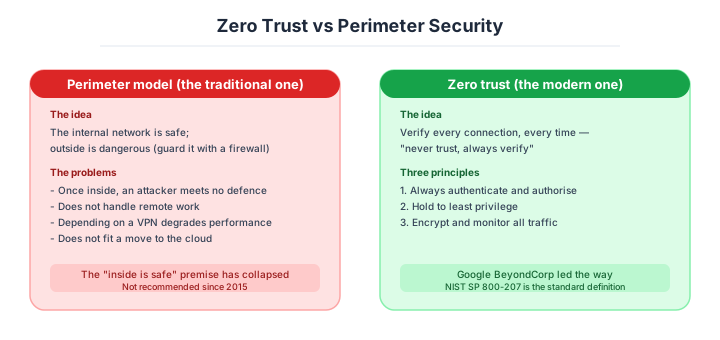
Zero trust applies the same idea. Rather than unconditionally trusting someone because they’re on the internal network, it’s a security model that verifies every access every time. Who is the user, is the device safe, is the location legitimate, is the time of day unusual — these contextual signals are comprehensively evaluated to allow or deny access each time.
Without zero trust, an attacker who breaches the internal network once can freely move anywhere. In practice, many large-scale data breaches started from a small entry point but expanded through lateral movement inside.
Why it is needed — castles and moats can no longer hold
Traditional perimeter-based security rested on the premise that “the corporate LAN is safe and everything inside the VPN is trusted.” Three realities have collapsed that premise.
First, the perimeter has disappeared. Staff work remotely, data lives in SaaS, servers live in the cloud — there is no longer any such thing as “inside the company,” and no boundary can be drawn physically. Second, insider threats and lateral movement. Break one PC and an attacker can move laterally across the LAN, so preventing the damage from spreading after a breach requires a design that does not trust the inside either. Third, with Salesforce, Slack, GitHub and AWS, everything is outside: all traffic passes beyond the boundary, and perimeter defence simply stops functioning.
Note that zero trust is a philosophy, not a product. There is nothing you can install and be finished; it is a company-wide change of design.
The five principles of zero trust, and how it differs from the perimeter model
Basic principles of the zero-trust architecture defined in NIST SP 800-207. Stick to these and you automatically become zero trust - the guideline.
| Principle | Content |
|---|---|
| Treat all resources as protected | Data, devices, users - all |
| Encrypt and authenticate all communication | mTLS even for internal communication |
| Per-session access decisions | Verify every time, continuous verification |
| Apply dynamic policies | Decide by context (location, time, device) |
| Monitor and log all access | Traceable later |
The difference from the perimeter model comes down to one table.
| Perimeter (legacy) | Zero trust | |
|---|---|---|
| Trust criteria | Network location | Authentication, context |
| Verification frequency | Once at gate | Every request |
| Internal communication | No encryption | Always encrypted |
| VPN | Central | Unneeded (move to ZTNA) |
| Access unit | Network | App/resource unit |
| Design premise | Inside is safe | Trust nothing |
Perimeter is “castle + moat,” zero trust is likened to checking ID one by one no matter who arrives.
The main components
Identity and authentication — the foundation of everything
The core of zero trust is a robust auth/authorization foundation. With weak identity verification, no amount of communication verification matters. IAM, MFA, passkeys, and SSO are the foundation of zero trust.
| Element | Role |
|---|---|
| ID provider (Okta, Azure AD) | Centrally manage IDs |
| MFA required (FIDO2 recommended) | Prevent impersonation |
| Device authentication | Reject unmanaged endpoints |
| Conditional access | Decide by location/time/device |
| Continuous authentication | Re-verify during session |
ZTNA — the successor to the VPN
ZTNA is the mechanism for per-app access, replacing VPN. VPN connects you to the whole network, but ZTNA individually controls “this user can connect to only this app.” Lateral movement on VPN breach is fundamentally prevented.
| Service | Characteristics |
|---|---|
| Cloudflare Access | Easy, Cloudflare-integrated |
| Zscaler Private Access | Enterprise |
| Tailscale | WireGuard-based, simple |
| Twingate | Developer-oriented |
| Palo Alto Prisma Access | Full set |
ZTNA is easier to set up than VPN, with good UX too. For new builds, ZTNA over VPN is the top candidate.
SASE — network and security combined
SASE is a cloud service integrating network + security, gaining attention as a zero-trust implementation form. ZTNA, SWG (Secure Web Gateway), CASB, and FWaaS are provided on one platform.
| Component | Role |
|---|---|
| SWG | Filter Web-borne threats |
| CASB | Visualize and control SaaS use |
| ZTNA | Per-app access |
| FWaaS | Cloud firewall |
| DLP (Data Loss Prevention) | Prevent sensitive-data leaks |
Representative services: Zscaler, Cloudflare One, Palo Alto Prisma, Netskope.
Microsegmentation and continuous monitoring
A design that finely partitions the network and minimizes inter-service communication. Using a Service Mesh (Istio, Linkerd), you can mTLS-mutual-authenticate all inter-microservice communication, preventing lateral movement to others if one service is breached.
| Technology | Use case |
|---|---|
| Istio / Linkerd | Service mesh inside Kubernetes |
| Calico / Cilium | K8s network policies |
| Consul Connect | HashiCorp’s service mesh |
| AWS App Mesh | AWS-integrated |
The other half of this component is continuous monitoring. What characterises zero trust is that one verification is never the end of it: you need mechanisms that keep watching during a session and strip permissions the moment something looks wrong.
| Element | Role |
|---|---|
| SIEM | Log integration, correlation analysis |
| SOAR (Security Orchestration, Automation, and Response, security-response automation) | Auto-response, playbooks |
| UEBA (User and Entity Behavior Analytics, anomaly detection of user behavior) | Behavior analysis, anomaly detection |
| XDR | Multi-layer integrated detection |
Anomalies like “logged in at 5pm weekday → 3am from overseas IP” can be auto-detected by UEBA and temporarily suspend permissions.
Google’s BeyondCorp
The most famous implementation example of zero trust is Google’s BeyondCorp. Triggered by a 2009 attack from China (Operation Aurora), they took the bold design step of abolishing VPN entirely and treating all employees as external.
| BeyondCorp features | Content |
|---|---|
| No VPN | Direct via internet |
| Device certificate required | Only managed endpoints allowed |
| Context decisions | Decide by location, device state |
| Per-app access | Not per network |
Google employees connect to business apps the same way from anywhere - no distinction between office, home, or cafe. The state of “the concept of connecting to the corporate LAN doesn’t exist at Google.”
The December 2020 SolarWinds incident had attack code embedded in trusted monitoring software’s update files, allowing legitimate-route intrusion into about 18,000 organizations’ “insides,” including US government agencies. A path with the “trusted” label is the largest attack surface - a case driving home the necessity of zero trust.
A realistic adoption roadmap
Zero trust is an organisational change that cannot be achieved overnight. Rolling it out company-wide in one go stops the business, so adoption runs in stages over several years.
| Phase | Rough duration | What you implement | Effect |
|---|---|---|---|
| Phase 1: IAM foundation | up to 6 months | IdP (Okta / Entra ID) + mandatory MFA | the base against impersonation |
| Phase 2: Device management | up to 1 year | MDM (Jamf / Intune) + device certificates | unmanaged endpoints blocked |
| Phase 3: ZTNA | up to 1.5 years | phased VPN → ZTNA migration | per-application access control |
| Phase 4: Microsegmentation | up to 2 years | Service Mesh + mTLS on all traffic | lateral movement blocked |
| Phase 5: Continuous monitoring | up to 3 years | SIEM + UEBA + SOAR | automated detection and response |
“The first step is strengthening IAM and MFA.” Neglect phase 1 and adding ZTNA alone achieves nothing — once somebody is impersonated, the rest is meaningless. Investing six months to a year in that first foundation decides whether the whole zero-trust programme succeeds.
Three scenarios
If you are building solo or at a startup
Start on the free tiers of Google Workspace and Cloudflare Zero Trust. Do not introduce a VPN at all; protect internal tools with Cloudflare Access. Manage company-issued machines with MDM and forbid work access from personal devices. Even across the whole company this stays within a few hundred dollars a month, and it already gives you stronger defence than a mid-size company on a perimeter model.
If you are a small or mid-size SaaS company
Okta plus Cloudflare One (SASE) plus Jamf or Intune is the standard combination. Centralise every SaaS behind SSO, and routing all web traffic through SASE lets you apply DLP and filtering in one place. For an existing VPN, the realistic path is to replace it gradually — new applications on ZTNA — and retire it.
If you are a large enterprise
Entra ID plus Zscaler plus a SIEM such as Sentinel or Splunk. Switching the existing VPN off in one move halts the business, so new applications run on ZTNA while existing ones stay on the VPN, and the replacement runs on a three-to-five-year plan. In finance, healthcare and government, implementing every element of NIST SP 800-207 is joined by investment in “continuous monitoring” through UEBA and SOAR, and in a 24/7 SOC — the highest priority of all.
AI decision axes — Include AI agents among the things you verify
Designing AI agents as zero-trust subjects
AI agents need to be treated as zero-trust subjects just like human users. When an agent accesses a DB, it must pass authentication and authorization each time, record operations in audit logs, and revoke tokens immediately when anomalous patterns are detected (mass SELECTs, access to unusual tables).
The legacy design of “giving service accounts strong permissions and leaving them” results in massive damage if an AI agent is compromised (via prompt injection, etc.). Minimizing agent operation scope and having mechanisms to immediately halt on anomaly is a prerequisite.
Combining continuous verification with AI anomaly detection
Zero trust’s “continuous verification” is the mechanism of constantly monitoring user/agent behavior even after session establishment. Implementing UEBA (User and Entity Behavior Analytics) with AI enables automatic detection of anomalies like “this user normally only logs in 9am-6pm but is accessing at 3am” or “this agent normally makes 100 API calls/min but suddenly jumped to 10,000/min.”
Automating the post-detection response (token revocation, access blocking, admin notification) minimizes damage without waiting for human on-call response.
Pitfalls and forbidden moves
Here are the six most dangerous ways to have an accident adopting zero trust. Every one has the structure of mistaking it for something you can buy.
| Forbidden move | Why it is bad → what to do instead |
|---|---|
| Believing that buying a product makes you zero trust | the philosophy, the design and the operation are the substance → drive it as a company-wide change involving management, HR, infrastructure and development |
| Adopting ZTNA while deferring IAM and MFA | once somebody is impersonated the rest is meaningless → build up from phase 1, IdP plus MFA |
| Retiring the VPN in one move to go to ZTNA | existing applications stop the business → run new on ZTNA and existing on VPN in parallel, migrating in stages |
| Allowing work access from personal devices with no device verification | a malware-infected endpoint connects straight in → require MDM and device certificates |
| Leaving internal traffic in plaintext | lateral movement takes every service at once → put all traffic on mTLS through a service mesh |
| Not disabling permissions for leavers and transfers immediately | the pattern of the 2020 Twitter internal-tool breach → link joiners and leavers to permissions through central IdP management |
Author’s note - cases where the “trusted path” was the largest attack surface
How dangerous the premise of “the inside is trusted” is - a lesson recent large-scale incidents have driven home, told as a perennial talking point.
The December 2020 SolarWinds incident (Sunburst attack) had attack code embedded in trusted monitoring-software update files, allowing legitimate-route intrusion into about 18,000 organizations’ insides, including US government agencies (Treasury, Commerce, Homeland Security). It decisively demonstrated zero trust’s necessity that “a path labeled ‘trusted vendor’ becomes the largest attack surface,” changing CISOs’ (Chief Information Security Officer) recognition worldwide.
Another, the same-2020 Twitter internal-tool breach incident, where social engineering (spear phishing) stole some employees’ credentials, hijacking notable accounts like Obama/Biden/Elon Musk from the internal management tool. A case making clear the reality that the implicit trust of “internal tools are touched only by internal people” was actually held up by a state without MFA or device verification.
I myself, in a previous job, watched a near-miss where a retiree’s account remained valid for nearly half a year because of believing “the inside is safe” with just VPN configuration, and the person, without malice, connected to the dev environment. Both are cases where the trusted path was struck, retroactively backing up Google’s correctness in choosing to abolish VPN entirely with BeyondCorp after the 2009 Operation Aurora.
The thinking of always re-asking “who, on which device, is connecting now” is the core of zero trust.
What to decide - what is your project’s answer?
For each of the following, try to articulate your project’s answer in 1-2 sentences. Starting work with these vague always invites later questions like “why did we decide this again?”
- IdP selection (Okta / Azure AD / Google Workspace)
- Scope of mandatory MFA (company-wide / managers only)
- Device management (MDM, Jamf/Intune etc.)
- ZTNA service (Cloudflare Access etc.)
- SASE introduction necessity (company-wide SASE or phased)
- Microsegmentation (Service Mesh etc.)
- SIEM/UEBA adoption (continuous monitoring)
Related Articles
Summary
This article covered zero trust, including the 5 NIST SP 800-207 principles, ZTNA, SASE, microsegmentation, continuous monitoring, a phased roadmap, and AI-era design treating humans and machines equally.
Phase from IAM+MFA, replace VPN with ZTNA, verify during sessions with continuous monitoring+UEBA, treat AI agents equally. That is the practical answer for zero trust in 2026.
Next time we’ll cover secret management (storage of API keys, passwords, certificates).
Back to series TOC -> ‘Architecture Crash Course for the Generative-AI Era’: How to Read This Book
I hope you’ll read the next article as well.
Also popular with readers
📚 Series: Architecture Crash Course for the Generative-AI Era (57/95)