About this article
This article is the second deep dive in the “System Architecture” category of the Architecture Crash Course for the Generative-AI Era series, covering the deployment model — “where to put the system, and who runs it.”
Whether you own the physical equipment, rent cloud, or mix both — this decision swaps initial cost, operating cost, security, and flexibility. The article covers the five forms (on-prem / public / private / hybrid / multi-cloud) plus configurations and selection flow by scale.
Before you read this
This article uses a good deal of infrastructure vocabulary — servers, networks and so on. If that is unfamiliar, reading the primers "Servers and the Cloud" and "How a Web Service Works" first makes it far easier to follow. You can also look anything up in the glossary as you read.
What is a deployment model in the first place
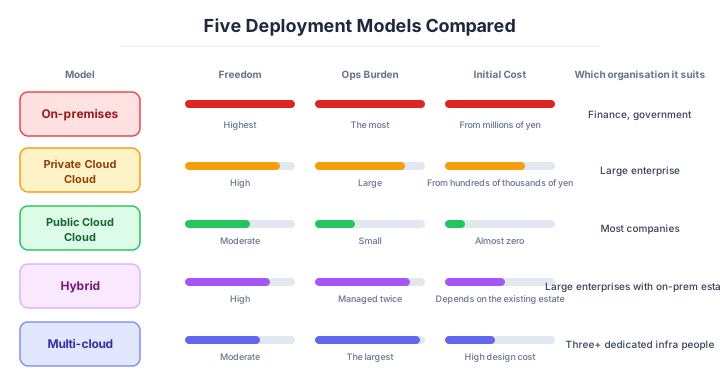
A deployment model is, roughly speaking, “the form of where you put the system and who takes care of it.”
Imagine restaurant real-estate strategies. Opening in your own building (on-premises) gives maximum freedom but costs a fortune in construction and maintenance. Leasing a tenant space (public cloud) is cheap up-front with shared facilities, but even changing the wall color requires following the building’s rules. You can also outfit part of your own building as tenant-style (private cloud), or mix both (hybrid). Which real-estate form you choose swaps initial cost, rent, freedom, and ease of exit — deployment model selection works exactly the same way.
Why deployment model selection matters
If you proceed without thinking it through, “cloud for now” can mean discovering six months later that regulations require domestic data storage — forcing an architecture rebuild. This is not just a technology decision; it’s a strategic call intertwining business, regulation, and technology.
Go the other way — hold the line on “we have always been on premises” — and adding servers takes three months while the business opportunity passes. Depending on which you choose, the initial cost, the running cost, the security posture and the flexibility all swap places wholesale.
In Japanese finance and the public sector in particular, legal constraints attach to cloud use itself, which makes this an area that a purely technical judgement cannot settle. Selecting a deployment model is a decision closer to the management layer, settled by business, regulation and technology together — not something engineers can decide on their own.
The five main forms
| Form | Substance |
|---|---|
| On-premises | Own and operate physical servers in-house |
| Public cloud | Shared use of AWS / Azure / GCP, etc. |
| Private cloud | Cloud environment dedicated to one organization |
| Hybrid cloud | On-prem and cloud coupled |
| Multi-cloud | Multiple clouds combined |
The majority of new systems are built on public cloud, but for established enterprises hybrid is the realistic answer. “Fully migrated to cloud” is actually a minority position; many large Japanese enterprises keep their core systems on-prem and only build new systems in cloud.
Where each one fits
Public cloud — the default for anything new
Public cloud is shared infrastructure provided by hyperscalers — AWS, Azure, Google Cloud — across many tenants. “Zero upfront, pay-as-you-go” is the structure that powered the post-2010 startup explosion.
| Pros | Cons |
|---|---|
| Near-zero initial cost | Customization limits |
| Pay-as-you-go cost optimization | Sharing physical resources with others |
| Usable from day one | Hard to satisfy strict security standards in some cases |
| Auto-scaling, resource changes | Vendor lock-in risk |
Representative services: AWS EC2 / S3 / Lambda, Azure VM / App Service, GCP Compute Engine / Cloud Run. 80%+ of new services are built on public cloud — the de facto default. Twenty years after EC2’s 2006 launch, “new = public cloud” is locked in.
Default new projects to public cloud. To pick anything else, be ready to explain “why not public cloud” — if you can’t, the call is emotional, not technical.
On-premises — it survives because there are reasons it survives
On-premises is the traditional model: buy and install physical servers, network gear, and storage in your own data center or server room. Before “cloud” existed as a concept, this was the only choice.
| Pros | Cons |
|---|---|
| Highest customizability | Very high initial cost |
| Physical isolation = high security | Hardware procurement takes weeks to months |
| Full control over latency | All ops in-house |
| Reuse existing assets | Disaster / outage recovery is hard |
On-prem still persists in financial-institution core systems, government agencies, healthcare, and manufacturing-control systems. The reasons are regulation, security requirements, and legacy weight — non-technical “things you can’t move” cases dominate. “It’s old so it’s still here” isn’t accurate; “there’s a reason it’s still here” is closer to truth.
Picking on-prem fresh in 2026 is rare. But adding features on top of existing assets still leaves on-prem as an option.
Private cloud — a dedicated environment for regulated industries
Private cloud is an independent cloud environment dedicated to one organization. The aim is reconciling “cloud flexibility” with “dedicated-environment safety,” common in finance, healthcare, and government.
| Type | Description |
|---|---|
| On-prem-style | Build a cloud environment in your own data center |
| Hosted-style | Carve out a dedicated section inside a major cloud (current mainstream) |
Hosted-style (AWS Outposts, Azure Stack, etc.) is the mainstream — “physically managed by the cloud provider but logically dedicated.” No need to build your own DC, lower initial cost, dedicated-environment safety preserved.
| Pros | Cons |
|---|---|
| Public-cloud flexibility | Higher cost than public |
| Higher security bar | Construction / ops effort |
| No noisy-neighbor effects | Resource provisioning may be slow |
Private cloud is the “hybrid of cloud and dedicated environment.” Particularly effective in regulated industries.
Multiple services are available depending on the isolation level required. Reason backward from the requirements: “how much do we actually need to isolate from others?”
| Service | Isolation level | Use |
|---|---|---|
| Amazon VPC | Logical (virtual network) | Most basic isolation |
| AWS PrivateLink | Internal traffic | Communication without traversing the Internet |
| Direct Connect / VPN | External traffic | Dedicated-line connection |
| EC2 Dedicated Hosts | Physical | Don’t share physical hosts |
| AWS Outposts | Site-level | AWS environment in your own DC |
Logical isolation via VPC is free and used by nearly all AWS users. Dedicated Hosts is the upper-tier option for finance / healthcare with “no physical sharing” mandates — a last-resort weapon. “Just in case” physical isolation balloons cost by multiples.
Raise isolation in steps as required. Excess maps directly to waste.
Hybrid cloud — where large enterprises realistically land
Hybrid cloud combines on-prem (or private cloud) with public cloud, integrated. For Japanese enterprises this is the actual center of gravity.
Typical patterns: “keep existing on-prem systems, build new on cloud,” “core on-prem, frontend on cloud,” “sensitive data on-prem, analytics on cloud.” With circumstances preventing full cloud migration (existing assets, regulation, audit, executive decisions), only new builds go to cloud — that’s hybrid in practice.
| Pros | Cons |
|---|---|
| Use cloud while keeping legacy systems | Hard to optimize cost |
| Physically isolate sensitive data | System and operations complexity |
| Phased cloud migration is possible | Need expertise in both |
The biggest reason to pick hybrid is the organizational reality of “want full cloud, can’t drop existing assets.” It’s a compromise stitching past and future, not a technical optimum. Operational cost is high; engineering load is heavy. Whether it’s healthy or pure debt depends on whether you frame it as “a transition midpoint” with a real plan to consolidate to a single cloud later.
Hybrid cloud is enterprises’ realistic landing zone. Full-cloud migration turns out to be unexpectedly hard.
Multi-cloud — only when there is a clear reason
Multi-cloud combines multiple public clouds — AWS + Azure, AWS + GCP. Goals are “avoid vendor lock-in” and “pick best-of-breed by use case,” but operational difficulty rises sharply.
| Pros | Cons |
|---|---|
| Best service per use case | System / operational complexity |
| Avoid vendor dependency | Hard to optimize cost |
| Distribute outage impact | Specialty knowledge per environment |
The thinking: “compute on AWS, AI on GCP, Office integration on Azure.” Beautiful in theory. Unifying ops, monitoring, and security across all environments is extremely hard, and many cases land at “don’t do it.”
“Just-in-case multi-cloud” is a textbook soft choice. Without specialists for both clouds, mid-sized teams take on operational debt the moment they adopt it. The practical floor for multi-cloud is 3+ dedicated infra engineers. Below that, update tracking, monitoring unification, and permission management alone melt the team.
Pick multi-cloud only with a clear reason. Defaulting to it spikes ops cost.
The truth about cost — cloud is not always cheaper
The conditioning “cloud is cheaper” isn’t always true; depending on scale and time horizon on-prem can be cheaper. Use TCO (Total Cost of Ownership) as the accurate comparison axis.
| Item | On-prem | Public cloud |
|---|---|---|
| Initial | Tens of thousands to millions of dollars | Near zero |
| Monthly | Depreciation + electricity + ops labor | Pay-as-you-go |
| 5-year TCO (small / mid) | Higher | Lower |
| 5-year TCO (large / heavy load) | Lower (long term) | Higher (load growth explodes cost) |
Famously, Dropbox in 2015-2016 ran the “Magic Pocket” project to migrate its storage backend from AWS to its own data center, and publicly reported tens of millions of dollars in annual cost savings over multiple years. Even Amazon internally is moving certain workloads back to in-house DCs.
Cloud is overwhelmingly better for “fast start, flexible,” but cost spikes when you use it heavily at scale. Not a panacea.
That said, this is the “Dropbox-scale” discussion. 90%+ of services close before they reach Dropbox scale, and the ones that do take 5-10 years. “We’ll be Dropbox-scale eventually so let’s start on-prem” is canonical premature optimization and almost always fails.
How to choose — three scenarios by scale
If you are building solo or at a startup — public cloud, plus a cost alert
There is no room to hesitate here. Build on a single public cloud, one region, managed services first. Choosing on-premises without a special reason is anachronistic, and it hurts hiring as well. The one defence to put in place immediately is a spending-limit alert (AWS Budgets or the equivalent). Once you have grown into an early-stage startup, make multi-AZ and IaC mandatory.

If you are a small or mid-size SaaS — the courage to lean on one cloud
A single cloud, multi-AZ, and IaC across the board is the basic shape, with a second region added for DR once the availability requirement rises. Taking multi-cloud early “to be ready for the future” is a textbook wrong move; adopting it when you actually need it is not too late. Until your scale genuinely suffers on one cloud, “the courage to lean on one” saves both operations and AI productivity.
If you are a large or regulated enterprise — hybrid, migrating in stages
If the existing on-premises estate is large, migrating in stages under a hybrid model is the realistic answer. Put a dedicated line (Direct Connect) and organisation-level governance in place, and unify the CIDR design and the identity platform (AD or IdP) before anything else. Finance, healthcare and the public sector start from a private cloud or a configuration that includes compliance certification, and checking the legal requirements on where data is stored (GDPR and similar) is mandatory.
A guideline by scale
Even within “public cloud,” the right configuration shifts with org size. Pair monthly cost guidance with the operational capacity required:
| Phase | Monthly infra (est) | Recommended | Dedicated infra people |
|---|---|---|---|
| MVP / individual | up to $300 | Single public cloud, 1 region, managed-first | 0 (split duty) |
| Early startup | $300-3k | Single cloud, multi-AZ, IaC mandatory | 0.5 (split duty) |
| Mid-sized SaaS | $3k-30k | Single cloud, multi-AZ + DR in 2 regions | 1-3 |
| Enterprise core | $30k+ | Hybrid (legacy + cloud), dedicated lines, AWS Organizations | 5+ |
| Finance / public / healthcare | Industry-dependent | Private cloud or hybrid + compliance certifications | 10+ |
The practical floor for multi-cloud / hybrid is 3+ dedicated infra people. Below that, just tracking updates, unifying monitoring, and managing permissions melts the team. Picking multi-cloud “for the future” is canonical soft choice — adopting only when needed isn’t too late.
Until single-cloud causes pain at your scale, “the courage to lean on one” saves operations.
AI decision axes — Does it close inside IaC?
With AI-driven development as the assumption, “does it complete in IaC” carries extremely heavy weight in deployment-model selection.
Why a single cloud raises AI accuracy
When having AI write infrastructure code, projects closed to only AWS or only GCP show clearly better accuracy than mixed projects. With a single cloud, AI can handle that cloud’s service names, config parameters, and IAM structure consistently. In multi-cloud, confusion between similar-but-different services (e.g., AWS ALB vs GCP Cloud Load Balancing) and applying one side’s best practices to the other increases.
This doesn’t mean “never do multi-cloud” — if choosing it, clearly separate each cloud’s IaC by repository/directory. Without clearly partitioning the context fed to AI, mixed configurations get generated, becoming a source of incidents.
How IaC + AI changes operations
With configs codified in Terraform, CDK, or Pulumi, AI can do the following:
- Create change PRs — just say “upgrade the RDS instance type to db.r6g.large” and an IaC diff PR appears
- Pre-estimate cost impact — combine with tools like
infracostto show monthly cost deltas before changes - Security policy checks — embed IaC static analysis (tfsec, checkov) in CI; AI proposes policy-violation fixes
Conversely, in GUI-configured environments, AI has no means to grasp infra state. When asked “tell me the current config,” it can’t answer — severely narrowing the scope of AI assistance.
The principle: not “AI can write it, so complexity is OK” — it’s “manage infrastructure in a form AI can read and write.”
Pitfalls and forbidden moves
Hybrid and multi-cloud double the operational cost from the moment you adopt them, so avoiding the forbidden moves alone prevents serious injury.
| Forbidden move | Why it is bad → what to do instead |
|---|---|
| Adopting multi-cloud at the start “just in case” | hiring specialists and unifying monitoring raises cost exponentially → start on one cloud and add when you need to |
| Using the same IP ranges on premises and in the cloud | routing collides when you connect over VPN or a dedicated line and nothing reaches → unify the CIDR design first |
| Running two identity platforms | passwords and permissions drift out of sync and audits stall → unify on one AD or IdP and federate |
| Not estimating data transfer volume | monthly transfers from cloud to on-premises alone produce five-figure bills as a matter of routine → cost it at design time |
| Moving everything off the cloud on the single argument that “cloud is cheap” | depending on scale, on-premises is sometimes cheaper → compare on three-year TCO |
| Not checking where the data is stored | storing in an overseas region can breach GDPR and similar → check the regulatory requirement first |
Author’s note — the weekend that produced the invoice
A common case at companies new to cloud: spin up a verification environment Friday night, forget to stop it over the weekend, hit Monday — bill comes in 10x the expected at month end. GPU instances, large RDS, and NAT Gateways spun up “just to try briefly” and forgotten to stop are the classic offenders.
Cloud’s “only what you use” banner trips you up because there are kinds of resources billed even when not used. NAT Gateways, ELBs, and unattached Elastic IPs are the canonical ones; the person who spun them up doesn’t notice while a few dollars/day melt.
The fix is simple: set cost-cap alerts (AWS Budgets, GCP Billing Alerts), notify on monthly threshold crossings. Cloud operations without these are an accident waiting to happen.
Cloud’s “pay-as-you-go” has parts billed even when idle. Cost alerts are mandatory.
What to decide — what is your project’s answer?
Articulate your project’s answer in 1-2 sentences for each:
- Base deployment model (Cloud / On-prem / Hybrid)
- Cloud vendor (AWS / GCP / Azure / domestic)
- Isolation level (shared / logical / physical)
- Data location (country, region, regulation handling)
- Existing-system integration
- Cost ceiling and monitoring
- DR / BCP (Business Continuity Plan) requirements
Recording the decision rationale
Deployment-model selection has a wide blast radius and high cost to reverse, so recording the rationale as an ADR (Architecture Decision Record) at decision time is strongly recommended. Here is a concrete example:
| Item | Content |
|---|---|
| Title | Run production on containers (ECS Fargate) |
| Status | Accepted |
| Context | Current EC2 manual provisioning takes 30+ minutes per deploy, and environment-drift incidents occur ~3 times/year. Goal: reduce ops load while improving deploy speed |
| Decision | Adopt AWS ECS Fargate and containerize all services |
| Rationale | - Eliminates EC2 OS management and patching, saving ~20 hours/month in ops - Container images lock the environment, eliminating “works in dev but not in prod” - Fargate is serverless, so autoscaling config is minimal |
| Rejected alternatives | EKS (Kubernetes): overhead too large for a 4-person team. Lambda: existing app is stateful, migration cost too high |
| Outcome | Containerization requires CI/CD pipeline setup. Dockerfile standardization and image scanning become additional tasks |
Store ADRs as Markdown in docs/adr/ in the code repo, approved through the same PR-review flow. Having “why we chose this” visible at a glance later is the greatest value of an ADR.
Related Articles
Summary
This article covered deployment-model selection — “where does the system live, and who runs it?”
Public cloud is the overwhelming default for new projects. Hybrid and multi-cloud should be limited to cases with clear reasons and the operating capacity. In the AI era, single-cloud-with-IaC’s advantage only widens.
The next article covers the biggest decision after picking public cloud: cloud vendor selection (AWS / Azure / GCP).
Back to series TOC -> ‘Architecture Crash Course for the Generative-AI Era’: How to Read This Book
I hope you’ll read the next article as well.
Also popular with readers
📚 Series: Architecture Crash Course for the Generative-AI Era (13/95)