About this article
This article is the first deep dive in the “System Architecture” category of the Architecture Crash Course for the Generative-AI Era series, covering the application form that gets decided first in system architecture.
PC-installed app, browser-based, or smartphone app — the answer to this question binds nearly every downstream design decision: who you hire, how you sell it, what your exit cost looks like. This article covers Native / Web (SaaS/PaaS/IaaS/FaaS) / Hybrid, the inner subdivisions, and case-by-case selection criteria.
Before you read this
This article uses a good deal of infrastructure vocabulary — servers, networks and so on. If that is unfamiliar, reading the primers "Servers and the Cloud" and "How a Web Service Works" first makes it far easier to follow. You can also look anything up in the glossary as you read.
What is application form in the first place
Application form is, roughly speaking, “the basic shape of how you deliver software to users and have them use it.”
Imagine restaurant business models. A brick-and-mortar shop (native app) offers the best experience but requires customers to visit. A delivery-only service (web app) is convenient but limited in what it can do. A food truck (hybrid app) takes the best of both but inherits the constraints of both too. Software is the same: whether you deliver via PC install, browser, or smartphone app determines everything from how you develop to how you sell to how you operate.
Why the choice of application form matters
If you leave the form selection ambiguous, porting a web app to native later requires UI rebuilds, offline support, and app-store review processes — effectively a new project. The form can’t be changed afterward.
Depending on the answer, the developers’ skill set changes, the way sales fights changes, and the shape of customer support changes with them. You hear of plenty of projects in the industry that “changed form partway through”, and it is not unusual for half the team to have left by the time it finished. The pattern that shows up most often is a startup deferring the decision with “let us build a prototype first” and then regretting it when the prototype’s form becomes the production form. The iron rule is to build the prototype in the form you intend to ship.
The three basic forms
| Form | Runtime | Examples | Suited case |
|---|---|---|---|
| Native app | On OS (built with OS-native APIs) | Photoshop, Excel, iOS apps | Games, 3D, direct HW control |
| Web app | In browser | Google, YouTube, Amazon | SaaS, enterprise, SEO-critical sites |
| Hybrid app | On OS (built with Web tech) | Electron, Flutter, React Native | iOS/Android dual-platform with a small team |
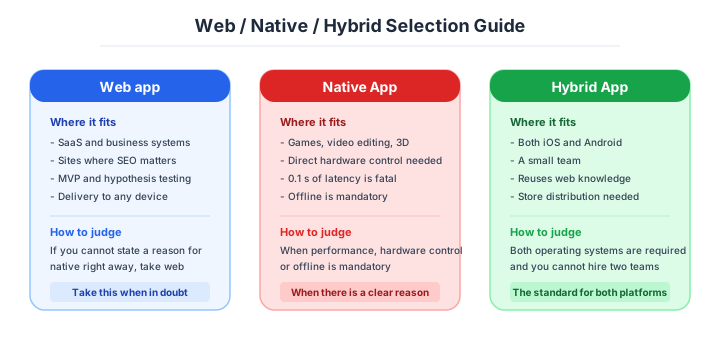
This split is by “where does the user interact with the app.” Native runs directly on the OS. Web opens via a URL in a browser. Hybrid is the middle ground: “runs on device but built with Web tech.”
The location of execution propagates through distribution method, performance characteristics, update workflow, and platform dependency. “Just pick whatever” is wrong. Projects that start without articulating why this form get warped mid-design. Build the prototype in the final form — the prototype tends to become production.
Native — unmatched on performance and hardware control
A native application runs directly on top of the device’s OS. Windows .exe, macOS .app, iOS/Android apps. Anything not going through a browser falls here.
Most of computing history was native-led. From 1970s mainframes through 1990s PCs, “using software” meant “installing from physical media.”
Native subtypes:
- PC software (accounting, image editing, games, etc.)
- Smartphone apps (LINE, Instagram, camera apps)
- Embedded systems (ATMs, vending machines, in-car nav)
- Batch processing (nightly batch, ETL)
Native’s biggest weapons are performance and direct hardware control: GPU for real-time rendering, raw camera-sensor access, fine-grained Bluetooth control, full-speed local storage. These cannot realistically be done through a browser sandbox (the security mechanism limiting Web code’s execution privileges). Video editors, games, 3D modeling, embedded devices, and high-frequency trading still belong to native.
The weakness concentrates around distribution and updates: store-review delays, prompting users to update, OS-specific implementations. Teams that have waited two weeks on App Store review only to be rejected stop picking native casually. Web and hybrid spread because they escaped these chains. But native still has problems only it can solve.
Embedded, gaming, creative — still native’s territory. If 0.1-second latency or direct hardware control is in play, pick native without hesitation.
Web — delivered with zero friction
 A Web app runs HTML, CSS, and JavaScript in the browser. Gmail, Notion, Google Docs, Slack, Figma. Open the URL and use it — no install, no update prompt. That “zero-friction delivery” has fixed Web as the default candidate for new projects.
Two technical inflection points:
- Ajax (Asynchronous JavaScript and XML — async communication without full page reload) around 2005, enabling “update the screen without navigating” and bringing near-native interactivity to the Web.
- SPA (Single Page Application — all navigation handled within a single loaded page) maturing in the late 2010s, producing “Web but feels like an app” products like Gmail and Notion.
From the developer’s view, Web’s biggest weapon is structural: distribution friction goes to zero. One deploy and every user is on the latest version. Find a bug, ship the fix in 30 minutes. The lean development cycle this enables is a major reason SaaS exploded over the past 20 years.
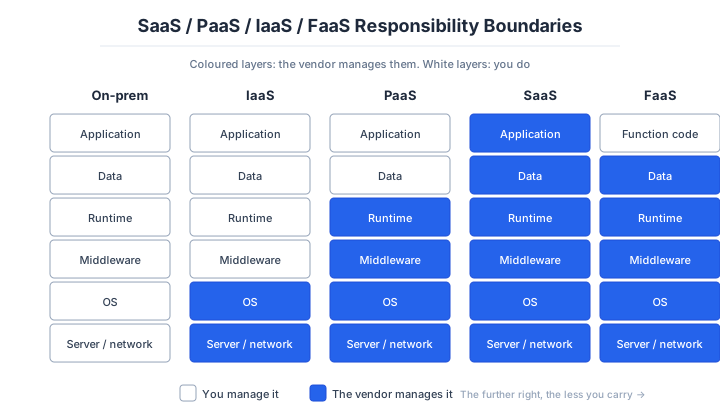
Web apps subdivide into four service models:
- SaaS (Software as a Service) — finished application provided as-is.
- PaaS — development platform rented out.
- IaaS (Infrastructure as a Service) — virtual servers rented out.
- FaaS (Function as a Service) — submit just a function, runs only when called.
Vehicle analogy: SaaS is a dispatch taxi, PaaS is car-share, IaaS is a monthly parking lot, FaaS is on-demand taxi. The only difference is how much you want to maintain yourself. The choice trades scope of management (= responsibility) against degree of freedom.
Web’s strength is the single point of “no install, instant delivery.” All business advantages chain off that.
SaaS is the consumption end of that.
SaaS rents finished applications over the Internet. Gmail, Notion, Slack, Google Workspace, Salesforce. Browser + login = usable in one second. Software is “used,” not “owned”, billed monthly or annually.
The substantive innovation isn’t “runs on the Web” — it’s multi-tenant architecture: one application serving multiple customers (tenants) with logically isolated data, sharing common infrastructure across all customers. When Salesforce introduced this in 1999, traditional packaged-software vendors dismissed it as “unthinkable to put data on shared servers.” Today most business software has fully migrated to SaaS.
| Pros | Cons |
|---|---|
| Available worldwide | Low customizability |
| No install needed | Vendor outages affect you |
| Independent of client performance | Vendor lock-in |
| Always latest features | Recurring fees, no offline |
The technical definition (multi-tenant) and the business definition (any subscription web service) often diverge. When someone says “this is also SaaS,” confirm which sense they mean. Single-tenant (an isolated instance per customer) significantly increases the operational burden, often degenerating into custom-build territory. Mixing them up will throw your estimate off by an order of magnitude.
For a new B2B/B2C product, defaulting to SaaS-only is the rule. If you can’t write the reason to skip it in 1 minute, don’t skip it.
PaaS sits a layer lower.
PaaS rents the entire app runtime. OS, middleware (software between OS and app providing shared functionality), runtime (the system that executes programs), scaling (auto-adjusting server count under load) — pre-configured. Developers just write code. git push and the deploy is done; load goes up and instances scale automatically. Heroku (launched 2007) cemented this experience.
PaaS’s substance is removing “OS and middleware fiddling time” from the developer’s job. Server-OS updates, nginx (high-performance web-server software) configuration, automatic SSL renewal, deploy scripts — these tasks unrelated to the app’s core value get delegated to the PaaS vendor.
| Pros | Cons |
|---|---|
| Higher dev productivity | Less freedom than IaaS |
| Lower cost (no upfront) | Vendor lock-in |
| Easy environment cloning | Cannot run offline |
| Auto-scaling | Hard to handle unique requirements |
Examples: Heroku (the original; lost ground for personal use after free-tier removal in 2022), Vercel (Next.js-focused), Fly.io / Render / Railway (newer crowd that filled the post-Heroku free-tier gap), Cloudflare Pages, Salesforce Platform, and the AWS/GCP/Azure managed-service families (App Runner, Cloud Run, App Service, etc.).
In 2026, the first choice for personal use is Fly.io / Render / Railway. For a commercial startup, Vercel (frontend) + Cloud Run / App Runner (backend) is the combo.
Default new apps to PaaS. Going down to IaaS is allowed only when “why PaaS doesn’t work” can be answered in 1 minute. Legitimate reasons: special kernel modules required, GPU instances required, direct integration with existing VPC (Virtual Private Cloud — logically isolated private network in cloud) resources, compliance requiring auditable OS images. Outside those, PaaS is safer. “IaaS just feels cheaper” ignores the fact that operational labor cost makes a $300/month IaaS effectively $3,000/month in real terms.
IaaS gives you the machine and the responsibility with it.
IaaS rents virtual servers over the Internet. AWS EC2, Google Compute Engine, Azure Virtual Machines. The most straightforward form: “rent a server monthly.”
Until AWS EC2’s 2006 launch, “server” meant on-prem (physical machine, power, network — capital expenditure of thousands of dollars and weeks of lead time). EC2 changed that to “minutes and a credit card.” Airbnb, Dropbox, and Slack are all children of the EC2 era — without that shift, most “unicorns” wouldn’t exist.
| Pros | Cons |
|---|---|
| High freedom (anything possible) | Specialty knowledge required |
| Cheaper than on-prem | OS / middleware management on you |
| No hardware to buy | Security is your job |
| Easy BCP setup | Cost can exceed PaaS |
Since Heroku in 2007, “PaaS is even easier” spread, and demand drifted toward higher abstraction. Docker (2013 — packaging app + runtime into a lightweight container) and Kubernetes (2015 — container orchestration) further reduced the necessity of bare IaaS. Today, picking pure IaaS is reserved for compliance constraints or special requirements PaaS can’t meet. “Educational” is a soft choice — what you should learn on work hours is the app’s value, not how to apply OS patches.
FaaS bills only for what runs.
FaaS runs a single function only when called. AWS Lambda (launched 2014), Google Cloud Functions, Azure Functions, Cloudflare Workers — pure pay-as-you-go, $0 when idle. “Serverless” as a term landed via this model.
FaaS’s substance is the redefinition of infrastructure from “always running” to “runs only when called.” Traditional servers charged whenever they were on, even at zero traffic. FaaS bills only on “execution time × memory × request count,” so a job hit a few times a month costs effectively zero.
Nightly batch, Webhook (HTTP callback fired on external-service events) handlers, admin APIs, image-thumbnail generation — for these intermittent workloads, FaaS dominates.
| Pros | Cons |
|---|---|
| Implementation without environment concerns | Less customization |
| Pay-as-you-go (cheap) | Cold starts (first-call latency) |
| Auto-scaling, infinite parallelism | Hard to debug |
| Quick to ship | Limited execution time (minutes) |
Running an always-on web server on FaaS is a textbook bad fit. When traffic pauses the container is destroyed, and the next request needs to recreate it — the cold start problem. Node.js: 100-500 ms penalty per cold start. JVM-class: 2-5 seconds. This degrades UX consistently — users don’t distinguish “system is slow” from “my connection is slow.” For always-on APIs, just pick PaaS or container services. Don’t use FaaS for always-on APIs — that’s the classic early landmine.
Hybrid — two operating systems from one codebase
Hybrid apps wrap a Web-tech (HTML/CSS/JS) implementation in a native shell for distribution. Mostly used for mobile, where covering iOS and Android with one codebase is the biggest weapon. For projects without the budget to hire separate teams per OS, hybrid is the de facto standard.
Two lineages:
- WebView-style (Cordova, Ionic): embed a browser inside the native app to render Web pages. Easier to implement; behaves like a browser, often heavy.
- Native-rendered (React Native, Flutter): code in JS or Dart, mapped to native UI components. Lighter, closer to native UX. The 2026 default.
Traits:
- OS-independent (the main feature)
- Easier hiring (Web engineers can do it)
- Tends to feel heavier than native
- Can feel browser-like in interactions
Major examples: React Native (Meta), Flutter (Google), Ionic, Electron (desktop). Flutter and React Native are the default for projects that can’t afford separate iOS/Android teams. A mixed model where critical screens stay native and the rest goes hybrid is also common (Instagram and Discord both run React Native + some native).
The known landmine in hybrid: deep native-feature access. Bluetooth fine-control, camera depth sensors, push-notification details — hybrid plugins often lag behind native API updates and break suddenly. Most “app crashes after OS update” stories trace back to plugins. iOS/Android dual-support starts from hybrid; pick native only when you can immediately answer “why hybrid won’t do.”
What decides between web and native
| Aspect | Web | Native |
|---|---|---|
| Distribution / updates | Open URL | App store |
| Cross-platform | Excellent | Poor (re-implement) |
| Performance | Mid to high | Highest |
| Direct hardware control | Limited | Full |
| Offline | Limited (PWA) | Excellent |
| Initial start | Slow | Fast (already installed) |
If any one of “0.1s latency is fatal,” “direct hardware control,” or “offline mandatory” is non-negotiable, pick native. Otherwise, Web. Games, video editing, CAD, medical-device UIs, and trading terminals fall on the native side. Look at how peers in your industry built it — copying the market’s revealed preference is faster than reasoning from first principles.
PWA (Progressive Web Apps) achieves “near-native” but iOS still imposes restrictions. For full features, go to hybrid or native.
Pitfalls and forbidden moves
Deciding to change the form of the application partway through is a rebuild in all but name. Here are the five most dangerous.
| Forbidden move | Why it is bad → what to do instead |
|---|---|
| Porting web to native “as it is” | copying a DOM-premised UI degrades both performance and experience → plan on rebuilding the UI |
| Using FaaS for a continuously running API | the cold start eats the user experience every time → use an edge runtime or a container |
| Leaning towards web while ignoring performance requirements | video editing, 3D and heavy data processing hit the browser’s limits → choose native once the requirement is settled |
| Choosing IaaS because “it will be a learning experience” | OS patching and certificate renewal stop the application making progress → start the production line on PaaS |
| Stopping the old form before migrating to the new one | there is nowhere to retreat to when something breaks, and the outage is total → run both for three to six months and switch in stages |
The scope of a migration has an iron rule too. A “big bang migration” that moves everything at once fails unless the system is genuinely small. The strangler pattern — replacing feature by feature or user by user — is the baseline, designed around a period where old and new run together. A migration with the retreat cut off is a gamble, not a design.
How to choose — three scenarios by scale
 The form is ninety percent decided by “who, where, and what they want to do.” Here are three typical cases.
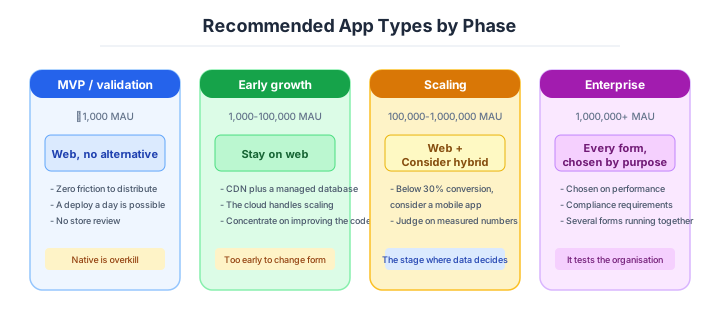
If you are building solo or at a startup — always validate on the web
Validate on the web without exception. Distribution has no friction, there is no review queue, and you can ship a fix the same hour. Going native before the demand is proven spends the review cycle and the build pipeline on something nobody has asked for yet.

If you are a small or mid-size SaaS — polish the web, decide on native by numbers
Keep improving the web experience, and decide on a native app from measurements rather than impressions: what proportion of use is mobile, what push notifications are worth, whether any hardware feature is genuinely required. Cross-platform frameworks keep one codebase across two systems.
If you are a large enterprise — run several forms, by purpose
The realistic answer is several forms in parallel, chosen by purpose: web for the administrative screens, native where the hardware matters, and a hybrid where reach matters more than depth. What is not realistic is unifying everything onto one form for tidiness.
A guideline by phase
The right answer changes with the phase, even for the same product.
| Phase | Rough MAU | The form to take |
|---|---|---|
| MVP / validation | up to 1,000 | Web (PaaS or serverless) |
| Early growth | 1,000 to 100,000 | Web (plus CDN and a managed database) |
| Scaling | 100,000 to 1,000,000 | Web, plus hybrid where it is needed |
| Enterprise | 1,000,000 and up | Web plus native plus embedded, by purpose |
AI decision axes — Does it close inside code?
With AI-driven development (vibe coding) as the assumption, the selection axis has shifted from “human learning cost” to “AI’s fluency.”
GUI dependence and proprietary consoles are heavy AI-era shackles. When two forms can satisfy the same requirements, pick the one that completes in code (Web / containers / IaC).
- Filter candidates by physical requirements (eliminate forms that can’t satisfy them).
- Decide the category by reach (worldwide browsers vs specific devices).
- Land on the realistic answer by dev resources (people, budget, skill).
- Use AI compatibility as the final differentiator.
Web applications are overwhelmingly favoured in AI generation accuracy.
In AI’s training data, Web-app implementation examples (HTML/CSS/JavaScript + backend API) outnumber native-app examples by an order of magnitude. Building a SaaS with React + Next.js, designing an API with Express + PostgreSQL, implementing UI with Tailwind CSS — all areas where AI generates at high accuracy.
In contrast, iOS (Swift/SwiftUI) and Android (Kotlin/Jetpack Compose) native apps have many spots where AI makes mistakes in OS-specific lifecycle management and permission design. iOS App Store review compliance and push-notification configuration in particular change spec per version, so AI-generated code sometimes uses outdated methods.
Cross-platform frameworks sit next in AI compatibility.
Cross-platform FWs like React Native and Flutter cover both iOS/Android from one codebase, so the context for AI is also a single set. Managing two platform-specific codebases means instructing AI the same fix twice, with mismatch risk.
Flutter’s unified widget system gives stable AI generation accuracy. React Native mixes platform-specific code in its native bridge configuration, so AI accuracy drops in those parts.
Backend-minimised stacks are the other pattern that suits this.
In the late 2020s, “rich frontend, ruthlessly minimal backend” took hold. Combine an idle-zero function-execution environment with a CDN-served frontend; no always-on server. Personal projects can run production for a few dollars a month or in free tiers.
| Pattern | Examples | Strengths | Weaknesses |
|---|---|---|---|
| FaaS | AWS Lambda | Rich info, exists on every cloud | Cold starts, 15-min timeout |
| Edge Runtime | Cloudflare Workers, Vercel Edge | Near-zero cold start, streaming | Partial Node compatibility, heavy compute weak |
| BaaS | Supabase, Firebase, Convex | Auth + DB + functions bundled | Strong lock-in (Firebase/Convex), pricing cliffs |
LLM streaming flipped Edge Runtime into the lead. For new projects with LLM streaming, Edge Runtime is the first candidate. FaaS lives in batch and webhook territory.
BaaS lock-in differs by product. Firebase and Convex depend deeply on proprietary APIs — escaping is essentially a rewrite. Supabase is Postgres-based open-source stack, and exit cost is comparatively light. Estimate “how many days to migrate if the vendor stops” before adopting.
”Picked IaaS to learn” — a weekend (industry case)
A standard rite of passage: starting a small SaaS as a side project, picking AWS EC2 because “it’ll be educational,” burning the weekend on nginx, systemd (Linux’s daemon manager), domain setup, manually starting PostgreSQL, writing the Let’s Encrypt (free SSL) renewal cron, and finally getting Hello, World on the Internet — completely exhausted.
At that exact moment, Heroku was doing the same thing in git push heroku main on its free tier. (Heroku’s free tier was retired in November 2022; Fly.io / Render / Railway now play that role.) For personal projects, “if you can’t write the reason not to use PaaS, use PaaS” is the only sane judgment. People who’ve touched both swear by it.
“Educational” and “product development” are different things. Learn infra outside work hours; ship products on PaaS. Mixing them evaporates time meant for the product. You don’t get that time back. The void after burning two days, then deploying on Heroku in 30 minutes, is the kind of feeling you only need to experience once.
“It’ll be educational” is the most expensive selection rationale. Bring it into a real project, and someone’s time melts.
What you must decide — what’s your project’s answer?
Articulate your project’s answer in 1-2 sentences for each item.
- Application form (Native / Web / Hybrid)
- Web service model (SaaS / PaaS / IaaS / FaaS)
- Target platforms (Windows / Mac / iOS / Android / Linux)
- Offline requirements
- Performance targets (latency, throughput)
- Distribution / update frequency and method
- Initial cost and operating cost ceilings
These belong to project week 1. Postponing means downstream choices proceed on tentative assumptions, and major rework hits when the form is finally locked.
Write your answers down as an ADR. A concrete guide to writing them is here.
Related Articles
Summary
This article covered the application form decision that comes first in system architecture.
When in doubt, Web. If the reason for native can’t be written on the spot, start with Web. Form is the most upstream irreversible decision; it deserves discussion until you can articulate it in week 1.
The next article covers the deployment model (on-prem / cloud / hybrid).
Back to series TOC -> ‘Architecture Crash Course for the Generative-AI Era’: How to Read This Book
I hope you’ll read the next article as well.
Also popular with readers
📚 Series: Architecture Crash Course for the Generative-AI Era (12/95)