About this article
This article is the sixth deep dive in the “System Architecture” category of the Architecture Crash Course for the Generative-AI Era series, covering the overall placement strategy for datastores.
In 2026, combining RDBMS, KVS, search engines, time-series DBs, vector DBs, and object storage by use case is the default. “What goes where” decides operating cost and latency. This article focuses on the system-wide placement strategy — category overviews, Polyglot Persistence, scaling, and backup design (per-app deep selection lives in the “Data Architecture” category).
Before you read this
This article uses a good deal of infrastructure vocabulary — servers, networks and so on. If that is unfamiliar, reading the primers "Servers and the Cloud" and "How a Web Service Works" first makes it far easier to follow. You can also look anything up in the glossary as you read.
What is a datastore in the first place
A datastore is, roughly speaking, “the collective term for mechanisms that store and retrieve data for an application.”
Imagine a library. Books go on shelves (RDBMS) in orderly rows, frequently referenced dictionaries sit on the counter (cache), and posters and photos go in a separate warehouse (object storage). Stuffing everything in one place makes it overflow and unsearchable — choosing the right storage location per use is what datastore placement strategy is about.
Why the placement strategy matters
Suppose you go ahead without thinking hard about where data lives. A system that starts from “let us put everything in the RDBMS for now” hits concentrated traffic six months later and responses pass ten seconds — and adding a cache in a hurry means rewriting the whole data-access layer of the application. Go the other way, pick NoSQL because it is fashionable, and realising later that “we needed joins after all” means migrating tens of millions of rows with days to weeks of downtime.
Datastore selection is the most irreversible judgment in system architecture. Application code can be rewritten, but DB migration after schemas and large data have piled up is orders of magnitude heavier — sometimes unavoidable days to weeks of downtime.
Covering everything with the familiar RDBMS alone is no longer the modern way. The current default combines RDBMS, NoSQL, cache, search, and object storage. “What you picked here” dictates the next 5-10 years.
This is a domain where “think about it later” doesn’t work. The first decision matters.
The four main categories
| Category | Use | Examples |
|---|---|---|
| RDBMS | Structured data, integrity priority | PostgreSQL, MySQL |
| NoSQL | Scale priority, flexible schema | DynamoDB, MongoDB |
| Cache | High-speed access, transient data | Redis, Memcached |
| Search engine | Full-text search, aggregation | Elasticsearch, OpenSearch |
Plus object storage (S3, etc.) for images, videos, attachments. The design sense of “which data goes where” decides app-wide performance and operating cost.
Where each one fits
RDBMS — start here
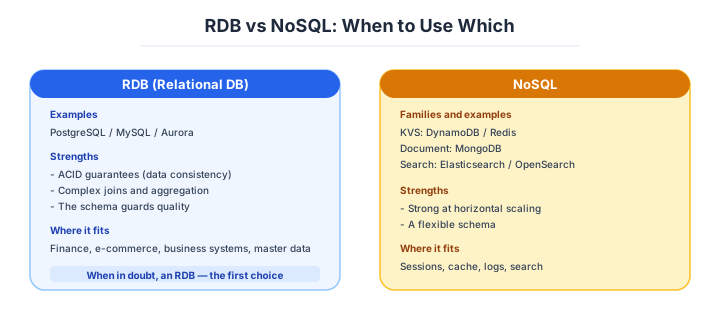
RDBMS stores data in tables and operates on it via SQL. ACID transactions (Atomicity, Consistency, Isolation, Durability) guarantee strong consistency, with overwhelming track record in finance and business apps where data correctness is non-negotiable.
| Product | Trait | Fits |
|---|---|---|
| PostgreSQL | OSS standard, JSON / full-text / GIS support | First choice for new development |
| MySQL | Adoption, lightweight, info density | Web services, legacy compatibility |
| MariaDB | MySQL fork, fully OSS | MySQL alternative, commercial avoidance |
| Oracle Database | Enterprise, feature-rich | Finance, core systems |
| SQL Server | Tight Microsoft integration | .NET / Windows |
| Amazon Aurora | MySQL/PG compatible, cloud-optimized | New AWS builds |
For new projects, PostgreSQL is the default unless there’s a specific reason. JSON type, full-text search, and GIS capabilities make it stand out in OSS for capability and extensibility. MySQL still works on legacy web services but new selections almost always favor PostgreSQL.
The first choice for new is PostgreSQL. When in doubt, start here.
NoSQL — once you genuinely need to scale
NoSQL (“Not Only SQL”) covers everything beyond RDBMS. The core traits are scale and flexible structure, splitting into four families:
| Family | Examples | Strong at |
|---|---|---|
| KVS (key-value) | Redis / DynamoDB / Memcached | Cache, sessions |
| Document | MongoDB / DocumentDB / Firestore | JSON, hierarchical data |
| Wide-column | Cassandra / HBase / BigTable | Time-series, write-heavy |
| Graph | Neo4j / Neptune | Social, relationship analysis |
NoSQL’s basic philosophy: “sacrifice RDBMS-grade integrity to scale.” Workloads like e-commerce catalogs, social-feed history, IoT logs — “large volumes written fast” — are where NoSQL shines. Conversely, picking it for an integrity-critical business app is a bad fit.
DynamoDB (AWS) and Redis are the two most-used NoSQL products in real work. Both are KVS but with clearly different strong suits.
DynamoDB is a fully managed distributed KVS — “write without thinking about scale” is the headline. It scales theoretically without limit and pairs well with serverless, often picked for high-traffic APIs. Joins and aggregation are weak; the mental model flips from RDBMS — “decide access patterns first, design tables second.”
Redis is the de facto in-memory cache. Sub-millisecond responses from in-memory data; broad utility for sessions, page cache, rate limiting, ranking (ZSET), Pub/Sub.
| Use | Recommended |
|---|---|
| Fixed-pattern, large-scale writes | DynamoDB |
| Sessions, page cache | Redis / ElastiCache |
| Real-time leaderboards / rankings | Redis (ZSET) |
DynamoDB for scale, Redis for cache. Different roles.
Search engines — once LIKE queries have got slow
Search engines are specialized DBs for fast searches across text content (articles, product descriptions). RDBMS LIKE '%kw%' is possible but unusable past tens of thousands of rows; the standard is to bring in a dedicated search engine.
| Product | Trait | Fits |
|---|---|---|
| Elasticsearch / OpenSearch | Full-text de facto, also log analytics | Serious search, log aggregation |
| Meilisearch / Typesense | Lightweight, modern, easy setup | Small/mid apps |
| PostgreSQL full-text | No extra DB needed; pg_bigm and similar | Small scale, easy start |
| Algolia | Managed SaaS, rich UI | Speed-priority services |
Japanese full-text search hinges on morphological analysis (Kuromoji) configuration. Without proper dictionaries, “Tokyo Metropolis” gets split into “Tokyo” and “Metropolis” with cascading missed matches.
Object storage — files do not belong in the database
Object storage holds images, videos, PDFs, etc. Putting images directly into RDBMS bloats the DB and tanks performance — “metadata in RDBMS, blobs in object storage” is the basic split. Not following this is a textbook landmine.
| Service | Provider | Trait |
|---|---|---|
| Amazon S3 | AWS | Industry de facto, rich integrations |
| Azure Blob Storage | Azure | Strong tiered storage |
| Google Cloud Storage | GCP | Strong BigQuery integration |
| Cloudflare R2 | Cloudflare | Free egress, low cost |
Combined with CDN (CloudFront, etc.), delivery speed and traffic-cost reduction work together. Cloudflare R2 is S3-compatible without bandwidth charges, drawing attention for bandwidth-dominated workloads like video.
Polyglot persistence — combining is the premise
Polyglot Persistence is the design philosophy of using multiple datastores in one system. “One DB for everything” looks tidy on paper, but matching the right DB to each use beats it on performance, cost, and ops.
For e-commerce sites and SaaS products this kind of role-split is essentially standard. Connect the datastores via async message queues (SQS / Kafka) rather than synchronous calls — better for failure isolation. Synchronous chains cascade outages when one DB drops.
“One DB for everything” is past tense. Use the right tool per role.
How to choose — three scenarios by scale
The placement strategy follows from “the size of your own project.” Here are three typical cases.
If you are building solo or at a startup — PostgreSQL and S3, nothing else
With one to five people and almost no budget, PostgreSQL (Supabase, or the smallest RDS configuration) and S3 are the only two you need. Honestly, not even Redis: sessions can live in the database, and adding a cache layer or a search engine at this size is over-equipment that buys nothing but operational load. On a managed free tier or minimum plan it stays within a few thousand yen a month.

If you are a small or mid-size SaaS — three managed pieces
With a team of five to thirty and tens of thousands of users, the basic shape is Aurora (or Cloud SQL) plus ElastiCache (Redis) plus S3. Take read load on the cache and read replicas first, and add OpenSearch at the point where product search or cross-cutting search becomes a requirement. Leaning everything on managed services, so that the team runs without a dedicated database operator, is what keeps this size viable.
If you are a large enterprise or on heavy traffic — measure whether you are at that scale first
Writes above ten thousand per second, data reaching billions of rows — only then do sharding and distributed databases such as DynamoDB or Spanner enter the picture. Put the other way round, stepping into a distributed configuration before confirming with numbers that “we have actually reached that scale” is textbook over-design. Hold on with cache and replicas first, and if you do migrate, plan it as a project measured in months.
A guideline by scale
“PostgreSQL by default” is high-accuracy, but the optimum shifts with volume and traffic. Approximations as of April 2026:
| Volume | Write RPS | Read RPS | Recommended main DB | Typical companion |
|---|---|---|---|---|
| Up to 100k rows | up to 10 | up to 100 | PostgreSQL (single) | None |
| Up to 10M rows | up to 100 | up to 1k | PostgreSQL + 1 read replica | Redis (sessions) |
| Up to 1B rows | up to 1k | up to 10k | Aurora / Cloud SQL + multiple replicas | Redis + OpenSearch |
| Up to 10B rows | up to 10k | up to 100k | Aurora + sharding or DynamoDB | Redis + Kafka + ClickHouse |
| 10B rows+ | 10k+ | 100k+ | DynamoDB / Spanner / Cassandra | Kafka + data lake |
Past 10M rows per table, plan index design and partitioning; past 100M rows, consider sharding; past 1B rows, NoSQL becomes a realistic option. Just adding cache (Redis) alone often improves performance; verify that cache solves the issue before changing DBs.
When in doubt: PostgreSQL single -> add cache -> add replicas -> shard. Jumping straight to NoSQL is a bad fit.
AI decision axes — How datastore selection changes
With AI-driven development as the assumption, the deciding axes add “can the schema be managed in code?” and “can AI generate queries / migrations accurately?” But it’s not just that. In the AI era, the way datastores are used themselves is changing.
SQL and AI generation accuracy
When having AI write code, SQL accuracy is overwhelmingly higher compared to other query languages. With 50 years of accumulated massive training data, this is unsurprising. Meanwhile, DynamoDB’s PartiQL and MongoDB aggregation pipelines are highly idiosyncratic, and AI frequently generates incorrect code.
This doesn’t mean “don’t use NoSQL.” DynamoDB and Redis remain optimal for their use cases. However, when designing with the assumption of having AI write queries, you need to intentionally prepare mechanisms that enable accurate code generation — such as defining access patterns as types (TypeScript type definitions → DynamoDB operation code generation).
Vector DB as a new layer
Since 2024, a new layer called “vector DB” has joined Polyglot Persistence. When incorporating AI features (RAG: Retrieval-Augmented Generation) into products, a dedicated datastore for vectorizing and searching text and images is needed.
| Product | Characteristics | Use case |
|---|---|---|
| pgvector (PostgreSQL extension) | Just add to existing PG, easy ops | Small-mid RAG, getting started |
| Pinecone | Fully managed, easy to scale | Large-scale vector search, SaaS embedding |
| Weaviate / Qdrant | OSS, freely customizable | Self-hosted, cost optimization |
The decision point is “add pgvector to existing PostgreSQL, or stand up a dedicated DB.” Under 1M vectors, pgvector suffices — better not to add unnecessary ops overhead. When vector count exceeds 1M and search latency becomes an issue, consider separating to a dedicated DB — this phased approach is realistic.
Schema management and AI utilization prerequisites
AI is good at generating migration SQL. Tell it “I want to rename user_name column to full_name” and it correctly generates a 3-stage migration following the expand/contract pattern. However, this works only with prerequisites:
- Schema is managed in code — Prisma Schema / Drizzle Schema / SQL migration files are in Git
- Existing migration history exists — AI reads past migration patterns as context and aligns output to project conventions
- Table definitions and app code are in the same repository — AI can verify schema-change and app-code-change consistency at once
Conversely, if schema is managed via GUI with no code definitions, AI cannot assist with migrations. “Managing schema in code” is no longer a technical preference — it’s a prerequisite for AI utilization.
Pitfalls and forbidden moves
Most of the “cannot be changed later” accidents with data stores come from schema changes and from choosing wrongly. Here are the five most dangerous.
| Forbidden move | Why it is bad → what to do instead |
|---|---|
| Renaming a column in a single migration | instances still running the old code die instantly → split it into three with expand and contract: add the column, write both, switch, drop the old one |
| Running a plain CREATE INDEX on a large table | the table locks and production cannot write → use CREATE INDEX CONCURRENTLY on PostgreSQL, or gh-ost and similar on MySQL |
| Choosing NoSQL as the main store “because it feels right” | joins and aggregation turn out to be needed and the redesign is major surgery → if transactions are involved, when in doubt use an RDBMS |
| Storing images and video directly in the RDBMS | the database bloats and both performance and backup time suffer → metadata in the database, the object in S3 |
| Running backups with no restore rehearsal | you find out during a real incident that you “cannot restore” → set RPO and RTO and include the restore in the operation |
The last item is not a joke. In the GitLab database-deletion incident of 2017, an engineer mistook production for development, and all five prepared backup mechanisms turned out not to work. What matters is not “do you take backups” but “can you restore.”
Author’s note — the MongoDB “by feel” incident
A startup picked MongoDB “to change schema freely,” then six months later started aggregating sales reports from order history — and joins and transactions were suddenly needed everywhere, halting work. Some teams ended up migrating to PostgreSQL and burning three months on the move alone.
Around 2018 I watched a similar case: a startup on MongoDB hit aggregation requirements for orders and couldn’t write the queries; ended up adding daily PostgreSQL sync to feed BI tools.
The lesson: “DB selection isn’t about today’s ease — it’s about a year from now’s requirements.” Especially for transaction-touching apps, default to RDBMS when in doubt. Add NoSQL only when you actually need it. Reversing the order hurts.
“Schemaless is easy” holds until aggregation starts.
What to decide — what is your project’s answer?
Articulate your project’s answer in 1-2 sentences for each:
- Main DB (PostgreSQL / MySQL / Aurora / DynamoDB)
- Cache strategy (Redis / Memcached / in-app / CDN)
- Search platform (OpenSearch / PostgreSQL full-text / SaaS)
- File store (S3 / R2 / Blob Storage)
- Backup policy (RPO / RTO / retention)
- Encryption (at-rest, in-transit, key management)
- Scaling strategy (replicas / sharding / multi-region)
Write your answers down as an ADR. A concrete guide to writing them is here.
Related Articles
Summary
This article covered system-architecture-level datastore placement strategy — Polyglot Persistence, scaling, schema-change traps.
For new builds: PostgreSQL-centric, use-specialized additions only as needed (Redis for cache, OpenSearch for search, S3 for blobs). Multi-layer from day one breaks ops; the realistic order is adding when you run short.
The next article covers network (VPC, subnets, CIDR design).
Back to series TOC -> ‘Architecture Crash Course for the Generative-AI Era’: How to Read This Book
I hope you’ll read the next article as well.
Also popular with readers
📚 Series: Architecture Crash Course for the Generative-AI Era (17/95)