About this article
This article is the tenth deep dive in the “System Architecture” category of the Architecture Crash Course for the Generative-AI Era series, covering BCP.
Designs and procedures so the service doesn’t stop — or recovers fast — even with earthquakes, power outages, cloud incidents, cyber attacks, or human error. Setting RPO/RTO, the availability ladder, the four DR-strategy patterns, 3-2-1 backups, ransomware mitigation, and the reality that redundancy without drills is worthless.
Before you read this
This article uses a good deal of infrastructure vocabulary — servers, networks and so on. If that is unfamiliar, reading the primers "Servers and the Cloud" and "How a Web Service Works" first makes it far easier to follow. You can also look anything up in the glossary as you read.
What is BCP/DR design in the first place
BCP/DR design is, roughly speaking, “the plan for how fast to recover when systems go down due to earthquakes, power outages, cyber attacks, or other disasters.”
Imagine an emergency preparedness bag. Searching for water and food after a disaster strikes is too late — preparing in advance is what makes it meaningful. BCP works the same way — you decide in advance “how many hours until recovery (RTO)” and “how far back can data be restored (RPO),” then set up backups, redundant configurations, and recovery procedures. Just like disaster preparedness, plans without regular drills won’t work when you need them.
Why BCP/DR design matters
What happens if you skip BCP/DR design? Major outages happen somewhere every few years. Tohoku earthquake 2011, AWS Tokyo region outage 2021, CrowdStrike global outage 2024 — “unforeseen” happens routinely. Without preparation, this leads directly to “days of downtime” — customer trust destroyed, revenue lost, contracts breached. SaaS especially: one long outage and customers churn to competitors and never come back.
RPO and RTO — agreement with the business is the starting point
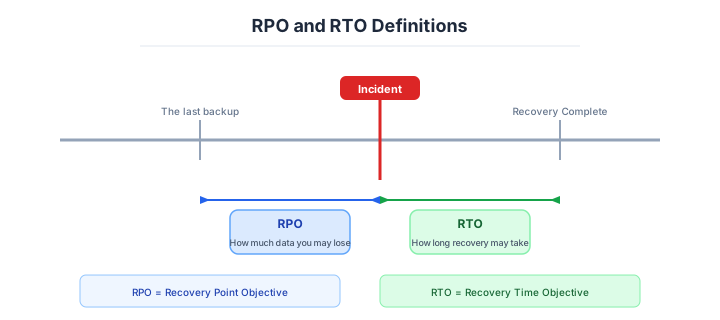
The center of BCP design is RPO and RTO — the two target values to agree with the business first.
| Indicator | Meaning |
|---|---|
| RPO (Recovery Point Objective) | How far back can data be restored (allowable data loss) |
| RTO (Recovery Time Objective) | How fast to recover (allowable downtime) |
| Requirement | RPO | RTO | Examples |
|---|---|---|---|
| Mission-critical | Zero | Seconds-minutes | Financial trading, payments |
| Business-critical | Minutes | Within 1 hour | E-commerce, internal core systems |
| Normal business | 24 hours | Days | Internal tools |
Stricter requirements raise cost exponentially. Tightening RPO/RTO without thought triggers massive unnecessary infra investment — a landmine. “How much downtime can we accept?” must be agreed coldly with the business first.
RPO/RTO requires business agreement first. Don’t lead with technology.
The availability ladder
Each availability tier has order-of-magnitude different investment. “99.9%” vs “99.99%” narrows annual downtime from 8.76h to 52.6 min — but cost goes up several-fold.
| Availability | Annual downtime | Configuration | Cost |
|---|---|---|---|
| 99.0% | 3.65 days | Single server | Cheapest |
| 99.9% | 8.76 hours | Redundant, multi-AZ | Mid |
| 99.99% | 52.6 minutes | Multi-region | High |
| 99.999% | 5.26 minutes | Multi-cloud, Active/Active | Highest |
Multi-AZ (99.9-99.95%) is the realistic standard line. Higher tiers belong only to specialty domains (finance, healthcare, telecom); for most others it’s over-investment.
Multi-AZ as the standard line. Higher tiers require careful requirements review.
The four DR strategies
Per AWS Well-Architected Framework, four DR-strategy patterns. RTO drops left to right; cost multiplies.
| Strategy | Mechanism | RTO | Cost |
|---|---|---|---|
| Backup & Restore | Restore from backup | Hours to 1 day | Cheapest |
| Pilot Light | DB always-on, app stopped | Tens of minutes-1 hour | Mid |
| Warm Standby | Always-on at smaller scale | Minutes | High |
| Multi-site Active/Active | Both sites fully running | 0-seconds | Highest |
Startups and small/mid: Backup & Restore is enough. Business-core or customer-impact: Pilot Light or Warm Standby is realistic. Active/Active is reserved for finance, payments, telecom — zero-downtime requirements.
Pilot light and warm standby sit between the extremes.
The two are often compared. Understanding the difference balances budget and recovery speed.
Pilot Light keeps a small flame lit always. The secondary environment has only DB synchronously replicated; app servers are stopped. On disaster, start and scale out the apps.
Warm Standby keeps the secondary always running but at a smaller scale than production. Faster recovery via scale-up.
| Aspect | Pilot Light | Warm Standby |
|---|---|---|
| Secondary running | DB only | Smaller-scale full stack |
| Switchover time | Tens of minutes+ | Minutes |
| Monthly cost | Mid (DB+storage) | High (always-on full stack) |
| Fits | 1-hour downtime acceptable | Minutes-only |
Pick by RPO/RTO requirements. Over-provisioning is waste.
Multi-site active/active is the top of the range.
Multi-site Active/Active runs both regions and load-balances normally. Top-tier configuration with RTO 0-seconds, but implementation complexity and cost are an order higher.
| Required component | Substance |
|---|---|
| Global DNS | Route 53 / Global Accelerator distribution |
| Bidirectional DB replication | Aurora Global / DynamoDB Global Tables |
| Session sharing | Both regions handle the same session |
| Data-consistency design | Allow eventual consistency |
The hard part is data consistency: conflict resolution when both regions write at the same time, application architecture that allows eventual consistency, deciding which side is canonical. “Adopt only when truly necessary” is the rule; over-adoption sinks projects in complexity.
Active/Active is a tier above in difficulty. Question its necessity repeatedly.
The 3-2-1 backup rule and ransomware
The 3-2-1 rule is the world standard guidance for backups. Following it covers disaster, ransomware, and human error.
| Rule | Substance |
|---|---|
| 3 copies | Original + 2 backups |
| 2 media types | Different storage types |
| 1 offsite | Geographically separate / different cloud |
Cloud implementation examples:
- Auto-replicate to another region via S3 Cross-Region Replication.
- AWS Backup for unified backups across services.
- Storage in another AWS account against accidental deletion / attacks.
- Cold copies in offline storage (Glacier Deep Archive).
Just “taking backups” isn’t enough — design where, how many generations, how long explicitly.
Ransomware changes what a backup has to survive.
The largest current threat is ransomware. If backups also get encrypted, you have to pay. Designing to protect backups is essential.
| Mitigation | Substance |
|---|---|
| Object Lock / WORM (Write Once Read Many — write once, read-only thereafter) | Lock writes for a period |
| Isolated account | Permission compromise on prod doesn’t reach |
| Offline / cold storage | Stored without network connectivity |
| Audit-log immutability | CloudTrail -> S3 + Object Lock |
| MFA Delete | S3 deletion requires MFA |
The principle: “a design where admins can be compromised but backups can’t be deleted.” Backups in S3 inside the production AWS account can all be deleted on account compromise. Multi-layer storage in different account, different org, offline is required.
Redundancy and drills — redundancy you never rehearse does not work
Redundancy has typical patterns. Use the right one for the use case.
| Configuration | Mechanism | Use |
|---|---|---|
| Active-Active | Both running, load-balanced | Web apps, API servers |
| Active-Standby | One on standby, started on switchover | DB master, file servers |
| N+1 | N required + 1 spare | Workers |
| N+M | N + multiple spares | Large clusters |
Web apps: Active-Active (load balancer distributes). DBs: Active-Standby (single writer for consistency). Aurora and Cloud SQL automate this in managed form.
Failure drills are what make it real.
Redundancy alone isn’t enough; “does it actually switch?” must be drilled regularly or it won’t work when needed. That’s Chaos Engineering.
| Method | Substance |
|---|---|
| Game Day | Planned outage drill with the whole team |
| Chaos Monkey | Random instance termination (Netflix-origin) |
| Failover test | Switchover drill in prod-equivalent environment |
| DR drill | Region-switch exercise |
“Redundancy that isn’t drilled doesn’t work” is the harsh truth. Netflix runs Chaos Monkey to randomly kill servers in production, building a culture resilient to outages. Quarterly failover drills are recommended even for non-Netflix organizations.
Redundancy gets value only via drills. Paper redundancy is powerless.
How to choose — three scenarios by scale
If you are building solo or at a startup — managed automatic backups plus PITR
Automatic backups on the managed database with point-in-time recovery enabled is enough, and it costs almost nothing. Set the retention to seven days, and once a quarter actually restore into a scratch environment to confirm you can. A DR region is over-investment at this size.

If you are a small or mid-size SaaS — multi-AZ, 3-2-1, quarterly drills
Multi-AZ for the database, backups following the 3-2-1 rule into a separate account with Object Lock, and a real restore rehearsed quarterly. Agree RPO and RTO with the business first and size the investment against them, rather than deciding from the technology.
If you are a large or regulated enterprise — warm standby and up, with institutionalised drills
Warm standby or better, with the drill written into the operating procedure rather than left to goodwill. Test the capacity of the failover target under production-equivalent load, and decide in advance what happens if an entire region goes down.
AI decision axes — Can it be declared in IaC and the drills scripted?
With AI-driven development as the assumption, BCP / DR design has “everything declared in IaC, drills also scripted” as an absolute requirement.
RPO/RTO agreement with business requirements stays human work in the AI era. AI restores infrastructure, but “how much loss is acceptable” remains an executive-level decision.
- Agree RPO/RTO with the business before picking technology (don’t reverse).
- Multi-AZ + 3-2-1 backups as the baseline.
- Ransomware mitigation (Object Lock, isolated account) embedded from day one.
- Drill plans embedded in operations (Chaos Engineering, DR drills).
IaC-defined DR configs can be verified by AI
When DR configurations are codified in Terraform/CDK, AI can detect “diffs between production and DR environments.” The problem of forgetting to reflect new production services on the DR side becomes visible as a code diff, enabling an operational flow where AI flags it during PR review.
With manually-built DR environments, config diffs against production can only be tracked via documentation, and situations where the DR environment has been left on a months-old configuration are frequent.
Auto-generating Chaos Engineering scripts
AWS Fault Injection Simulator (FIS) templates and LitmusChaos YAML are formats AI can generate easily. For instructions like “write an FIS template simulating an AZ failure” or “generate a LitmusChaos YAML that injects network latency to a specific Pod,” AI can produce code following standard templates.
This lowers the cost of creating DR drill scenarios, making it easier to increase drill frequency. Instead of one large annual drill, monthly small-scale fault-injection tests become realistic.
Pitfalls and forbidden moves
BCP has value only as “operation that confirms it works every time”, not as equipment on a balance sheet. Here are the six most dangerous.
| Forbidden move | Why it is bad → what to do instead |
|---|---|
| Taking backups but never rehearsing a restore | you discover during a real incident that you cannot restore → do a real restore once a quarter |
| Keeping backups in the same account as production | a breach or ransomware deletes them → a separate account with Object Lock |
| Designing RPO and RTO from the technology without agreeing them with the business | you either over-invest or under-invest → agree the tolerable downtime first |
| Adopting active/active without the staff for it | configuration management falls behind in normal times and it is already broken when you need it → drop to a strategy that matches the requirement |
| Not sizing the failover target | production load arrives and overloads it, producing a secondary outage → verify the target capacity by test |
| Not planning for a whole region going down | total outages are real, as in AWS Tokyo in 2021 and CrowdStrike in 2024 → decide the blast radius and the alternatives in advance |
The CrowdStrike outage of 2024 — a missing update-validation process blue-screened 8.5 million Windows machines worldwide — put the modern premise plainly: your own cloud can be entirely healthy and one part of the supply chain stopping still stops everything (details in the appendix on major incidents).
Author’s note — GitLab’s “all five wiped out”
January 31, 2017: a GitLab operator accidentally deleted the production DB, and none of the 5 prepared backup methods worked (full details in Appendix: Major Incident Catalog). What’s important from the BCP angle: backups taken != restorable is the hard truth.
Lesson: keep the 3-2-1 rule plus run actual restore drills at least quarterly, or all backups are wiped together when needed.
Backup mechanisms break, permissions change, logs flow. Confirming it works each time, as part of operations, is what “prepared” actually means.
Evaluate by “how many times you successfully restored”, not how many copies you have.
What to decide — what is your project’s answer?
Articulate your project’s answer in 1-2 sentences for each:
- Per-feature RPO / RTO (agreed with business)
- DR strategy (Backup / Pilot / Warm / Active)
- Backup retention period and generations
- Geographic distribution of backups
- Failover procedure and owner
- Ransomware mitigation (Object Lock, isolated account)
- Failure-drill frequency (semi-annual, quarterly)
- Communication / escalation flow
Write your answers down as an ADR. A concrete guide to writing them is here.
Related Articles
Summary
This article covered BCP / DR design — RPO/RTO, the availability ladder, DR strategies, 3-2-1 backups, ransomware mitigation.
Agree RPO/RTO with the business, then pick tech. Multi-AZ + 3-2-1 backups as the standard line. Redundancy is worthless without drills. These three points anchor BCP design’s core.
The next article covers the System Architecture category’s final installment: Cost Management (FinOps).
Back to series TOC -> ‘Architecture Crash Course for the Generative-AI Era’: How to Read This Book
I hope you’ll read the next article as well.
Also popular with readers
📚 Series: Architecture Crash Course for the Generative-AI Era (21/95)