About this article
This article is the fourth deep dive in the “System Architecture” category of the Architecture Crash Course for the Generative-AI Era series, covering runtime selection — “where the app actually runs.”
The 2013 launch of Docker swapped the field from “VM-led” to “containers as default” in 10 years, and FaaS and Wasm are pressing in on top. This article compares the five layers — bare metal / VM / container / serverless / WebAssembly — covers recommended configurations by scale and use, and the migration traps.
Before you read this
This article uses a good deal of infrastructure vocabulary — servers, networks and so on. If that is unfamiliar, reading the primers "Servers and the Cloud" and "How a Web Service Works" first makes it far easier to follow. You can also look anything up in the glossary as you read.
What is a runtime environment in the first place
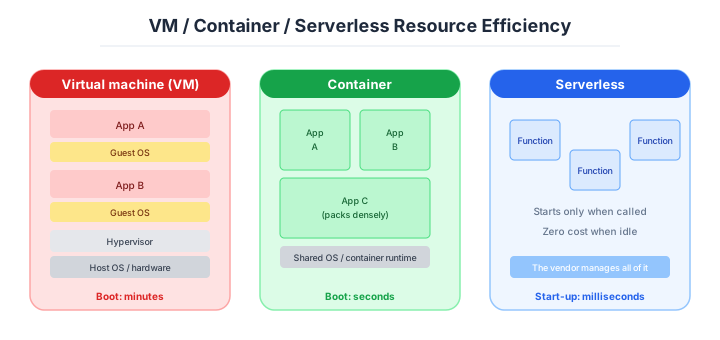
A runtime environment is, roughly speaking, “the platform that actually runs the programs you write.”
Imagine a kitchen for cooking. Your home kitchen (bare metal / VM) lets you set up any equipment you want, but cleaning and maintenance are all on you. A shared kitchen (container) comes with basic equipment, and you just bring your own tools. A cloud kitchen for delivery only (FaaS) uses the kitchen only when orders come in, and you pay only for what you use. How much you manage yourself versus how much you delegate — that trade-off is what runtime environment selection is about.
Why runtime environment selection matters
Once code is written for a specific environment, migrating to another requires partial rewrites. The lightness of initial selection and the heaviness of later reversal are asymmetric, so choosing casually leads to pain later.
An event-driven design built on FaaS is the sharpest case: moving it back onto an ordinary server is major surgery. The choice affects development efficiency, operational load, cost, performance and scalability — all of them at once.
The five main options
Modern runtimes split into five layers. The further down, the “narrower management scope, easier ops,” at the cost of degree of freedom and performance.
| Option | Management scope | Examples |
|---|---|---|
| Bare metal | Hardware through app | Direct physical-server ops |
| VM (virtual machine) | OS through app | AWS EC2, VMware |
| Container | App + runtime only | Docker, Kubernetes |
| Serverless (FaaS) | App code only | AWS Lambda, Cloud Functions |
| WebAssembly (Wasm) | On browser / runtime | Cloudflare Workers |
The principle: “pick the easiest one.” Within what satisfies functional and performance requirements, let go of as much management as you can. That’s the spine.
Housing analogy: bare metal = house with land (yard and plumbing all yours), VM = condo (building shared, unit yours), container = furnished weekly rental (move anytime), FaaS = capsule hotel (charged only when sleeping), Wasm = airport lounge (in and out instantly). Keep this in mind and the placement of each form clicks.
Where each one fits
Bare metal and VMs — special uses, and the way in to migration
Bare metal runs the OS directly on a fresh physical server, then runs the app. Before cloud existed, this was the only choice. Most on-prem still runs this way.
| Pros | Cons |
|---|---|
| No virtualization overhead | All hardware management yours |
| Full hardware control | Scaling physically constrained |
| Highest security via physical isolation | Long procurement / setup |
| Can use existing physical assets | Recovery is hard |
There’s essentially no reason to pick bare metal new. Candidates are limited to HFT (High-Frequency Trading), real-time computation, scientific computing, special GPU workloads — uses where “no overhead is allowed.” For typical web apps and backends, bare metal is a don’t-do.
It still gets used only in cases that don’t tolerate even virtualization overhead.
The VM is the same hardware with a virtualisation layer on top.
A VM (virtual machine) runs multiple virtual computers on one physical server. Each VM has its own OS and runs without interference. Cloud’s EC2 and Azure VM are all delivered as VMs.
Two virtualization styles. Host-OS style runs virtualization software (VMware Workstation, etc.) on a normal OS — common in development. Production uses hypervisor style (AWS Nitro, ESXi) — virtualization layer directly on hardware, higher efficiency. EC2 runs this way.
| Pros | Cons |
|---|---|
| Run without minding hardware | Guest-OS layer overhead |
| Flexible resources / scaling | Build and operate from OS up |
| Good for migrating legacy on-prem apps | Slower start than containers |
| Full OS-level isolation | Lower density than containers |
Still strong as a cloud-migration entry point. For new builds, container is the favorite.
Containers — the de facto standard of 2026
A container packages the application and its required libraries / config into a lightweight execution unit. Where VMs virtualize at the OS level, containers share the host’s OS kernel and isolate only the application layer. Startup goes from minutes to seconds (or milliseconds).
The biggest milestone: ending the “works in dev, breaks in prod” problem. Distributed as a Docker image, the app and its runtime ship together and behave identically anywhere.
That portability dramatically shortened CI/CD cycles and was the driving force for DevOps spreading. Docker started in 2013 as an internal tool at the PaaS vendor dotCloud, opened up — and rewrote the industry in 10 years.
| Pros | Cons |
|---|---|
| Fast startup (seconds) | Container learning curve |
| Environment identity guaranteed | Orchestration (k8s) is complex |
| High resource efficiency, dense packing | OS-kernel-level isolation weaker than VM |
| Pairs well with CI/CD | Stateful workloads need extra design |
The 2026 de facto standard. New web apps go to Docker containers as the default.
The tooling around containers divides as follows.
To build and run containers you need containerization and orchestration (managing multiple containers) tools. Field standards:
| Category | Tool | Description |
|---|---|---|
| Containerization | Docker | Overwhelming share — effectively the standard |
| Orchestration | Kubernetes (k8s) | Origin Google, general orchestrator |
| Managed k8s | EKS / AKS / GKE | Each cloud’s k8s managed offering |
| Light orchestration | AWS ECS / Cloud Run | Easier container ops |
Kubernetes is powerful but has sharp operational fangs. It’s overkill for small/mid scale, and adopting it badly melts the ops team. Choices that “run containers more easily than k8s” — AWS ECS, App Runner, GCP Cloud Run — are better fit at smaller scale.
K8s is a powerful tool with high ops cost. Match it to scale.
FaaS — the specialist for intermittent work
FaaS uploads code by function and runs it. AWS Lambda, Azure Functions, Google Cloud Functions are the lineup. Broadly, “serverless” means any service without server management; in the field it usually means FaaS.
Developers don’t need to think about hardware, OS, or containers — just write business logic. Pay-as-you-go billing on execution time means $0 during idle. “Run things at very low cost” is the headline.
| Pros | Cons |
|---|---|
| Zero infra management | Cold starts (start latency) |
| Per-call billing, zero idle | Execution-time caps (Lambda 15 min, etc.) |
| Auto scaling | Stateless |
| Easy deploys | Bad fit for long-running / high-frequency workloads |
FaaS shines for event-driven, async batch, webhook handling, lightweight per-API processing. Using it for an always-on web server is the classic landmine.
FaaS has limits, and there are ways around each of them.
| Limit | Substance | Mitigation |
|---|---|---|
| Cold start | Several seconds for first call when inactive | Provisioned Concurrency, periodic invocation |
| Execution-time cap | Lambda 15 min / Azure 10 min, etc. | Split via Step Functions, etc. |
| Stateless | Memory cannot persist across invocations | External stores like DynamoDB |
| Hard to debug | Difficult to run locally | SAM / Serverless Framework |
Cold starts especially hit user-facing APIs. Picking FaaS for VIP-user APIs or low-latency requirements is a bad fit. Wasm or containers are the favorites there.
FaaS shines on “light, short, event-driven.” Identifying the wrong fits matters.
Wasm and edge runtimes — near-zero cold start, the next generation
Wasm was originally born to run high-performance work (3D, video editing, physics) in the browser. Compile high-level languages (C++, Rust, Go) to .wasm binaries; the browser or a Wasm runtime executes them at multiples of JavaScript’s speed.
What’s drawn attention recently is Wasm as a server-side runtime. Adopted in edge-compute environments like Cloudflare Workers and Fastly Compute@Edge. “Far faster cold starts than FaaS,” “safe isolation,” “multi-language support” — positioned as FaaS’s next generation.
| Pros | Cons |
|---|---|
| Cold starts in milliseconds | Ecosystem still maturing |
| High safety via sandbox | Limited language / library support |
| Multi-language binaries in one format | Debugging tools immature |
| Optimal for edge | Restricted file I/O and OS features |
The “frontrunner for edge execution.” Positioned as a next-generation runtime that overcomes FaaS’s limits.
FaaS, edge runtimes and BaaS look alike and are not the same thing.
Conflated under the “don’t manage servers” banner, but where they run and what they cover differ.
FaaS: per-function, on-demand execution in a specific region. Edge Runtime: lightweight runtime that ms-starts at edges (CDN PoPs) globally. BaaS (Backend as a Service): bundles auth, DB, functions, real-time — “backend as a whole.” Different layers. Not mutually exclusive — they can be combined.
For individual development and MVPs, BaaS + Edge Runtime as the configuration with near-zero in-house backend has cemented over the last 2-3 years. For LLM-streaming responses, Edge Runtime overwhelmingly outperforms regular FaaS — often the deciding factor.
| Aspect | FaaS | Edge Runtime | BaaS |
|---|---|---|---|
| Examples | AWS Lambda, Cloud Functions | Cloudflare Workers, Vercel Edge | Supabase, Firebase, Convex |
| Cold start | 100s of ms-seconds | Near-zero (ms) | Built-in functions are Edge-equivalent |
| Execution time | 15-min cap, etc. | ~30s + streaming separately | Service-dependent |
| Strengths | Async batch, webhooks | Streaming, lightweight APIs | Auth+DB+functions bundled |
| Lock-in | Mid-high | Low-mid | High (DB-and-all is hard to move) |
BaaS is the option that “writes no backend” to its limits. Highest cost-effectiveness in personal use, with heavier exit cost as you scale.
The five methods compared
Lining up the five methods on key axes — moving left to right, management load drops:
| Aspect | Bare metal | VM | Container | FaaS | Wasm |
|---|---|---|---|---|---|
| Management scope | All | OS+ | App only | Code only | Code only |
| Startup | Slow (minutes) | Slow (minutes) | Fast (seconds) | Fairly fast | Fastest (ms) |
| Cost | Fixed, high | Fixed | Variable | Pay-as-you-go | Pay-as-you-go |
| Scaling | Hard | Mostly manual | Auto | Auto | Auto |
| Vendor lock-in | Low | Mid | Mid | High | Low |
| Suited case | HFT, scientific computing | First step from on-prem | General new web apps | Batch, webhook processing | Edge low-latency APIs |
On vendor lock-in, containers and Wasm are portable and easier to move; FaaS is tightly coupled to cloud-specific features and hard to migrate. Picking FaaS means accepting that lock-in.
How to choose — three scenarios by scale
If you are building solo or at a startup — hand all of it to a managed service
Start on managed containers that need no orchestration — Cloud Run, App Runner, Vercel — or on a BaaS plus edge runtime setup. Kubernetes at this size is out of the question, and a plain VM is wasted operational effort. The less backend you implement yourself, the more time goes into the product itself.
If you are a small or mid-size SaaS — ECS Fargate plus Lambda
Web and API on ECS Fargate (or Cloud Run), with intermittent work such as image conversion, notifications and webhook reception filled in by Lambda, is the configuration you see most often in practice. With a team of three to ten, Kubernetes is still too early. Getting the basic container manners right — logs to standard output, image tags pinned — comes first.
If you are a large enterprise or running microservices — Kubernetes, with dedicated people
The practical floor for adopting Kubernetes is “a team of ten and one person dedicated to operating it.” If you are genuinely at the scale where microservices, multi-region and a service mesh are needed, run managed Kubernetes (EKS or GKE) with a dedicated team behind it. Keep bare metal as a separate slot for special uses such as high-frequency trading or scientific computing.
A guideline by scale
“Container is the default” is correct, but the right granularity shifts with scale and use. Team-size affinity:
| Team size | App nature | Recommended runtime | Orchestration |
|---|---|---|---|
| Up to 3 | Web / API | Cloud Run / App Runner / Vercel | None (managed) |
| 3-10 | Web + batch | Container (ECS Fargate) + Lambda (batch) | ECS (k8s too early) |
| 10-30 | Microservices | Container + EKS / GKE | k8s (dedicated ops mandatory) |
| 30+ | Multi-service, multi-region | k8s + service mesh | k8s + Istio / Linkerd |
| Special | Edge low-latency | Wasm (Cloudflare Workers, etc.) | — |
| Special | HFT / scientific | Bare metal | — |
The practical floor for k8s adoption: “~10-person scale with one dedicated ops engineer.” Below that, the learning cost of CRDs, Helm, Ingress, certificate renewal, and network policies exhausts everyone.
ECS Fargate / Cloud Run is roughly “90% of k8s functionality at 10% of the learning cost” — the default for small/mid scale.
K8s is a weapon for orgs that fit it. Reaching for it melts ops.
AI decision axes — The learning-cost wall has dropped; performance and portability are now the axes
With AI-driven development as the assumption, the selection axis pivots from “human learning cost” to “performance, startup speed, and lock-in.”
- Filter exclusion candidates by physical / performance constraints (latency, GPU, cold start).
- Decide k8s / ECS / Cloud Run granularity by ops-staff thickness.
- Adjust FaaS density by portability (future cloud migration possibility).
- Don’t fixate on one method; design with use-by-use selection.
Kubernetes YAML generation is now AI’s strong suit
Kubernetes Deployment, Service, Ingress, HPA, and similar YAML manifests are areas where AI can generate at high accuracy. Training data includes massive amounts of Helm charts and kustomize configurations, so instructions like “write an Ingress YAML routing /api to the backend via Nginx Ingress” get near-accurate responses.
However, security-related YAML (RBAC, NetworkPolicy, PodSecurityStandard) tends to be omitted since it doesn’t directly affect functionality. When reviewing AI-generated k8s configurations, make it a habit to check whether security-related manifests are included.
Containerized apps pair well with AI-driven ops automation
Dockerfile authoring, multi-stage build optimization, health-check configuration — these are well-established patterns AI can write accurately. Furthermore, containerized apps are designed with the assumption that logs flow to stdout, making integration with AI-powered log analysis and fault detection natural.
Bare-metal and traditional-VM apps vary in log location, startup method, and config-file format per project, requiring more upfront context for AI to automate ops tasks.
Pitfalls and forbidden moves
Here are the six most dangerous ways runtime selection and migration go wrong.
| Forbidden move | Why it is bad → what to do instead |
|---|---|
| Moving a VM-based application straight to FaaS | stateful behaviour and long-running work do not fit the premises of FaaS → put containerisation in between first |
| Serving a continuously running web API on FaaS | the cold start eats the user experience → use an edge runtime or a container |
| Deciding to adopt Kubernetes with no dedicated infrastructure people | YAML, RBAC, Helm and certificates are all things to learn, and incidents are frequent → start with ECS or Cloud Run |
| Leaving container logs written to files | the logs vanish when the container restarts → send them to stdout and stderr |
Specifying the latest tag for a base image | reproducibility disappears and one day it simply stops working → pin the version |
| Leaving the FaaS retry strategy undesigned | automatic retries execute a payment or an email twice → build idempotency into the design |
Author’s note — the day we brought in Kubernetes at small scale
At small (single-digit) team scale, adopting Kubernetes in production and getting buried weekly by CRDs (Custom Resource Definitions, k8s extensibility) and Helm Charts (k8s manifest packaging) is widely reported around 2018-2020. Monitoring, logs, Ingress, certificate renewal, network policies — all required specialty knowledge to keep “correct ops,” and were obvious overkill for under-3-people teams.
Teams in the same era using AWS ECS or GCP Cloud Run got the same functions at 1/5 of the operational load. Many stories of teams that adopted k8s and switched back to ECS within six months.
K8s is the standard for large orgs, but picking it without scale produces suffering. Canonical over-reach landmine.
K8s is a weapon for orgs at scale. At small scale, ECS / Cloud Run is enough.
What to decide — what is your project’s answer?
Articulate your project’s answer in 1-2 sentences for each:
- Primary runtime (VM / container / FaaS / Wasm)
- Orchestration (k8s / ECS / managed)
- Scaling strategy (auto / manual / scheduled)
- Tolerance for cold start
- Acceptable lock-in
- Existing-asset (VM / on-prem) policy
- Runtime language support state
Write your answers down as an ADR. A concrete guide to writing them is here.
Related Articles
Summary
This article covered runtime selection in the cloud era — VM, container, serverless, Wasm.
The 2026 default: spine on containers, supplement minimally with use-specialized choices. K8s is a weapon for orgs that match its scale; ECS / Cloud Run is enough for small/mid teams.
The next article covers OS selection — Linux / Windows / UNIX.
Back to series TOC -> ‘Architecture Crash Course for the Generative-AI Era’: How to Read This Book
I hope you’ll read the next article as well.
Also popular with readers
📚 Series: Architecture Crash Course for the Generative-AI Era (15/95)