About this article
This article is the fifth deep dive in the “System Architecture” category of the Architecture Crash Course for the Generative-AI Era series, covering OS selection.
Server OS selection is the area least amenable to redos — apps, middleware, runbooks, monitoring tools, and personnel are all bound to the OS. This is a decision where you have to be ready to carry the choice for 10 years. The article covers the three families (Linux / Windows Server / commercial UNIX), distribution selection, license / EOL management, and CPU architecture (x86 / ARM).
Before you read this
This article uses a good deal of infrastructure vocabulary — servers, networks and so on. If that is unfamiliar, reading the primers "Servers and the Cloud" and "How a Web Service Works" first makes it far easier to follow. You can also look anything up in the glossary as you read.
What is OS selection in the first place
OS selection is, roughly speaking, “deciding which base software will serve as the server’s foundation.”
Imagine a house’s foundation work. A wooden frame (Linux), a steel frame (Windows Server), and reinforced concrete (commercial UNIX) require completely different construction methods and tools. If you decide “actually, I want steel” after the foundation is poured, the only option is to tear down the house and rebuild. Server OS is the same — apps, middleware, runbooks, monitoring tools, and personnel are all bound to the OS, and once you choose, you live with it for a decade.
Why OS selection matters
What happens if you take OS selection lightly? Once code, runbooks, and monitoring tools are written for a specific OS, switching to another is essentially a rebuild. Defaulting to “just go with what we know” locks the team out of switching for the next 10 years, losing technology-selection flexibility.
For new projects today, the real decisions narrow to two: which Linux distribution and whether to use ARM. OS is a foundation you can’t change later — decide at project planning time.
The main options
| OS | Main use | Position |
|---|---|---|
| Linux | Web/app servers, container infrastructure | Overwhelming majority |
| Windows Server | Active Directory (Microsoft’s identity platform), .NET, Office | Specific use cases |
| UNIX (AIX / Solaris, etc.) | Legacy large-scale finance / core systems | Effectively gone for new builds |
For new projects, the temperature is “if you pick anything but Linux, you owe a reason.” With cloud and containers as the assumption, building a rationale to pick anything else is harder than just picking Linux.
Licensing is one of the two axes that cut across all of them.
OS license form maps directly to cost structure. Cloud generally bills “OS-included by the hour,” but you can also bring existing OS licenses (BYOL — Bring Your Own License).
| Form | Examples | Trait |
|---|---|---|
| OSS, free | Rocky / AlmaLinux / Debian / Ubuntu | Free, self-managed |
| OSS + commercial subscription | RHEL / Ubuntu Pro / SUSE | Annual contract with support |
| Commercial product | Windows Server / AIX / Solaris | License purchase + maintenance |
RHEL / Ubuntu Pro is the hybrid model: “OSS but with commercial support.” At scale, the annual support fee buys the comfort of getting official help during production incidents.
The support period is the other.
EOL (End of Life) is the day OS vendors stop providing security patches. Continuing past EOL means accumulating critical security risk as vulnerabilities go unfixed. Pick a version with EOL well past your operational period.
| OS | Standard support end |
|---|---|
| RHEL 9 | 2032 |
| Ubuntu 24.04 LTS | 2029 (2036 with Pro extension) |
| Amazon Linux 2023 | 2028 |
| Windows Server 2022 | 2031 |
| Debian 12 | 2028 (LTS included) |
For systems that will run 10+ years, picking near-EOL is a landmine. Within a few years you trigger an OS-update project at significant cost.
EOL = patches stopped. Pick a version with support longer than the project.
Linux — start here when in doubt
Linux is the open-source UNIX-compatible OS Linus Torvalds began in 1991. It now runs the world’s servers, smartphones (Android), and embedded devices, and dominates cloud VMs, containers, and supercomputers as the foundation.
| Pros | Cons |
|---|---|
| Free (most distros) | No GUI-ops culture, learning cost |
| Lightweight, fast startup | Enterprise commercial support costs money |
| Highest affinity with containers and cloud | Inter-distro command differences |
| Rich OSS / middleware available | Desktop usage still minority |
Most AWS EC2 / GCP / Azure instances run Linux. The de facto for server use, and “Linux when in doubt” is the modern default.
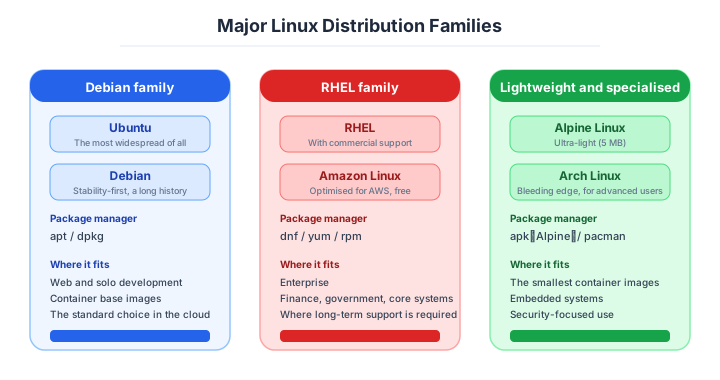
The distributions divide as follows.
A Linux distribution is “the complete Linux package” — Linux kernel + various software bundled. They split into Red Hat family and Debian family, with different package-management commands and config layouts.
| Family | Examples | Package manager |
|---|---|---|
| Red Hat family | RHEL / Rocky Linux / AlmaLinux / Amazon Linux | yum / dnf (RPM) |
| Debian family | Debian / Ubuntu | apt (DEB) |
| Other | SUSE / Alpine / Arch | Custom |
Pick the family the team is comfortable with. Enterprises lean Red Hat family; developers and startups lean Debian family (especially Ubuntu). After CentOS’s EOL policy change in 2021, Rocky Linux and AlmaLinux were elevated as RHEL successors and have become mainstream.
Which one to take depends on the case.
| Situation | Recommended |
|---|---|
| Enterprise, commercial support priority | RHEL (Red Hat Enterprise Linux) |
| RHEL-equivalent for free | Rocky Linux / AlmaLinux |
| Developer-friendly, info density | Ubuntu LTS |
| On AWS | Amazon Linux 2023 |
| Embedded / ultra-light (container base) | Alpine Linux |
| SAP and other ERP platforms | SUSE Linux Enterprise |
Ubuntu LTS gives 5 years of support and is the favorite for startups and in-house development. Finance, public sector, and large-enterprise core systems pick RHEL’s commercial support — willing to pay tens of thousands of dollars annually for the comfort of getting Red Hat on the line during incidents.
For new Linux: Ubuntu LTS / Amazon Linux / RHEL family. All three have high AI-generation accuracy.
Container-specialised lightweight distributions are a branch of the same family.
Container-only OSes optimized for the container era have appeared, surpassing general Linux on security, startup speed, and ops automation, with growing adoption on Kubernetes platforms.
| OS | Trait | Provider |
|---|---|---|
| Bottlerocket | AWS EKS/ECS-specific, auto-update | AWS |
| Flatcar Container Linux | Kubernetes-oriented, immutable | CNCF |
| Talos Linux | API-managed, K8s-only | Sidero Labs |
No SSH login, API-only management — minimizing attack surface while automating ops. Worth considering when running Kubernetes seriously.
Windows Server — only where Microsoft integration is essential
Windows Server is Microsoft’s commercial server OS. Even in the Linux era, companies built around the Microsoft platform (Active Directory, .NET, SQL Server, Office) still pick it as the first candidate.
| Fits | Reason |
|---|---|
| Active Directory-centric authentication | AD is a Windows Server feature |
| Existing .NET business apps | Tightly coupled to Windows Server |
| Office / SharePoint integration | Microsoft-product affinity |
| Hyper-V virtualization | Microsoft hypervisor |
| Pros | Cons |
|---|---|
| Easy GUI-based ops | High licensing cost |
| Full Microsoft compatibility | Slow startup, high memory |
| Strong enterprise support | Container ecosystem weaker than Linux |
| Strong AD integration | High running cost on cloud |
Mostly used to extract value from existing Microsoft assets. Picking it for a new cloud-native web app is a bad fit.
Skip Windows Server for new builds outside Microsoft-platform integration.
Commercial UNIX — only to continue existing maintenance
Commercial UNIX (AIX from IBM, HP-UX, Solaris) was tied to a specific vendor’s hardware and used in large-scale, high-reliability workloads. From the 1990s into the early 2000s it ran financial core, airline reservation, and telco systems, but Linux’s rise drove share down significantly.
| Trait | Description |
|---|---|
| Extremely high stability | Multi-year non-stop operation track record |
| Vendor-specific hardware | Tied to IBM Power, SPARC, etc. |
| High licensing / maintenance cost | Can run hundreds of thousands of dollars annually |
| Scarce skill base | Engineer aging and decline |
Commercial UNIX is essentially never picked for new builds. Most efforts are now in “maintain the existing core system, gradually migrate to Linux.”
Don’t pick for new builds. Only relevant for legacy maintenance.
CPU architecture — considering ARM64 is now mandatory
Equally important is CPU architecture. x86_64 (amd64) was overwhelmingly dominant traditionally, but ARM64 has risen since the early 2020s in cloud, mobile, and Apple Silicon as a low-power, low-cost option.
| CPU | Trait | Examples |
|---|---|---|
| x86_64 (amd64) | Most common, max compatibility | Intel Xeon / AMD EPYC |
| ARM64 (aarch64) | Power-efficient, cost-effective | AWS Graviton / Apple M-series |
| RISC-V | Open architecture, emerging | Embedded / IoT |
AWS Graviton (ARM) runs 20-40% cheaper than equivalent-performance x86 instances. Web servers, Java apps, and many managed services (RDS, ElastiCache, etc.) support Graviton, and not considering ARM for new builds is a missed opportunity.
In cloud, ARM adoption can cut cost 20-40%. Always evaluate for new builds.
How to choose — three scenarios by scale
If you are building solo or at a startup — Ubuntu LTS on ARM64
The combination to back is Ubuntu LTS (or Amazon Linux) on ARM64: pick the distribution with the largest volume of learning material and the highest AI generation accuracy behind it, and take twenty to forty percent off the cloud bill with Graviton. Licence costs are zero, and support is covered by the community and by the sheer amount of information available.

If you are a small or mid-size SaaS — the same three, plus automated patching
The choice of operating system is the same three as at startup scale; what starts to matter here is operation. Automate monthly CVE patching with Systems Manager Patch Manager or the equivalent, and make applying critical CVEs within 72 hours a rule. If you are container-centric, moving the host OS to something like Bottlerocket to shrink the attack surface itself is also a good move.
If you are a large enterprise — commercial support and the existing estate decide it
Commercial support on RHEL is the standard for core systems in finance, government and large enterprises. Where the identity platform is built on Active Directory or there are .NET assets, run Windows Server alongside it, and plan a phased Linux migration for existing commercial UNIX while keeping its maintenance going. Every additional operating system piles up operational and audit cost, so governance such as “no more than three standard operating systems company-wide” is effective too.
AI decision axes — Volume of training data and how standard the commands are
With AI-driven development as the assumption, “engineer familiarity” drops as a criterion, replaced by “AI training data volume” and “command standardization.”
- EOL must exceed operating period + 2 years.
- Existing-platform integration (Microsoft / UNIX legacy).
- Commercial support contract sized to industry risk.
- CPU architecture: always evaluate ARM64 (cost axis).
Ubuntu / Amazon Linux have high AI generation accuracy
When AI writes shell scripts or systemd unit files, targeting Ubuntu LTS or Amazon Linux 2023 yields higher accuracy. apt/dnf package names, config file paths, and service startup methods are abundantly present in training data.
Conversely, RHEL-specific minor-version differences (SELinux policy configuration, firewalld zone design) and commercial UNIX command systems have thin training data, and AI may generate non-working code by extrapolating from generic Linux knowledge.
Why Windows Server GUI ops become disadvantageous in the AI era
Windows Server managed via GUI doesn’t record config changes as operations, making it outside the scope of AI-driven config review or automation. Even the same Windows Server, if managed via PowerShell DSC or Ansible, becomes code that AI can read and write — so the GUI-vs-code operational policy determines whether AI utilization is possible.
EOL management — choosing is not the end; the ten years of operation are
Note: industry rates as of April 2026. Periodic refresh required.
OS isn’t “pick and forget” — the real work is the 10-year run to EOL. What matters changes by phase.
| Phase | When | What | Cadence |
|---|---|---|---|
| Selection | Project planning | EOL >= operating period + 2 years | Decide in 1 week |
| Patching | Post-launch up to 2 years before EOL | Monthly CVE patches; Critical within 72 hours | Monthly + emergency |
| Migration evaluation | 2 years before EOL | Stand up next-LTS validation | Half year to 1 year ahead |
| Production migration | 1 year before EOL | Blue-Green migration, parallel run | 3-6 months |
| Stop the old OS | At EOL | Cleanly shut down — don’t leave vulnerable servers | Immediate |
Continuing on an EOL’d OS produces the same structure as the Equifax 2017 incident (Apache Struts unpatched, 147M records leaked). Manual patching doesn’t scale; modern practice automates with tools like AWS Systems Manager Patch Manager.
EOL: act backward from the announcement date. Last-minute discovery doubles migration cost.
Pitfalls and forbidden moves
Here are the six most dangerous ways OS operation goes wrong.
| Forbidden move | Why it is bad → what to do instead |
|---|---|
| Applying patches to production all at once | a kernel patch side-effect stopping middleware from starting is a standard accident → apply in stages with blue-green or canary |
| Adopting an OS near end of life, or with an uncertain roadmap | one announcement can force a migration, as with CentOS 8 → check the EOL date and how dependable the backing is |
Running apt upgrade interactively in production | with no pinned versions and no rollback procedure it becomes an accident you cannot undo → update through a configuration-management tool |
| Judging an x86-to-ARM migration on unit tests alone | ARM support differs case by case across the JVM and native modules → verify with integration tests under production-equivalent load |
| Doing OS updates once a year in one batch | the difference is too large to isolate a problem → move in monthly or quarterly steps |
| Choosing Windows Server “because it feels right” | licence costs pile up → limit it to cases where Microsoft-platform integration is essential |
Author’s note — the CentOS 8 affair
After picking CentOS 8 and developing on it, December 2020’s sudden announcement of “support ends end of 2021” forced a migration in about 1 year on projects that should have run until 2029.
One Japanese SI took millions of dollars and several months of unplanned work to swap CentOS 8 across dozens of deployed sites to Rocky Linux. Stories of “we just kicked off a new project on CentOS 8 — meeting the next week was hellish” abound.
The lesson is simple: “OSS doesn’t mean roadmap reliability is the same.” For free distros too, check “who’s behind it” and “have they moved EOL before?” as a defense line.
“Should be usable for a long time” can flip on one announcement. Verify the backer’s reliability.
What to decide — what is your project’s answer?
Articulate your project’s answer in 1-2 sentences for each:
- OS family (Linux / Windows / UNIX)
- Distribution (RHEL family / Debian family / other)
- Version and EOL date
- CPU architecture (x86_64 / ARM64)
- License contract (free / paid sub / commercial)
- Patching policy (manual / auto / Blue-Green)
- Support contract scope
Write your answers down as an ADR. A concrete guide to writing them is here.
Related Articles
Summary
This article covered OS selection — Linux / Windows / UNIX comparison, distributions, EOL management, ARM architecture.
New Linux: pick from Ubuntu LTS / Amazon Linux / RHEL family. Windows Server: only when integrating with Microsoft platforms. Commercial UNIX: only legacy maintenance. CPU: ARM64 evaluation is mandatory. The 2026 realistic answer.
The next article covers datastore (overall data placement at the system-architecture level).
Back to series TOC -> ‘Architecture Crash Course for the Generative-AI Era’: How to Read This Book
I hope you’ll read the next article as well.
Also popular with readers
📚 Series: Architecture Crash Course for the Generative-AI Era (16/95)