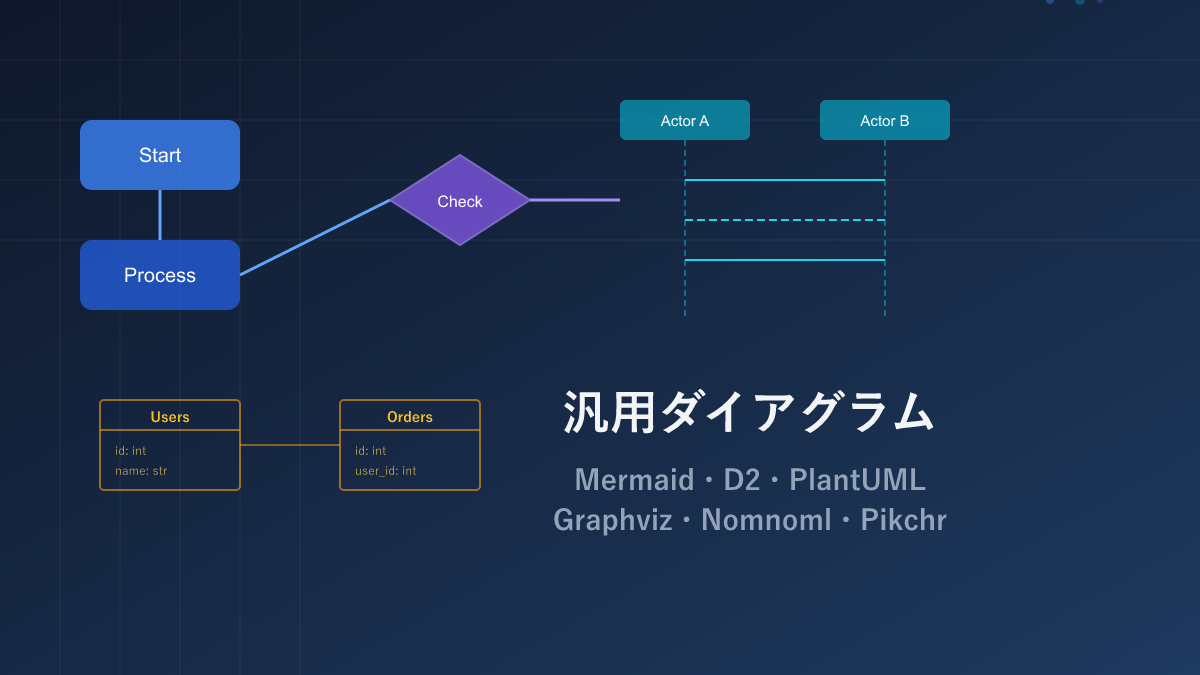
Thank you for visiting this site. This article is the first installment in the series on code-manageable diagrams for the AI era, covering 6 general-purpose diagram tools. For the full series index, see the Complete Guide.
Flowcharts, sequence diagrams, ER diagrams — there are many moments in development when you need to draw a quick diagram. Instead of sketching these by hand in PowerPoint or draw.io, writing them as text (code) and auto-generating the output is now the mainstream approach. Because they are text, you can ask an AI to generate them, see changes at a glance, and manage versions with Git.
Why is this approach important right now? Because AI coding assistants (GitHub Copilot, Cursor, Claude Code, etc.) have become widespread, making it realistic to auto-generate diagram code from natural language. A diagram that used to take 30 minutes in PowerPoint now takes 10 seconds with a single sentence to an AI — and because it’s text, you can review the diff and keep it in sync with design changes easily. As AI tools continue to evolve, automatically updating diagrams in tandem with documentation changes will become standard practice.
There are admittedly a lot of tools out there, but mastering these 6 will cover the vast majority of use cases.
Comparison Table
| Name | Syntax | AI Compatibility | Diagram Types | Highlights |
|---|---|---|---|---|
| Mermaid | Custom | ◎ | Flowchart, sequence, ER, Gantt, and 10+ more | Embeds directly in GitHub. Start here if in doubt |
| D2 | Custom | ◎ | Flowchart, architecture, nested structure diagrams | Excellent nesting syntax. Modern look |
| PlantUML | Custom | ○ | Almost all UML types (class, sequence, use-case, etc.) | Suitable for formal UML-compliant documentation |
| Graphviz | DOT language | ○ | Node-and-edge graphs (dependencies, data structures) | Auto-layouts large numbers of nodes cleanly |
| Nomnoml | Custom | ○ | Class and object diagrams | Runs in the browser with no setup. Handy for quick sketches |
| Pikchr | PIC-based | △ | Coordinate-based custom diagrams | Pixel-level layout control. For advanced users |
Mermaid — GitHub’s Built-In Standard, Great for AI Generation
Mermaid is a JavaScript diagram-rendering library whose development began in 2014 by Knut Sveidqvist. Its defining feature is that writing ```mermaid in GitHub Markdown renders the diagram instantly. It is also widely supported by Notion, Obsidian, Docusaurus, Astro, and other major documentation tools.
Sample: Flowchart

flowchart TD
    A[User Logs In] --> B{Auth Success?}
    B -->|Yes| C[Show Dashboard]
    B -->|No| D[Show Error Message]
    D --> A
    C --> E[Fetch Data]
    E --> F[Render Complete]
flowchart TD means a top-to-bottom flowchart. Use --> for arrows, {} for diamond-shaped decision nodes, and [] for rectangular nodes.
Sample: Sequence Diagram
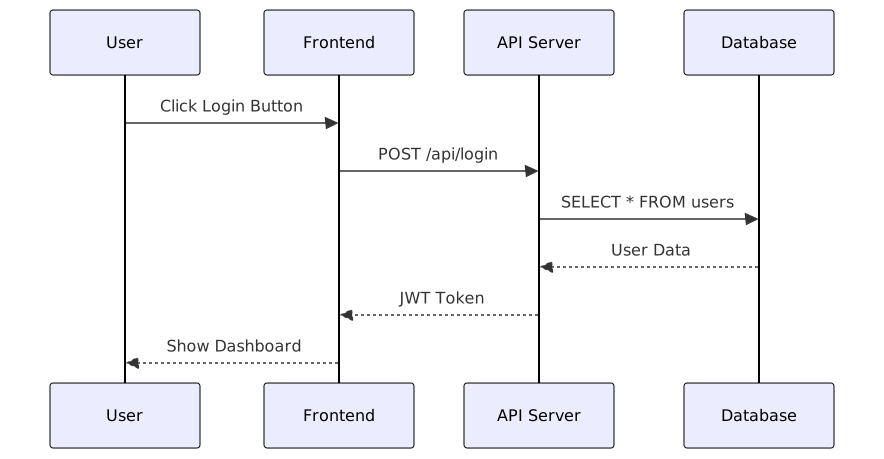
sequenceDiagram
    participant U as User
    participant F as Frontend
    participant A as API Server
    participant D as Database

    U->>F: Click Login
    F->>A: POST /api/login
    A->>D: SELECT * FROM users
    D-->>A: User Data
    A-->>F: JWT Token
    F-->>U: Show Dashboard
Sample: ER Diagram

erDiagram
    USERS ||--o{ POSTS : "has many"
    USERS ||--o{ COMMENTS : "has many"
    POSTS ||--o{ COMMENTS : "has many"
    POSTS }o--|| CATEGORIES : "belongs to"

    USERS {
        int id PK
        string name
        string email
        datetime created_at
    }
Pros and Cons
Breadth of tool support is its greatest strength. GitHub, GitLab, Notion, Obsidian, Confluence, and VS Code all support it natively, and the syntax is intuitive. It covers more than 10 diagram types: flowcharts, sequence diagrams, ER diagrams, class diagrams, Gantt charts, mind maps, and more.
On the downside, fine-grained layout control is weak. You cannot manually position nodes — you must rely on the automatic layout. Once you exceed 20–30 nodes, diagrams tend to get cluttered and the code itself becomes harder to read.
AI Compatibility
In terms of AI compatibility, Mermaid is unquestionably top-tier. Likely because it is heavily used in GitHub READMEs, LLMs have abundant training data for it — you can just say “draw a user registration flowchart” and get working code back. When I wrote the sample code for this series, I had the AI draft every Mermaid snippet and not once did a syntax error occur. If you want AI to generate diagrams, try Mermaid first.
D2 — Modern Look, Clean Output
D2 is a relatively new diagram description language released by Terrastruct in 2022. Its key feature is a single unified syntax for all diagram types — you can draw flowcharts and sequence diagrams alike without switching notation. Output looks polished by default, and you can choose from three layout engines (dagre, ELK, and TALA — the last is paid).
Sample: Nested Architecture Diagram

aws: AWS Cloud {
  vpc: VPC {
    public: Public Subnet {
      alb: ALB {
        shape: rectangle
      }
    }
    private: Private Subnet {
      ecs: ECS Service {
        shape: rectangle
      }
      rds: RDS {
        shape: cylinder
      }
    }
  }
}

aws.vpc.public.alb -> aws.vpc.private.ecs: HTTP
aws.vpc.private.ecs -> aws.vpc.private.rds: SQL
Just nesting with {} expresses logical groupings, making it ideal for hierarchical structures like AWS architecture diagrams.
Sample: Sequence Diagram
shape: sequence_diagram

user: User
browser: Browser
server: Server
db: DB

user -> browser: Enter Login Form
browser -> server: POST /login
server -> db: Search User
db -> server: User Data
server -> browser: Issue Session
browser -> user: Show Dashboard
Just specifying shape: sequence_diagram renders the same connection syntax as a sequence diagram.
Pros and Cons
Unified notation across all diagram types is D2’s greatest appeal — you don’t need to learn different syntax for each kind of diagram. The fact that output looks polished without any configuration is a big deal for anyone dissatisfied with Mermaid’s defaults.
On the other hand, GitHub Markdown does not render D2 natively, which is the biggest practical hurdle. You’ll need to set up a separate conversion pipeline, making the entry barrier significantly higher than Mermaid. Plugin and tool support is still limited, and the high-quality TALA layout engine is paid.
AI Compatibility
The consistent syntax makes D2 relatively easy for AI to generate. However, being newer (2022), it has less training data than Mermaid — if you don’t explicitly say “in D2,” the AI may return Mermaid syntax. Once you specify D2, flowcharts and architecture diagrams are generated without issues.
PlantUML — The UML Classic
PlantUML is a Java-based UML rendering tool that debuted in 2009. It can generate almost every type of UML diagram from text and has a long track record of enterprise adoption. Integration with Confluence, JIRA, GitLab, and other enterprise tools is well established.
Sample: Sequence Diagram with Conditionals
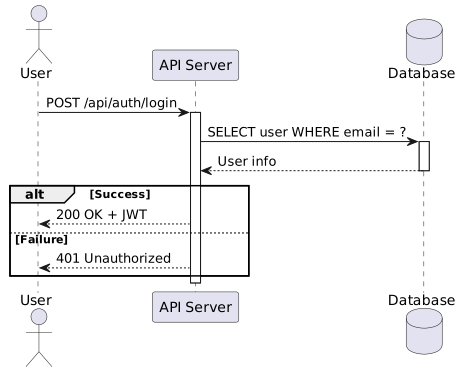
@startuml
actor User
participant "API Server" as API
database "Database" as DB

User -> API : POST /api/auth/login
activate API

API -> DB : SELECT user WHERE email = ?
activate DB
DB --> API : User Info
deactivate DB

alt Auth Success
    API --> User : 200 OK + JWT
else Auth Failed
    API --> User : 401 Unauthorized
end

deactivate API
@enduml
activate / deactivate express lifeline activation, and alt / else describe conditionals naturally. This expressiveness surpasses Mermaid.
Sample: Class Diagram
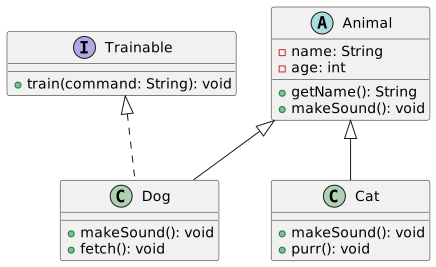
@startuml
abstract class Animal {
  - name: String
  - age: int
  + getName(): String
  + makeSound(): void {abstract}
}

class Dog {
  + makeSound(): void
  + fetch(): void
}

class Cat {
  + makeSound(): void
  + purr(): void
}

interface Trainable {
  + train(command: String): void
}

Animal <|-- Dog
Animal <|-- Cat
Trainable <|.. Dog
@enduml
Pros and Cons
Honestly, requiring a Java runtime and having a somewhat verbose syntax may create initial resistance. The @startuml / @enduml block delimiters are clearly more cumbersome than Mermaid, and the default visual style feels a bit dated.
That said, PlantUML remains widely used because of its comprehensive UML coverage. It covers nearly all UML specifications — sequence, class, use-case, activity, component diagrams — and has integrations with Confluence, JIRA, and GitLab. When UML-compliant documentation is required, PlantUML often ends up being the go-to choice.
AI Compatibility
Its long history means abundant training data, so generation accuracy for sequence and class diagrams in particular is high. However, the more verbose syntax produces longer generated code, so minor mistakes — mismatched activate/deactivate pairs or a missing @enduml — do occasionally appear. Sometimes it works as-is; sometimes one or two manual fixes are needed.
Graphviz (DOT Language) — The Pioneer of Automatic Layout
Graphviz is a graph visualization software developed at AT&T Bell Labs in 1991. It is the pioneer of automatic layout algorithms — the layout engines in later tools like Mermaid and D2 are based on Graphviz research. It offers six layout engines (dot, neato, fdp, circo, twopi, sfdp) and can render graphs with hundreds of thousands of nodes.
Sample: Dependency Graph
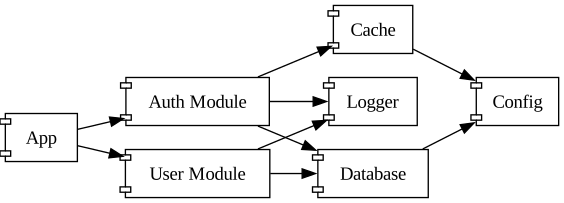
digraph dependencies {
    rankdir=LR;
    node [shape=component];

    app [label="App"];
    auth [label="Auth Module"];
    user [label="User Module"];
    db [label="Database"];
    cache [label="Cache"];
    logger [label="Logger"];
    config [label="Config"];

    app -> auth;
    app -> user;
    auth -> db;
    auth -> cache;
    user -> db;
    auth -> logger;
    user -> logger;
    db -> config;
    cache -> config;
}
Sample: Clusters (Subgraphs)
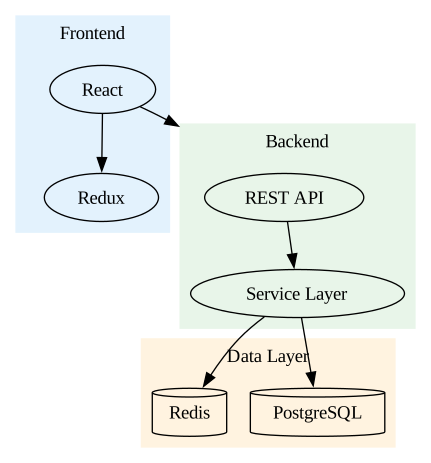
digraph architecture {
    compound=true;

    subgraph cluster_frontend {
        label="Frontend";
        style=filled;
        color="#e3f2fd";
        react [label="React"];
        redux [label="Redux"];
        react -> redux;
    }

    subgraph cluster_backend {
        label="Backend";
        style=filled;
        color="#e8f5e9";
        api [label="REST API"];
        service [label="Service Layer"];
        api -> service;
    }

    subgraph cluster_data {
        label="Data Layer";
        style=filled;
        color="#fff3e0";
        postgres [label="PostgreSQL", shape=cylinder];
        redis [label="Redis", shape=cylinder];
    }

    react -> api [lhead=cluster_backend];
    service -> postgres;
    service -> redis;
}
Pros and Cons
It only renders node-and-edge graphs, so sequence diagrams and Gantt charts are unsupported. The syntax is also lower-level and more verbose than Mermaid or D2.
But 30+ years of accumulated experience in graph rendering is no small thing. Automatic layouts that hold up even at tens of thousands of nodes are quality that later tools can rarely match, and the ability to switch layout engines (dot, neato, fdp, circo) is a real advantage. It also integrates well with programmatic generation, making it ideal for use cases like auto-updating dependency graphs in a CI pipeline.
AI Compatibility
With 30+ years of history, training data is abundant. For requests like “draw module dependencies in Graphviz,” the basic digraph syntax is almost never wrong. However, Graphviz-specific conventions — the subgraph cluster_ prefix rule, compound=true — tend to be missed. Simple directed graphs: first try usually works. Cluster diagrams: expect one or two manual fixes.
Nomnoml — Minimal Syntax Lightweight Tool
Nomnoml is a lightweight JavaScript UML diagram rendering library. The official site provides a browser-based editor you can use immediately. Its syntax is extremely minimal — just [NodeName] and -> to draw diagrams.
Sample
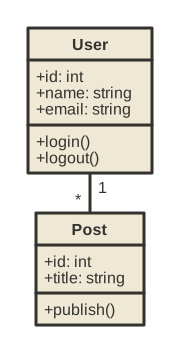
[User|
  +id: int
  +name: string
  +email: string
  |
  +login()
  +logout()
]

[Post|
  +id: int
  +title: string
  |
  +publish()
]

[User] 1 - * [Post]
Pros and Cons
It is convenient when you want to “draw a quick class diagram.” The simplest syntax of the 6 tools — open nomnoml.com, write in square brackets, and you’re done. You can start in 5 minutes.
However, Nomnoml cannot cover everything on its own. It focuses on class and flowchart-style diagrams and does not support sequence diagrams or ER diagrams. Rather than a primary tool, using it alongside Mermaid — “use Nomnoml just for simple class diagrams” — is the realistic approach.
AI Compatibility
The simple syntax is easy for AI to generate, but because Nomnoml code is scarce in training data, without explicitly saying “in Nomnoml,” the AI often returns Mermaid or PlantUML syntax. Specify it and basic class diagrams are generated without issues.
Pikchr — Coordinate-Based Diagram Language
Pikchr is a diagram language developed by D. Richard Hipp (the creator of SQLite), featuring precise coordinate-based layout control. Its engine is implemented in C as a single file with zero external dependencies. It is used in Fossil’s wiki and documentation.
Sample
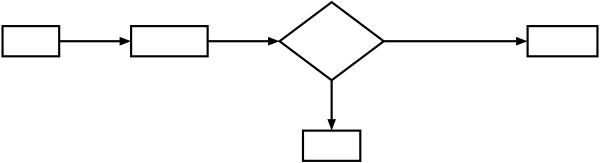
box "Input" fit
arrow
box "Process" fit
arrow
diamond "Check" fit
arrow right 200% "Yes" above
box "Output" fit

move to last diamond.s
arrow down 70% "No" ljust
box "Error Handler" fit
Pros and Cons
It is the most niche of the 6 tools. The coordinate-based PIC-derived syntax has a steep learning curve and lacks the ease of Mermaid or D2. The community is small, making it harder to find help.
Yet pixel-level layout control is something only Pikchr offers. Zero external dependencies and a single C source file are distinctive features, and it has a track record of being embedded directly in a VCS wiki like Fossil. Not for everyone, but a strong option when precise coordinate control is required.
AI Compatibility
Low training-data volume combined with the need for coordinate specification makes this difficult for AI. In testing, box and arrow basics appear, but relative coordinate references like move to last diamond.s tend to go wrong, and the generated layout often breaks. Use AI only as a starting point for Pikchr and expect to adjust manually.
Practical Tips for AI-Generated Diagrams
Having covered each tool’s AI compatibility, here are the key tips for improving accuracy when asking AI to generate diagrams.
Prompt Tips
Simply naming the output tool dramatically improves accuracy.
❌ “Draw a diagram of the user registration flow” (vague → AI is unsure what format to use)
✅ “Draw the user registration flow as a Mermaid flowchart. Include input validation and email confirmation steps.”
For even better results:
- Specify the diagram type: “as a sequence diagram”, “as an ER diagram”, etc.
- List the elements to include: “include API Gateway, Lambda, and DynamoDB”
- Provide existing code: attach source code and say “draw the class structure of this code as a Mermaid class diagram”
Auto-Rendering with GitHub Actions
One of the biggest advantages of code-managed diagrams is that you can auto-render them in CI/CD. A GitHub Actions example:
# .github/workflows/render-diagrams.yml
name: Render Diagrams
on:
  push:
    paths: ['docs/**/*.mmd']
jobs:
  render:
    runs-on: ubuntu-latest
    steps:
      - uses: actions/checkout@v4
      - run: npm install -g @mermaid-js/mermaid-cli
      - run: |
          for f in docs/**/*.mmd; do
            mmdc -i "$f" -o "${f%.mmd}.svg"
          done
      - uses: stefanzweifel/git-auto-commit-action@v5
        with:
          commit_message: "docs: auto-render diagrams"
Update a .mmd file (Mermaid source), push, and SVG images are auto-generated and committed. If you use multiple tools, running Kroki in Docker and batch-rendering via API is convenient.
Using Mermaid Live Editor
Mermaid provides a Live Editor (mermaid.live) that lets you preview edits in real time. Paste AI-generated code there, fine-tune, then commit to your repository — an efficient workflow. The URL encodes the diagram, making sharing with teammates simple.
What to Check in AI-Generated Diagrams
AI output is usually correct, but these points warrant manual verification:
- Arrow direction: confirm dependency and data-flow directions are not reversed
- Missing nodes: check that all elements from the requirements appear in the diagram
- Syntax errors: render it directly — that’s the fastest way to find them
Selection Guide
| Your situation | Recommendation |
|---|---|
| Not sure where to start | Mermaid |
| Want beautiful architecture diagrams | D2 |
| Need UML-compliant design documents | PlantUML |
| Need to visualize large dependency graphs | Graphviz |
| Want a class diagram in 30 seconds | Nomnoml |
| Need complete layout control | Pikchr |
| Want AI to generate diagrams | Mermaid → D2 |
Installation
Mermaid
In GitHub Markdown, ```mermaid code blocks render as diagrams with no extra setup. For local preview, the VS Code extension “Markdown Preview Mermaid Support” is handy. For CLI image output:
npm install -g @mermaid-js/mermaid-cli
mmdc -i input.mmd -o output.svg
D2
# macOS
brew install d2

# Windows
scoop install d2

# Run
d2 input.d2 output.svg
Note: the paid TALA layout engine requires a separate license.
PlantUML
A Java runtime is required.
# macOS
brew install plantuml

# Run
plantuml input.puml
You can also try it in the browser at plantuml.com/plantuml.
Graphviz
# macOS
brew install graphviz

# Windows
choco install graphviz

# Run
dot -Tsvg input.dot -o output.svg
Nomnoml
Visit nomnoml.com to use it directly in the browser. For programmatic use:
npm install nomnomlPikchr
Compile the single C source file (pikchr.c). Get the source from pikchr.org/home and build with gcc -o pikchr pikchr.c. It is built into Fossil SCM by default.
Related Articles
Summary
This article compared 6 general-purpose diagram tools as code-manageable visualizations for the AI era.
Personally, I recommend starting with Mermaid when in doubt. It embeds directly in GitHub READMEs, is easy for AI to generate, and has a low learning curve — honestly, it covers most situations on its own. When you need hierarchical structure diagrams that Mermaid can’t express, reach for D2; when UML compliance is required, use PlantUML; for large graphs, use Graphviz.
Next up: Vector and Direct Drawing tools (SVG, CSS Art, Canvas/p5.js).
Series Index → Complete Guide to Diagrams in the AI Era
For further details, see the official sites: Mermaid / D2 / PlantUML / Graphviz / Nomnoml / Pikchr
Thank you for reading. We hope to see you in the next article.
Also popular with readers
📚 Series: Code-Managed Diagrams for the AI Era (1/9)