Thank you for visiting this site. This article is the third installment in the series on code-manageable diagrams for the AI era, covering 3 text-art diagram tools. For the full series index, see the Complete Guide.
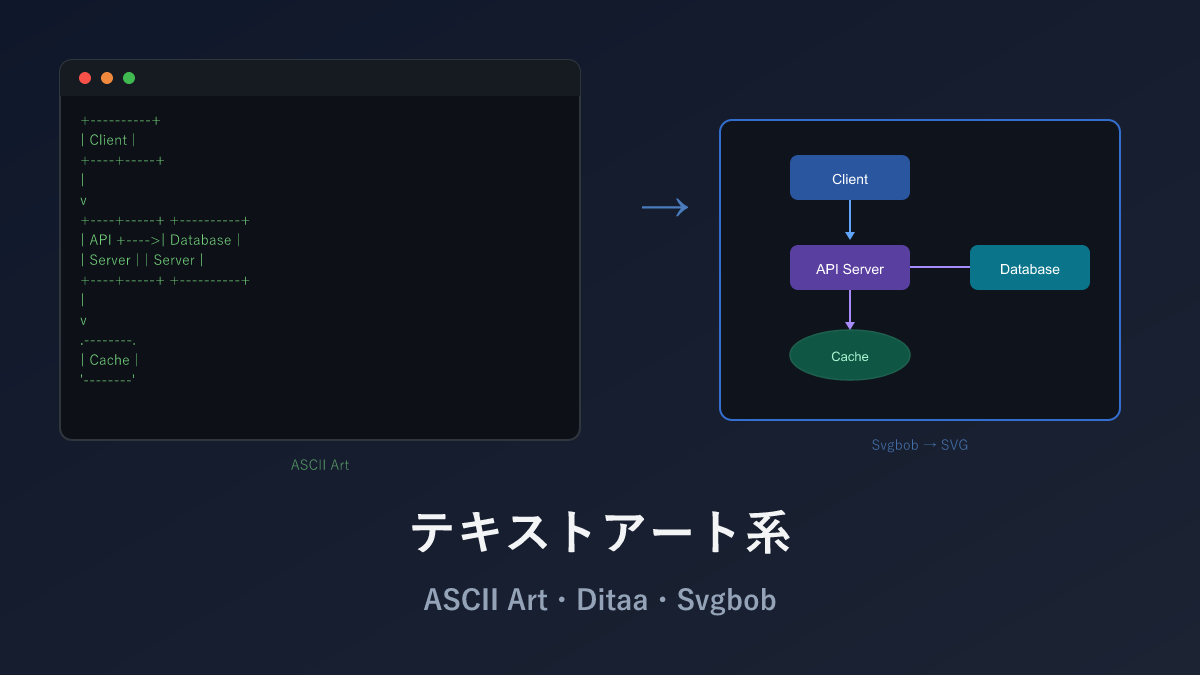
Text art refers to the approach of drawing diagrams using only characters like +, -, |, and >. No special tools are required — just a text editor makes for a readable diagram, and running the text through a tool converts it into a polished image.
What makes this interesting is that AI output is inherently text, which means text art is actually the diagram format most naturally compatible with AI. When you ask ChatGPT or Claude to “draw a system architecture diagram,” it returns exactly this format. And running that through Svgbob produces a clean SVG image. As AI becomes more widespread, the value of this pipeline only increases.
Comparison Table
| Name | Syntax | AI Compatibility | What You Can Draw | Highlights |
|---|---|---|---|---|
| ASCII Art | Text | ◎ | Diagrams composed purely of characters | No dedicated software needed. Embeds in source code comments |
| Ditaa | Text | ◎ | ASCII art → image (PNG) conversion | Converts character diagrams to hand-drawn-style images |
| Svgbob | Text | ◎ | ASCII art → clean SVG conversion | Higher quality than Ditaa. Also handles curves |
ASCII Art — The Original, No Software Required
ASCII Art is a technique for representing diagrams and pictures using only text characters. Basic ASCII characters such as +, -, |, >, and / are combined to draw flowcharts and architecture diagrams.
RFC documents and Linux kernel documentation have a long history of using this approach to illustrate plain-text content.
Sample: Flowchart
            +------------------+
            |    User Input    |
            +--------+---------+
                     |
                     v
            +--------+---------+
            |    Validation    |
            +--------+---------+
                     |
              +------+------+
              |             |
              v             v
        +-----+----+  +----+------+
        |  Success  |  |  Failure  |
        +-----+----+  +----+------+
              |             |
              v             v
        +-----+----+  +----+------+
        | Run Process|  | Show Error|
        +----------+  +-----------+
Use + for corners, - and | for lines, and v and > for arrows. Alignment works when displayed in a monospace font.
Sample: Architecture Diagram
    +-----------+       +-----------+       +-----------+
    |  Browser  | ----> |  Nginx    | ----> |  App      |
    |  (React)  |       |  (Proxy)  |       |  (Node)   |
    +-----------+       +-----------+       +-----+-----+
                                                  |
                              +-------------------+-------------------+
                              |                   |                   |
                              v                   v                   v
                        +-----+-----+       +-----+-----+       +----+------+
                        | PostgreSQL |       |   Redis   |       |    S3     |
                        +------------+       +-----------+       +-----------+
Sample: Sequence Diagram
    Client          Server          Database
      |                |                |
      |  POST /login   |                |
      |--------------->|                |
      |                |  SELECT user   |
      |                |--------------->|
      |                |  user data     |
      |                |<---------------|
      |  200 OK + JWT  |                |
      |<---------------|                |
Pros and Cons
Requiring no tools whatsoever is something no other tool can match. Source code comments, commit messages, Slack messages — wherever you can write text, you can embed a diagram, and Git diffs are fully human-readable.
The flip side is that all character alignment is manual. Adding a single box means shifting every surrounding border character, and diagrams with more than 10 nodes are honestly best avoided. It requires a monospace font, so it may break in some environments.
AI Compatibility
Among text-art tools, ASCII Art has excellent AI compatibility. Since LLM output is inherently text, you don’t even need to teach it a special syntax. Just say “draw this system’s architecture as text” and ASCII art comes back immediately.
One caveat: mixing full-width and half-width characters causes border lines to misalign. Keep labels in English, or plan to manually adjust alignment when non-ASCII characters are used.
Ditaa — Automatic ASCII-to-Image Conversion
Ditaa stands for “DIagrams Through Ascii Art” — it is a Java-based tool that automatically converts ASCII art into clean PNG images. Rectangles drawn with +, -, and | become rounded boxes, and --> becomes a smooth arrow.
Notably, the default hand-drawn style gives output a soft, sketch-like appearance rather than a rigid technical diagram look.
Sample: System Architecture
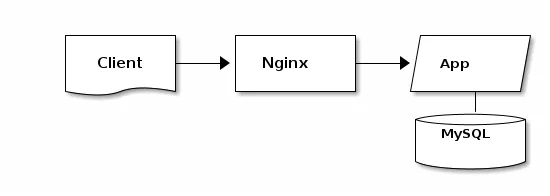
    +----------+     +-----------+     +----------+
    |          |     |           |     |          |
    |  Client  +---->+  Nginx    +---->+  App     |
    |  {d}     |     |           |     |  {io}    |
    +----------+     +-----------+     +-----+----+
                                             |
                                       +-----v----+
                                       |  MySQL   |
                                       |  {s}     |
                                       +----------+
{d} means document shape, {s} means storage shape, and {io} means I/O shape — these are Ditaa-specific markers.
Sample: Color Specification
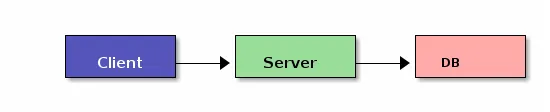
    +----------+     +-----------+     +----------+
    |  cBLU    |     |  cGRE     |     |  cPNK    |
    |  Client  +---->+  Server   +---->+  DB      |
    +----------+     +-----------+     +----------+
Color codes like cBLU (blue), cGRE (green), and cPNK (pink) can be specified.
Pros and Cons
The ability to combine ASCII Art’s simplicity with visual quality is Ditaa’s appeal. You can edit in any text editor, Git diffs remain readable, and Asciidoctor integration makes it easy to embed in documentation generation pipelines.
The concern is that output is PNG only. In modern web development, SVG is often preferred — PNG degrades when zoomed. Java dependency also adds setup complexity, and development has stalled. Svgbob addresses all these issues, so for new projects, compare both before choosing.
AI Compatibility
Since the input is ASCII art, LLMs can generate it naturally — just like ASCII Art. This means you can build an “AI → ASCII art → Ditaa → PNG” pipeline, letting AI indirectly generate diagram images. Ditaa-specific markers like {d} and {s} are also produced when you mention them in the prompt.
Svgbob — The Modern ASCII-to-SVG Converter
Svgbob is an ASCII-art-to-SVG converter written in Rust. Think of it as the modern successor to Ditaa — it resolves Ditaa’s issues with PNG-only output and Java dependency. Curve and diagonal line recognition accuracy has also improved.
Sample: Curves and Arcs
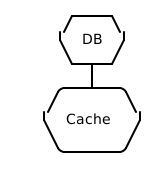
         _____
        /     \
       |  DB   |
        \_____/
           |
       .---+---.
      /         \
     |  Cache    |
      \         /
       '-------'
Svgbob accurately recognizes curve expressions composed of /, \, and _ characters and converts them to smooth SVG paths.
Sample: Network Diagram
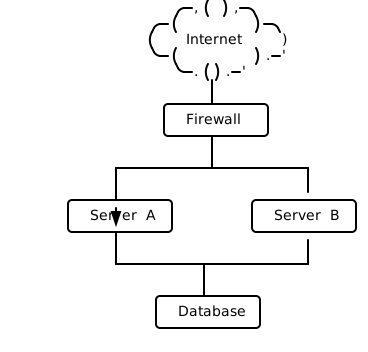
                      .-,(  ),-.
                   .-(          )-.
                  (    Internet    )
                   '-(          ).-'
                      '-.( ).-'
                          |
                    .-----+------.
                    |  Firewall  |
                    '-----+------'
                          |
              +-----------+-----------+
              |                       |
        .-----+------.         .-----+------.
        |  Server A  |         |  Server B  |
        '-----+------'         '-----+------'
              |                       |
              +----------+------------+
                         |
                   .-----+------.
                   |  Database  |
                   '------------'
Complex ASCII expressions like .-,( ),-. are recognized as a cloud shape.
Comparison with Ditaa
| Item | Ditaa | Svgbob |
|---|---|---|
| Output format | PNG | SVG |
| Implementation | Java | Rust |
| Curve support | Limited | Rich |
| Dependencies | Java required | Standalone |
| Color specification | Easy via cBLU etc. | Limited |
| Development status | Stalled | Active |
Pros and Cons
Svgbob resolves almost all of Ditaa’s weaknesses. SVG output stays crisp at any zoom level, and curve/arc recognition accuracy surpasses Ditaa. Conversion is fast, and a browser-based version is also available.
Lower name recognition than Ditaa means it can be harder to find solutions by searching when you hit a problem. Also, characters in labels can sometimes be unintentionally recognized as lines, requiring some care in how labels are written.
AI Compatibility
Like Ditaa, the input is ASCII art, so AI integrates naturally. What I personally like is the “AI → ASCII art → Svgbob → SVG” pipeline — having AI draw a text diagram and then converting it to a vector image with Svgbob is quite practical. Svgbob’s improved curve recognition means that when AI uses / and \ for curves, they often become clean SVG output.
Selection Guide
| Your situation | Recommendation |
|---|---|
| Want to embed diagrams in source code comments | ASCII Art |
| Want to share diagrams in Slack or email | ASCII Art |
| Want to convert ASCII art to hand-drawn-style PNG | Ditaa |
| Writing documentation in Asciidoctor | Ditaa |
| Want to convert ASCII art to high-quality SVG | Svgbob |
| Want to convert AI-generated text diagrams to images | Svgbob (SVG output recommended) |
Practical Tips: Embed ASCII Art in Source Code Comments
A unique use of ASCII Art is embedding process flows and state transitions in source code comments.
# Request processing flow:
#
#   Client --> [API Gateway] --> [Auth] --> [Handler]
#                                  |            |
#                                  v            v
#                              [403 Error]  [Database]
#                                              |
#                                              v
#                                          [Response]
#
def handle_request(event):
    ...
This way the diagram sits right next to the code — no need to reference a separate file or wiki. Ask AI to “write the processing flow of this function as an ASCII art comment” and it’s generated instantly.
It’s a surprisingly useful technique for helping future readers understand complex algorithms or state machine implementations.
Installation
ASCII Art
No dedicated software required. Write directly in any text editor, or use the browser-based ASCIIFlow editor.
Ditaa
# macOS
brew install ditaa

# Usage
ditaa input.txt output.png
ditaa --no-shadows input.txt output.png  # without shadows
Svgbob
# Install via Cargo (Rust)
cargo install svgbob_cli

# Usage
svgbob input.txt -o output.svg
Related Articles
Summary
This article compared 3 text-art diagram tools as code-manageable visualizations for the AI era.
Text-art tools occupy the interesting position of being the simplest approach yet highly compatible with AI. Piping AI-generated ASCII art directly into Svgbob to produce SVG is a genuinely practical workflow.
Personally, if choosing between Ditaa and Svgbob today, I would recommend Svgbob. SVG output, higher recognition accuracy, and a lightweight implementation resolve nearly all of Ditaa’s weaknesses. That said, if Asciidoctor integration is required, Ditaa remains a strong option.
Next up: Domain-specific design tools — Structurizr, DBML, and Diagrams (Python).
Series Index → Complete Guide to Diagrams in the AI Era
For further details, see the official sites: ASCIIFlow / Ditaa / Svgbob
Thank you for reading. We hope to see you in the next article.
Also popular with readers
📚 Series: Code-Managed Diagrams for the AI Era (3/9)