Thank you for visiting this site. This article is the seventh installment in the series on code-manageable diagrams for the AI era, covering 2 mind map and whiteboard tools. For the full series index, see the Complete Guide.
Mermaid and D2 were “write text and the diagram appears” tools, but the tools in this article have a different character. They take a hybrid approach: draw intuitively via a GUI, while the underlying data is stored as JSON or Markdown for code management.
Markmap in particular has tremendous scope in the AI era. When you ask an AI to research something or organize its thinking, it returns Markdown in a heading-and-list structure. Pipe that directly into Markmap and it is instantly visualized as a mind map. The loop of “have AI organize → confirm the overall picture visually → discover gaps and add further prompts” moves very fast.
Comparison Table
| Name | Syntax | AI Compatibility | What You Can Draw | Highlights |
|---|---|---|---|---|
| Markmap | Markdown | ◎ | Mind maps from Markdown | Visualize AI output directly |
| Excalidraw | GUI (saved as JSON) | △ | Free-form hand-drawn-style diagrams | Draw intuitively with a mouse. Great for rough sketches |
Markmap — Auto-Generate Mind Maps from Markdown
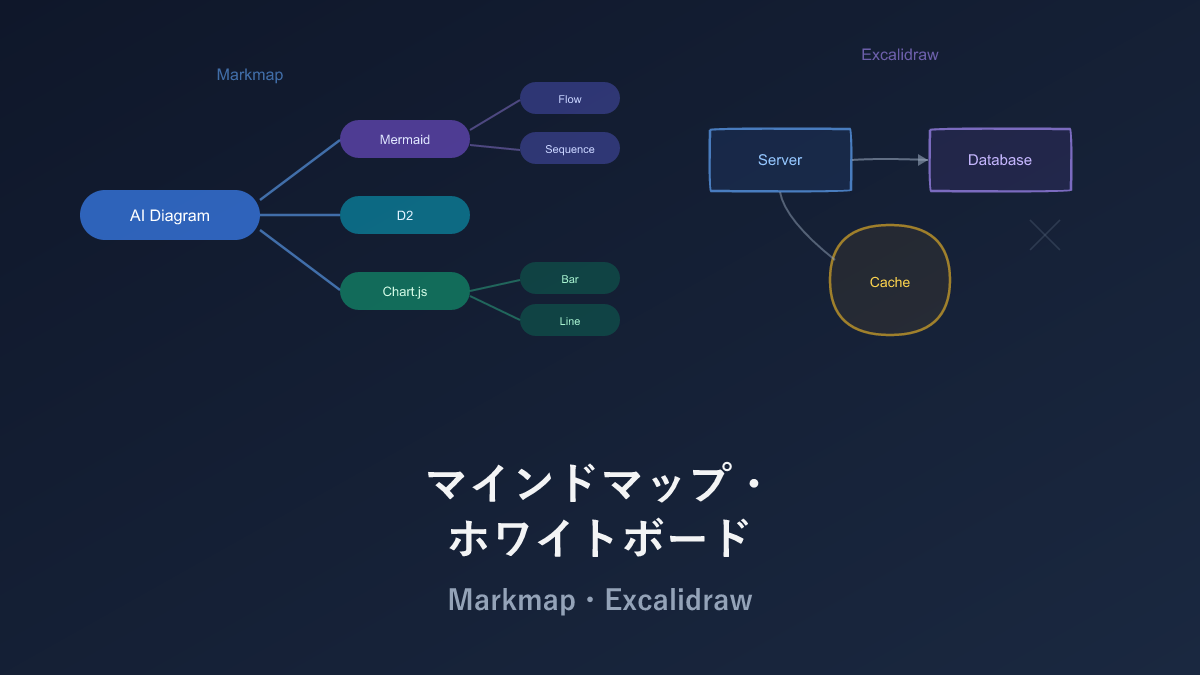
Markmap is a tool that automatically generates mind maps from the heading and list structure of Markdown. Nodes can be expanded, collapsed, and zoomed in the browser, and output is rendered as SVG — crisp at any zoom level.
The input is Markdown, so no special syntax needs to be learned, and a VS Code extension enables real-time preview.
Sample
# Diagrams in the AI Era

## General Diagrams
- Mermaid
  - GitHub-native support
  - Low learning cost
- D2
  - Modern design
  - Beautiful default theme
- PlantUML
  - Full UML support

## Data Visualization
- Vega-Lite
  - Declarative JSON
- Chart.js
  - Web app standard
- Recharts
  - React-specific

## Text-based
- ASCII Art
- Ditaa
- Svgbob
Passing this Markdown generates a mind map radiating from the center outward.
Pros and Cons
Near-zero learning cost is the defining feature. The input is plain Markdown headings and lists — nothing new to learn. Expand, collapse, and zoom work in the browser, and the VS Code extension enables real-time preview.
However, no diagram other than a mind map can be drawn. Also, deeply nested Markdown headings mean increasingly tiny nodes, making nesting beyond 5 levels practically very difficult. Splitting into multiple files or collapsing deep levels is the trick when information volume grows.
AI Compatibility
Markdown heading and list structures are the most natural output pattern for LLMs, making this extremely compatible with AI. Prompt “organize this concept in Markdown structured for a mind map” and out comes Markdown that feeds directly into Markmap.
I use it often for organizing AI research — pasting AI output into the Markmap VS Code extension reveals the full picture at a glance, which is genuinely convenient.
Excalidraw — Hand-Drawn-Style Diagrams Managed as JSON
Excalidraw is an open-source whiteboard tool for drawing hand-drawn-style diagrams. Since its 2020 release, it has spread rapidly among software engineers. Data is saved as a JSON file (.excalidraw) that can be Git-managed.
Note: Excalidraw also has a paid plan called Excalidraw+.
Data Format (JSON)
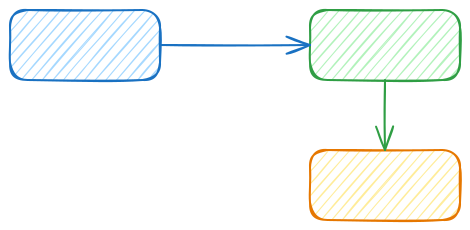
{
  "type": "excalidraw",
  "version": 2,
  "elements": [
    {
      "type": "rectangle",
      "x": 100, "y": 100,
      "width": 200, "height": 80,
      "backgroundColor": "#a5d8ff",
      "fillStyle": "hachure",
      "roughness": 1,
      "boundElements": [{ "type": "text", "id": "text1" }]
    },
    {
      "type": "text",
      "id": "text1",
      "x": 150, "y": 130,
      "text": "Server"
    }
  ]
}
Pros and Cons
The hand-drawn style is unique — it naturally conveys the nuance of “this is still a draft.” The intuitive GUI lets you draw with drag and drop, and live collaboration and offline operation are both supported.
As a code-management tool it has weaknesses. The JSON contains a sequence of coordinate and dimension numbers, and moving a shape even slightly generates a flood of diffs. On Git it becomes virtually unreviewable, so it is realistic to give up on diff management and use it solely for version tracking. It is not the type of tool that auto-generates diagrams from text — Mermaid and D2 work fundamentally differently.
AI Compatibility
Asking AI to directly generate Excalidraw’s JSON (a structure of coordinate, width, and height values) is not practical. Coordinate calculation is a known LLM weakness, and elements tend to overlap or fly off screen.
However, Excalidraw has a Mermaid import feature, so the workflow of “have AI generate in Mermaid → import into Excalidraw to clean up in hand-drawn style” is practical. This combines AI’s strength in text generation with Excalidraw’s intuitive GUI editing.
Selection Guide
| Your situation | Recommendation |
|---|---|
| Want to create mind maps from Markdown | Markmap |
| Want to have AI organize thinking and visualize it | Markmap |
| Want to draw hand-drawn rough sketches | Excalidraw |
| Want to collaborate in real time with a team | Excalidraw |
Practical Tips: AI → Mermaid → Excalidraw Workflow
I noted that AI generation is difficult with Excalidraw alone, but routing through Mermaid is quite practical:
- Ask AI to “generate ○○‘s flowchart in Mermaid”
- Open Excalidraw and select “Mermaid to Excalidraw” from the menu
- Paste the generated Mermaid code and import
- Freely adjust placement and style as a hand-drawn-style diagram
This approach combines AI’s generative power with Excalidraw’s expressiveness. Handy when you want a “not-too-formal hand-drawn diagram” in a presentation or design document.
Installation
Markmap
npm install -g markmap-cli
markmap input.md -o output.html
The VS Code extension “Markmap” enables real-time preview.
Excalidraw
Visit excalidraw.com to use it immediately. The VS Code extension “Excalidraw” is also available.
Related Articles
Summary
This article compared 2 mind map and whiteboard tools as code-manageable visualizations for the AI era.
Personally, in terms of AI compatibility, I am quite fond of Markmap. Having AI organize thinking and output it as Markdown — which then becomes a mind map — is genuinely effortless. If you want to draw intuitively, Excalidraw is accessible, and using the Mermaid import feature makes AI-to-cleanup a smooth workflow.
Next up: Math and Academic tools — TikZ and KaTeX/MathJax.
Series Index → Complete Guide to Diagrams in the AI Era
For further details, see the official sites: Markmap / Excalidraw
Thank you for reading. We hope to see you in the next article.
Also popular with readers
📚 Series: Code-Managed Diagrams for the AI Era (7/9)